Field Service Ver. 1.0 Aug. 2005 11. Soft Switch List
127
FK-503Adjustment / Setting
NOTE
• The features with (*) are settable by users. *: Screen setting
NOTE
• The features with (*) are settable by users. *: Screen setting
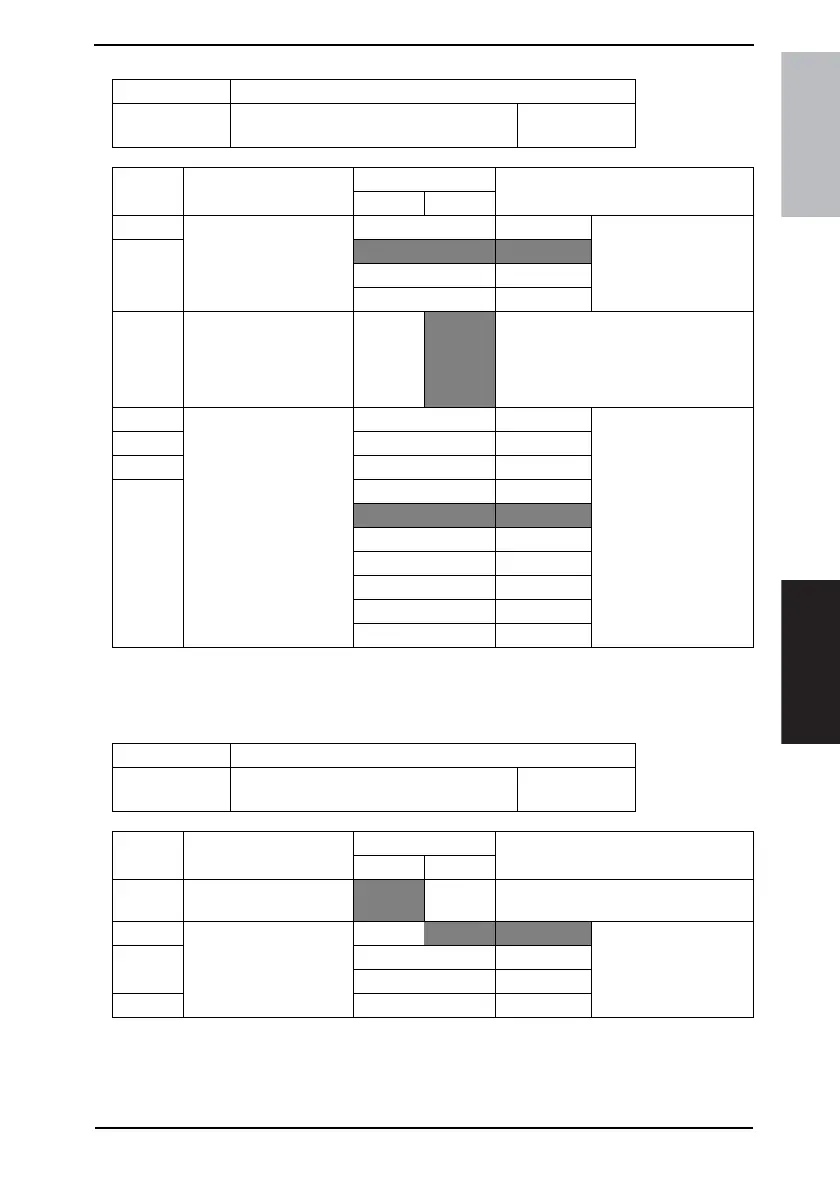
MODE Factory setting bit
410
Bit: 7654 3210
0101 0100
HEX:54
Bit Feature
Logic
Description
01
7 Select AE print density
level. (Copy) *
Bit7-6: 00 Darker Specifies level of auto
density.
6
01 Normal
10 Not available
11 Lighter
4 Light original adjustment,
(Copy: ADF only) *
Darker-
Copy
Lighter
Copy
Darker Copy: Scans originals in the den-
sity as specified. (The density is the
same as that in BS scanning.)
Lighter Copy:Scans originals in the den-
sity lighter than specified.
3 Select priority manual
density level. (Copy) *
Bit3-0: 0000 EXP1 Selects manual density
level at mode initializa-
tion or level when auto
density is switched to
manual density:
EXP1 (Lighter)
|
EXP5 (Normal)
|
EXP9 (Darker)
2 0001 EXP2
1 0010 EXP3
0 0011 EXP4
0100 EXP5
0101 EXP6
0110 EXP7
0111 EXP8
1000 EXP9
Others Not available
MODE Factory setting bit
411
Bit: 7654 3210
0000 0000
HEX:00
Bit Feature
Logic
Description
01
7 Select symbol bit. (Copy)
+ - Selects direction (+/-) of print density
adjustment by MODE 411 Bit 2 to 0.
2 Adjust print density.
(Copy) *
Bit 2-0:
000 0 Selects print density by
adjusting development
bias.
1 |
011 3
0 Others Not available









 To Next Page