●Selectthefunctionname
andreturntotheLinkage
menubypushingthe RTN
buttonor pushingthe
HOME/EXITbutton.
<Push Dial>
RETURN
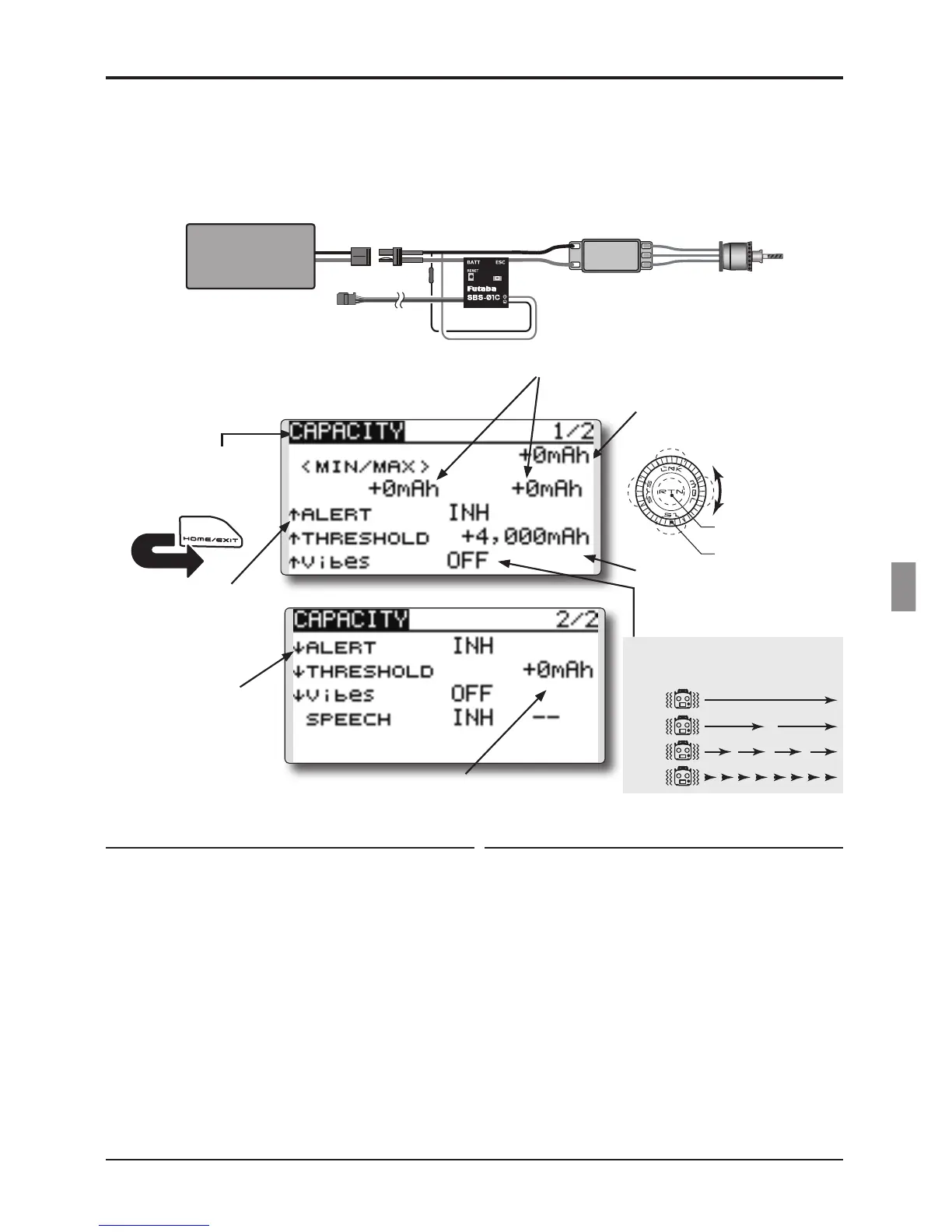
TELEMETRY : Current sensor
Displayingdatafromthedrivebatterycapacity
The SBS-01C has the capability of measuring
current, voltage and capacity (consumption) from
drive battery all at the same time.
*It cannot be used in S-FHSS mode
●Select[CAPACITY]intheTELEMETRYscreen
andaccessthesetupscreenshownbelowby
pushingtheRTNbutton.
●Displaysthecapacitydata
●Displaysthemaximum/minimumdata
afterthetransmitteristurnedon.
●Capacityalarmsettingrange
-32,000mAh
~
-32,000mAh
(↑THRESHOLD>↓THRESHOLD)
*Alarm when the capacity has increased.
●Capacityalarmsettingrange-32,000mAh
~
-32,000mAh
(↑THRESHOLD>↓THRESHOLD)
*Alarm when the
capacity
has decreased.
Alert setting when capacity increases
1.Set“↑ALERT”onthe<CAPACITY>screento
ACT.MovethecursortoINHandpushtheRTN
button.
2.SelecttheACTmodebyscrollingthePushdial.
3.PushtheRTNbutton.(Toterminatetheinput
andreturntotheoriginalstate,pushtheS1
button.)
4.Thecapacityatwhichanalarmisgenerated
canbesetbyselectingthecapacitydisplay
nextto“↑THRESHOLD”andpushingtheRTN
button.Thisgeneratesanalarmwhenthe
capacityincreases.
5.AdjusttheratebyscrollingthePushdial.
*When the RTN button is pushed for one second, the rate is
reset to the initial value.
6.PushtheRTNbutton.(Toterminatetheinput
andreturntotheoriginalstate,pushtheS1
button.)
Alert setting when capacity decreases
1.Selectpage2bypushingS1fromthe
<CAPACITY>screenandset“↓ALERT”to
ACT.
2.SelecttheACTmodebyscrollingthePush
dial.
3.PushtheRTNbutton.(Toterminatetheinput
andreturntotheoriginalstate,pushtheS1
button.)
4.Thecapacityatwhichanalarmisgenerated
canbesetbyselectingthenumericaldisplay
nextto“↓THRESHOLD”andpushingthe
RTNbutton.Thissoundsanalarmwhenthe
capacitydecreases.
5.AdjusttheratebyscrollingthePushdial.
*When the RTN button is pushed for one second, the rate is
reset to the initial value.
6.PushtheRTNbutton.(Toterminatetheinput
andreturntotheoriginalstate,pushtheS1
button.)
*SBS-01C must be installed in the aircraft.
TYPE 1
TYPE 2
TYPE 3
TYPE 4
"Vibes" type
Ifthefollowingtypesareselected,the
transmitterwillvibrateduringthewarning.
●PushtheS1buttontoadvancetothenextpage.
[Capacity]
Drive
Battery
SBS-01C
to Receiver
Motor
ESC
●↓Adownwardarrow
indicatesthealarm
willsoundwhenthe
capacityreaches
belowyoursetvalue.
●↑Anupwardarrow
indicatesthealarm
willsoundwhenthe
capacityreaches
aboveyoursetvalue.
Scrolling
●Movingcursor
●Selectingmode
●Adjustingvalue
●Tonextpage
●Toinputdatamode
●Dataisentered



 To Next Page