FC2250-UM-251-9730 3-7
3. OPER ATIONS
3.5 Turning On the Plotter and Initialization
CAUTION Do not put your hands on the writing panel while turning on the plotter.
The moment you turn the power on, the plotter’s Y bar and pen carriage will start to move.
Operations:
(1) Make sure that the “O” (OFF) side of the power switch is pressed down.
(2) Securely plug the connector end of the power cord into the plotter’s power inlet.
(3) Securely plug the other end of the power cord connector into an electrical outlet of the specied voltage.
(4) Press the “I” (ON) side of the power switch.
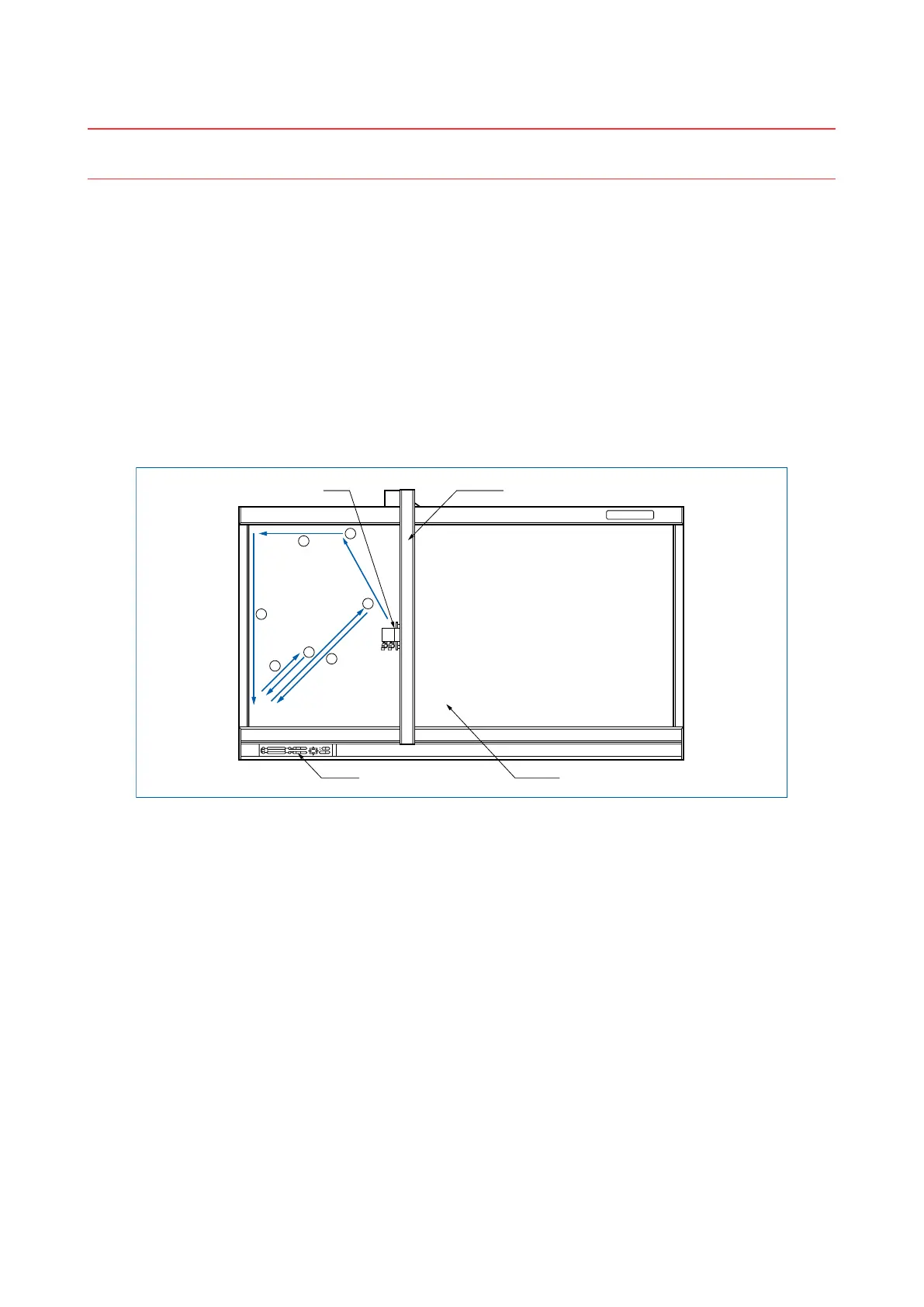
(5) The green power lamp on the control panel will light, and the Y bar and pen carriage will start to move as
shown in the gure below. These operations are part of the initialization process.
The gure below shows what the plotter does when the power is turned on.
The pen carriage returns to the origin point for plotting, and then moves back and forth twice at a 45˚
angle from the origin to determine the friction coefcient of the plotter mechanisms.
1
2
3
4
5
6
7
Pen carriage Y bar
Writing panelControl panel
(6) When the initialization process is complete, the plotter is ready to begin plotting or cutting.










 To Next Page