FC2250-UM-251-9370 7-40
7. DISASSEMBLY AND ADJUSTMENT
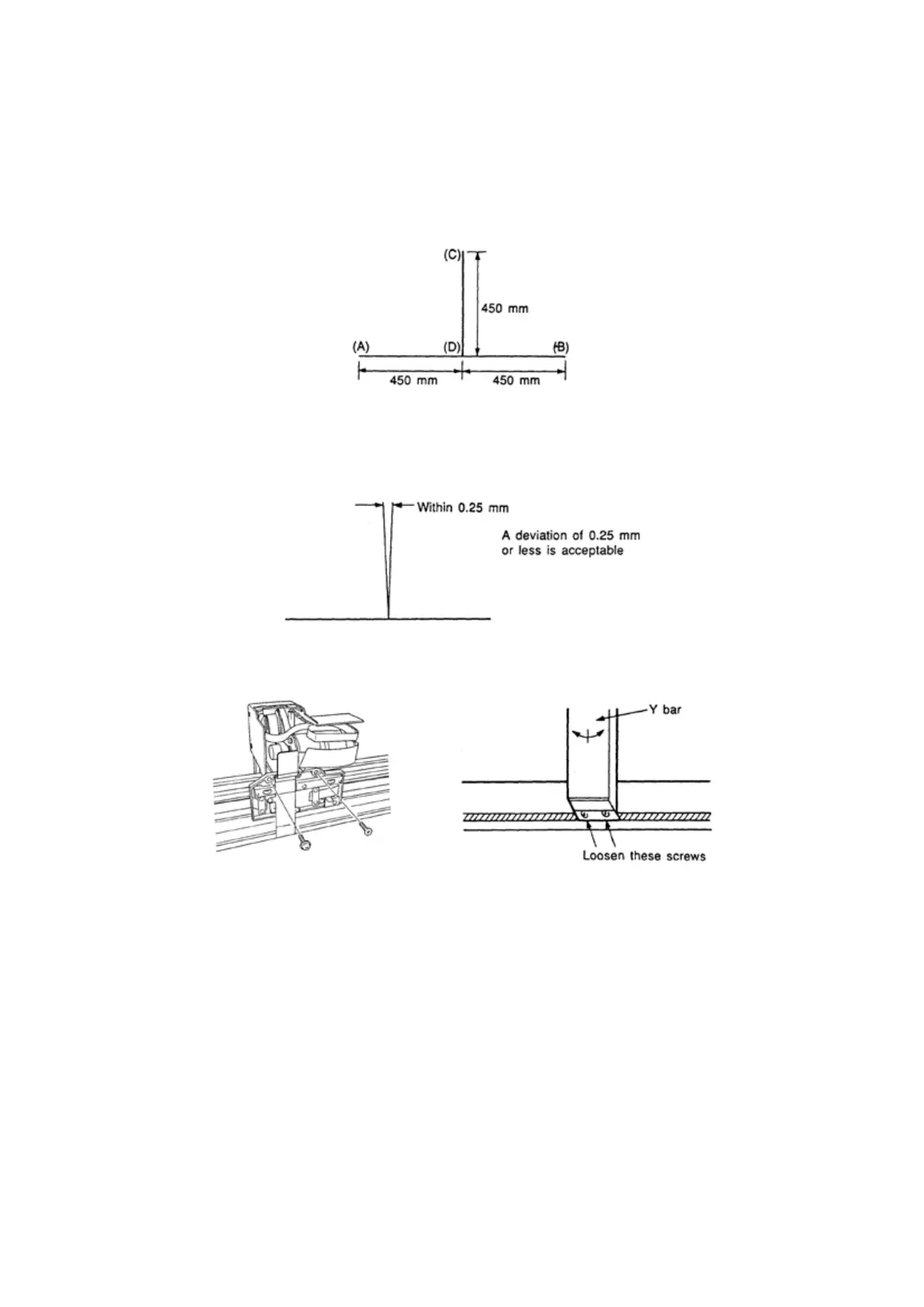
7.5.4 Adjusting the Perpendicularity Precision
Checking the Deviation in the Perpendicularity
(1) Load a thin sheet of paper on the writing panel and attach a plotter pen (0.2 mm ceramic pen) to the
No.1 pen holder.
(2) Manually move the pen to plot the pattern shown in the gure below.
(3) Turn the sheet over and load it so that points (A) and (B) on the other side are parallel to the X axis.
(4) After positioning the pen on point (D), draw a line to point (C). Check if there is any deviation between
the lines between points (D) and (C) on the front and back of the sheet.
(5) If the deviation exceeds 0.25 mm, loosen the screws at the top and bottom of the Y bar and adjust the
vertical orientation of the Y bar by moving it toward the pertinent side.
(6) Repeat Steps (1) to (4) above to conrm the precision of the perpendicularity.










 To Next Page