136
_____________________________________________________________________________________________
8.2 Loading Preset Values
______________________________________________________________________________________________
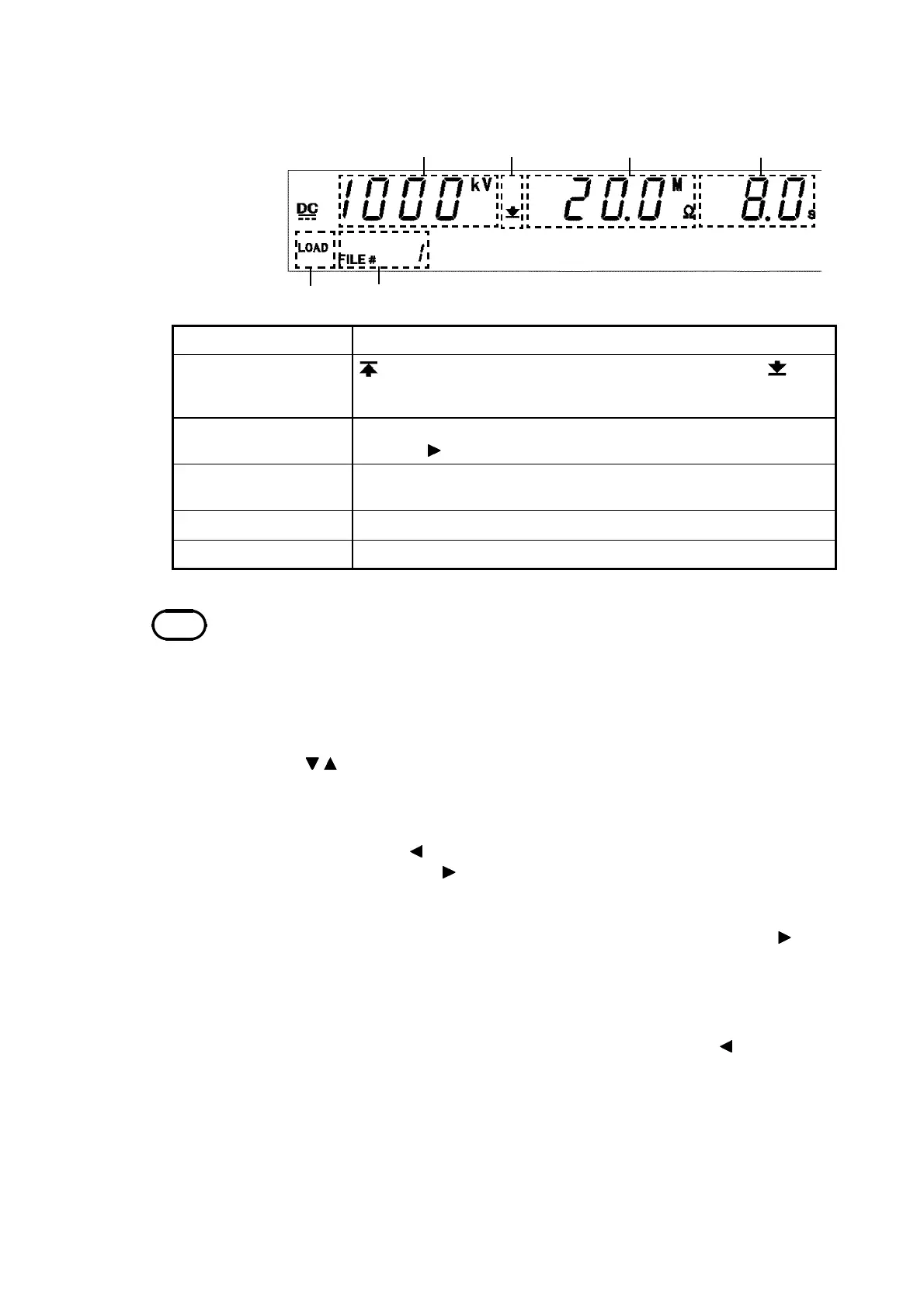
1 2 3 4
5 6
1 Test-voltage value
The test-voltage value for saved data.
2 Upper-limit value
icon and Lower-limit
value icon
is displayed when the upper-limit value is shown, and is
displayed when the lower-limit value is shown.
3 Upper and Lower-
limit values
The upper- or lower-limit value of saved data. Switch the display
using the
key.
4 Test time and delay
time
The test time or delay time for the saved data. Switch the display
using the
ON/OFF
key.
5 LOAD
Indicates a load screen.
6 File number
Indicates the file number for the saved data.
NOTE
When a test-voltage value greater than the value set in the optional function
"Section 7.9 Setting of the Output-Voltage Restricting Value" is loaded, an error
will occur upon startup of the test (the test-voltage value flashes), and the test
cannot be
erformed.
Insulation-resistance mode
(3) Selecting a file to load
Use the
/
keys to change the file number and confirm the saved data that
you want to load.
In the "load screen" in the withstand-voltage mode, the display of the "test
voltage" and "test frequency" (in the case of AC-withstand-voltage test) can
be changed using the key, the "upper-limit value" and "lower-limit value"
can be changed using the key, and the "test time" and "ramp timer time"
can be changed using the
ON/OFF
key.
In the "load screen" in the insulation-resistance mode, the display of the
"upper-limit value" and "lower-limit value" can be changed using the key,
and the "test time" and "delay time" can be changed using the
ON/OFF
key.
(4) Loading and canceling data
When the saved data to be loaded is displayed, press
SHIFT
+ keys. This
loads the saved data and the unit reverts to the READY state.
Press the
STOP
key to revert to the READY state without loading the target
data.



 To Next Page