88
_____________________________________________________________________________________________
6.3 Program Setting State
______________________________________________________________________________________________
NOTE
In the program setting state,
READY
is not lit, and the test cannot be started.
When the program mode is used, although the test-voltage value is displayed in
the READY state or "
ro
ram settin
state," that volta
e is not bein
out
ut.
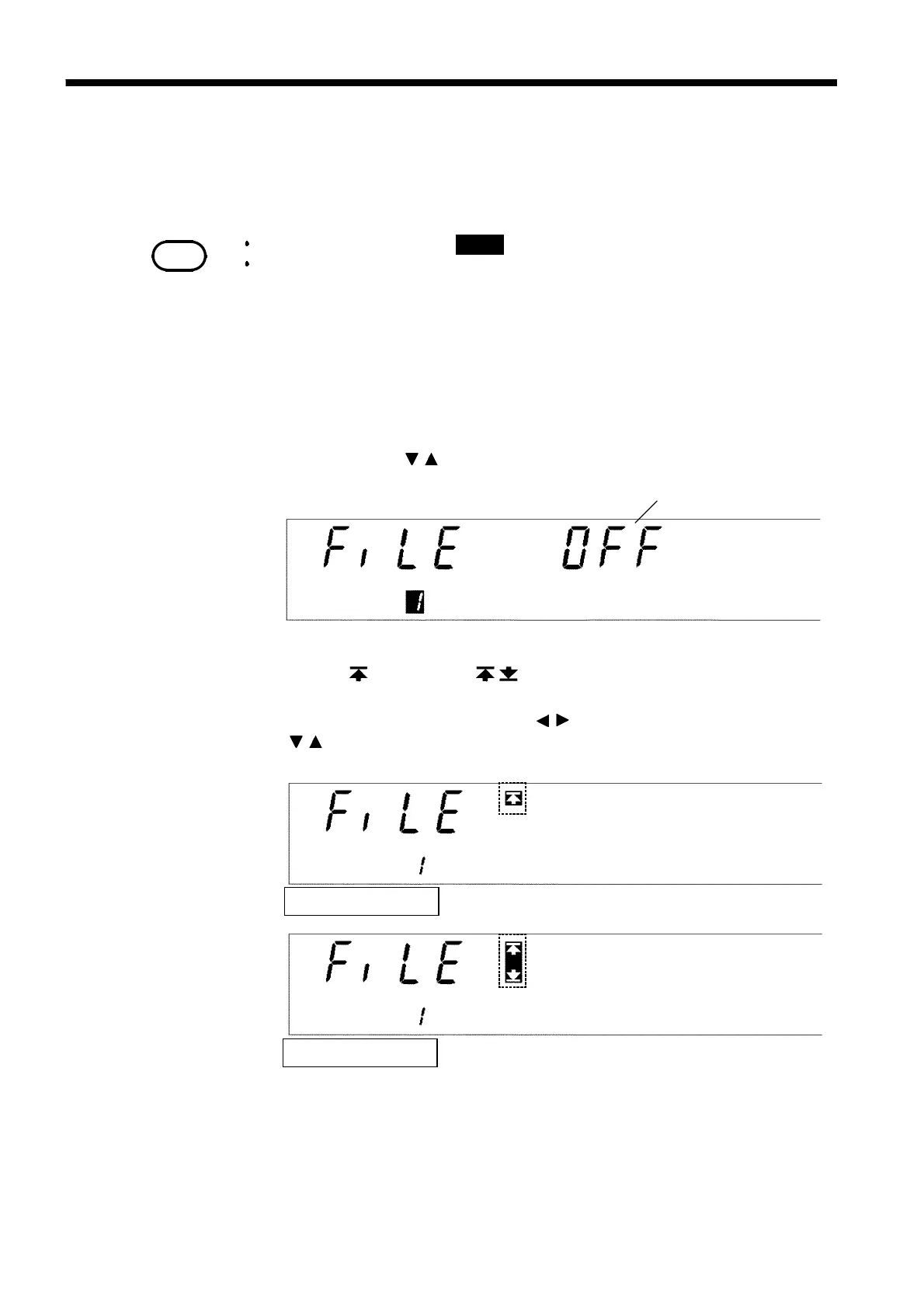
Scanner: OFF
Single scan mode
Multiple scan mode
6.3 Program Setting State
To edit, change, or confirm the program file, enter the Program setting state.
1. When the
ENTER
key is pressed in the READY state in the program
mode, the
FILE No.
lamp lights up and the unit enters the "program setting
state." READY goes off and the test does not start, even when the
START
key is pressed.
2. The file number flashes. Select the number of the file to be edited or
changed using the / keys.
3. To use the scanner, select the mode.* When the scanner is not used, set it
to OFF. (* : single scan; : multi-scan)
4. Move the flashing cursor using the / keys, and select the mode using
the / keys. (For details on the scanner setting method, see the
instruction manual for the 3930 HIGH VOLTAGE SCANNER.)
4. To finalize the setting, press the
ENTER
key.
If the
STOP
key is pressed, the setting state can be exited without
finalizing the setting (the unit changes to the program-mode READY
state).



 To Next Page