157
_____________________________________________________________________________________________
10.1 RS-232C Interface
______________________________________________________________________________________________
1
2
3
4
5
6
7
8
9
10
11
12
13
14
15
10.1.2 Preparing for Data Transfer
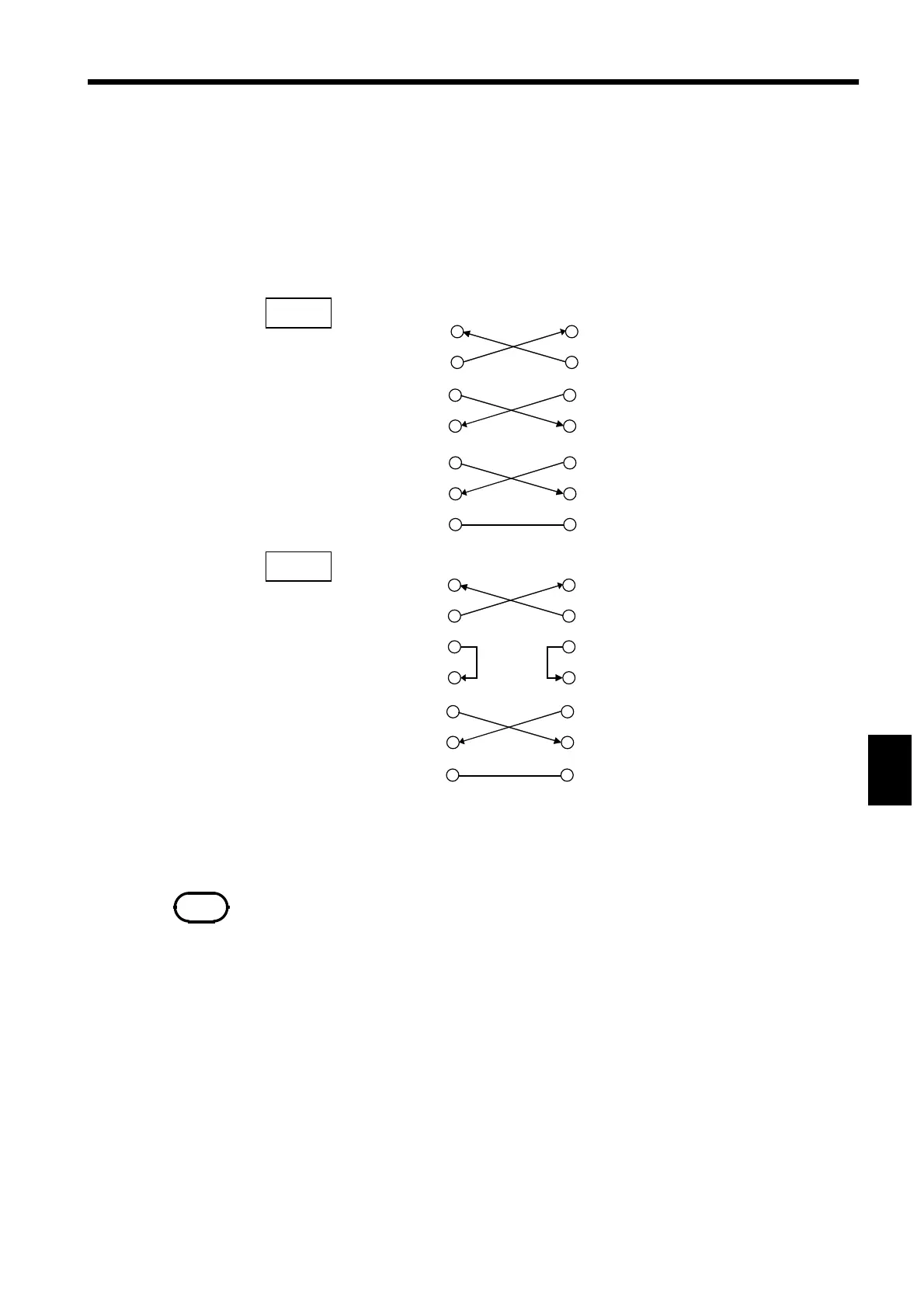
3153
GND
RxD
TxD
GND
PC
TxD
RxD
DTR DTR
DSR DSR
RTS
CTS CTS
RTS
Type 1
3153
GND
RxD
TxD
GND
PC
TxD
RxD
RTS RTS
CTS CTS
DTR DTR
DSR DSR
Type 2
NOTE
The optional 9637 and 9638 RS-232C cables must be connected in accordance with
the procedure for type 2.
(1) Connecting cable
Use a cross cable for connection to the PC. If the hardware flow control
signal (RTS and CTS) is not used, the 3153 will not perform hardware flow
control.
Connector on cable side: D-Sub 9 Pin female
Connection: Reverse connection



 To Next Page