111
Chapter 3
For securing the free space of the Internal storage capacity, it is recommended to store the settings for the system
and the patient / study data regularly in external storage media.
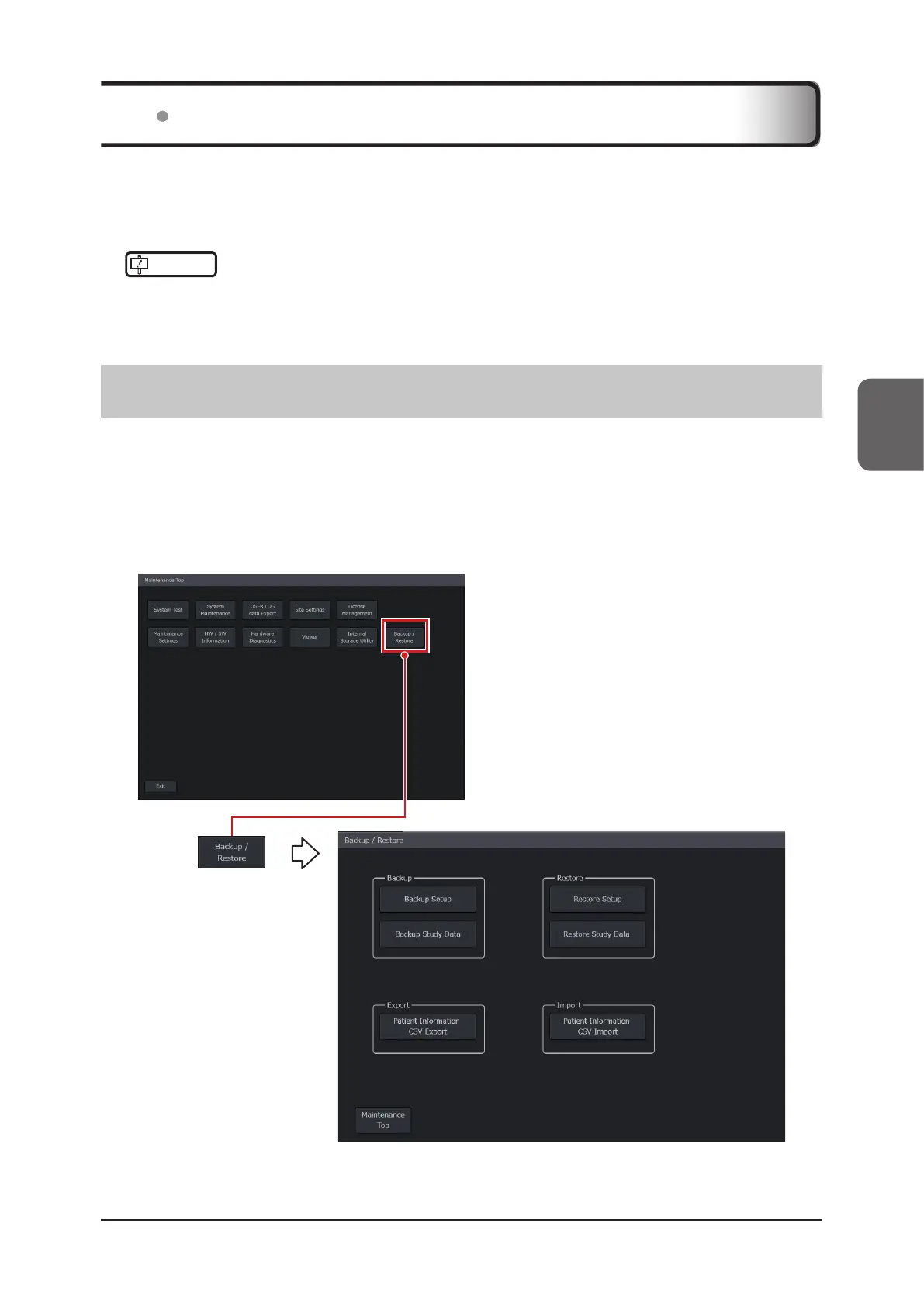
Each item of data can be backed up on the [Backup / Restore] screen.
IMPORTANT
•••••••••••••••••••••••••••••••••••••••••••••••••••••••••••••••••••••••••••••••••••••••••••••••••••••
•
The [Backup / Restore] screen is displayed only when a person who has a higher-level authority than that of a system
administrator logs in on the [Maintenance] screen
. General users cannot back up or restore data.
•••••••••••••••••••••••••••••••••••••••••••••••••••••••••••••••••••••••••••••••••••••••••••••••••••••••••••••••••••••
3.7.1 Backup / Restore Screen
The [Backup / Restore] screen has two functions: one is for replicating the settings for the system and patient / study
data in external storage media, and the other is for reading stored data to repair or restore the data.
Connect external storage media to the system to back up or restore data.
z
Study screen > [Menu] button > [Other] tab > [Setup] button > [Setup] screen > [Maintenance]
button > [Maintenance] screen > [Login] button > [Maintenance Top] screen > [Backup / Re-
store] button
3.7 Data Backup



 To Next Page