5.3 Text (Annotation)
190
5.3.2 Text Pop-up Menu
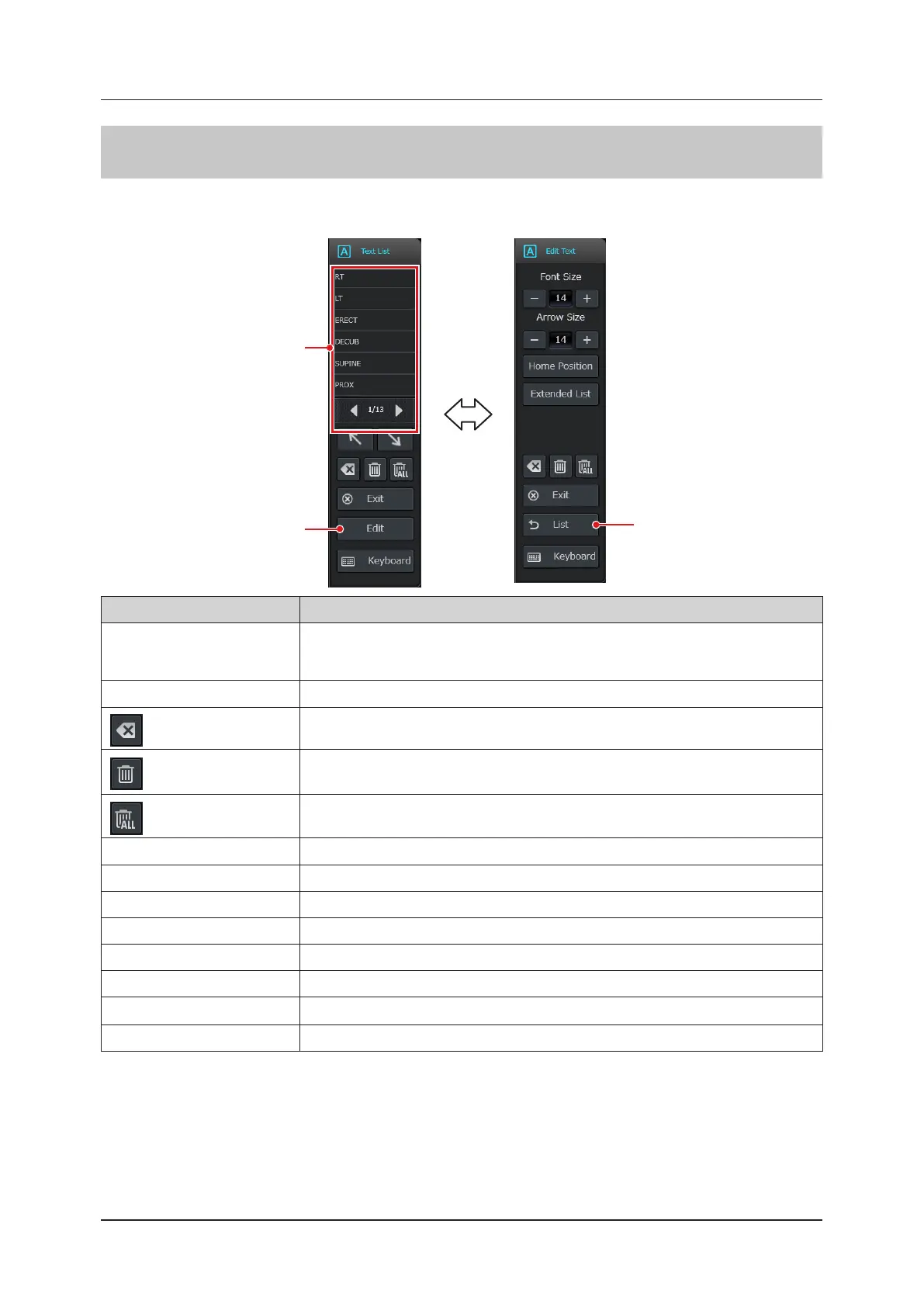
Text pop-up menu contains the [Text List] menu and the [Edit Text] menu, between which you can toggle using both
the [Edit] button and the [List] button.
[List] button
[Edit] button
Annotation list
Item Functions
Annotation list
Enters the selected text into the image display area using Auto Annotation.
• When the letters for Auto Annotation are too many to t in the button, they are abbreviated
as "...".
Arrow mark button Enters the selected arrow mark into the image display area.
button
Deletes the character before the cursor or removes the arrow indicating the location of the
cursor.
button Deletes a currently selected arrow mark or text.
button Deletes all arrow marks and text in the image display area.
[Exit] button Ends Text function.
[Edit] button Changes the pop-up menu display to the Edit mode menu.
[Keyboard] button Displays a software keyboard.
[Font Size] button Resizes text.
[Arrow Size] button Resizes an arrow mark.
[Home Position] button Sets the present cursor position as the default position that starts Text function.
[Extended List] button
*
1
Displays the Extended list window.
[List] button Changes the pop-up menu display to the Text menu.
*
1: To use this function, an optional "Text Annotation License" is required.



 To Next Page