96
Patient information is registered on the [Patient] screen.
The [Patient] screen includes the [Register] screen and the [Archive] screen.
Press the desired button to change the display and enter information required for an examination.
When you have started an examination without registering patient information, a Patient ID will be automatically is-
sued if you have stored a still image or clip on the study screen.
3.3.1 Layout of the Patient Screen
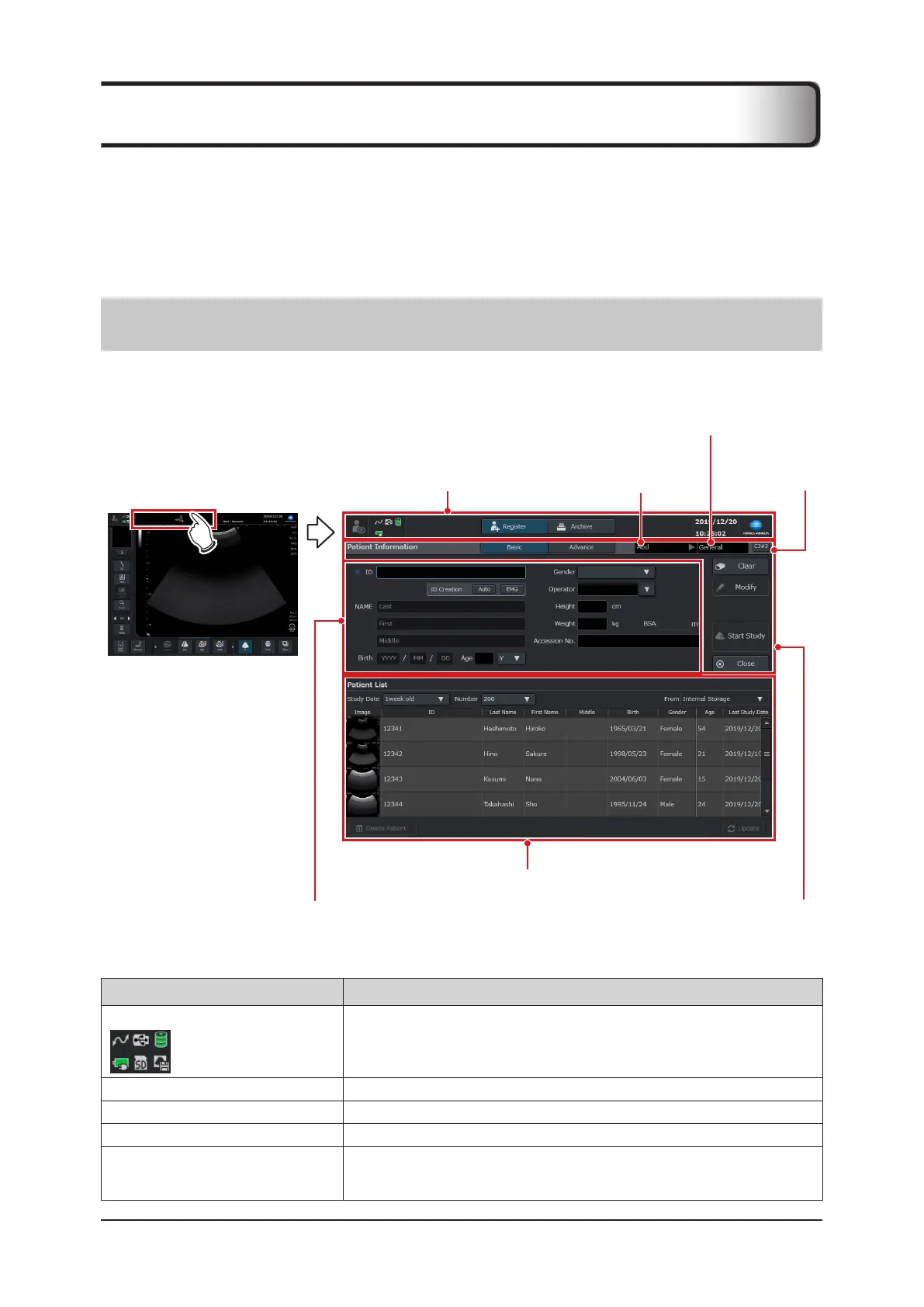
To change to the [Patient] screen, touch the patient register icon at the top of the study screen.
• [Register] screen is the default screen.
Basic information area
(including status area)
Patient information entry area
Patient list area
Patient information operation area
Preset / User preset pull-down menu
Exam pull-down
menu
Compound
menu
z
Basic information area (including status area)
Item Functions
Status indicator icon
Displays the system status.
Refer to "1.6.5 Monitor".
[Study] button Ends examination.
[Register] tab Changes to the [Register] screen.
[Archive] tab Changes to the [Archive] screen.
Date and Time
Displays the present date and time.
• A format of date and time can be changed.
Refer to "Date and Time Setting" of the "Operation Manual: Applications".
3.3 Registering Patient Information



 To Next Page