5.6 Common Functions
213
Chapter 5
5.6.7 Library Function
This function is for viewing libraries on external storage media. It can also add libraries to external storage media.
Refer to “[Library Settings] screen” in the "Operation Manual: Applications" regarding the settings for folders that are
viewed and added to libraries. You must have the optional "Library License" or "Direct Recording License" to use
the library function. Also, you must have the optional "Direct Recording License" to use the direct recording function.
Contact your service representative.
z
Viewing libraries
1
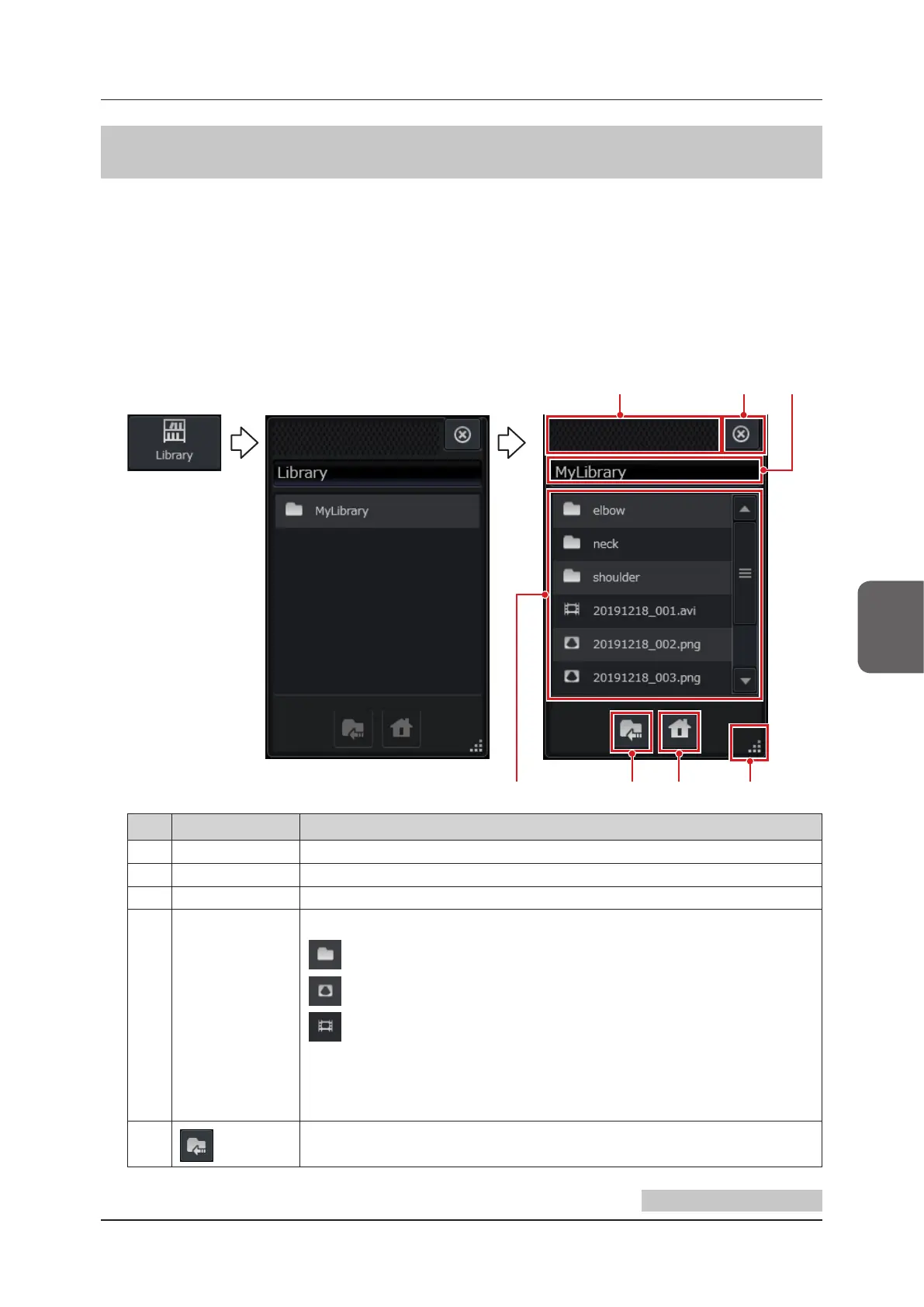
Press the [Library] button to display the contents browser.
(2)(1) (3)
(6)(5) (7)(4)
No. Item Functions
(1) Move bar Move the position of the contents browser by dragging it.
(2) [X] button Closes the library function.
(3) Current folder Displays the current folder’s name. When it is the library home folder, it displays “Library”.
(4) Folder list/le list
Displays folders/les.
: Icon that indicates a folder.
: Icon that indicates a still image le.
: Icon that indicates a clip le.
Pressing on a folder displays the relevant folder.
Pressing on a le displays the relevant image in the contents window. Only les with the fol-
lowing extensions can be displayed.
png / jpg / jpeg / bmp / mp4 / avi
(5)
button Displays the folder one level up.
Continued on the next page



 To Next Page