5.6 Common Functions
214
No. Item Functions
(6) Home button Displays the library home folder.
(7) Change size Change the size of the contents browser by dragging it.
2
Pressing on a le name displays the contents window.
• Pressing on the contents window displays various controls.
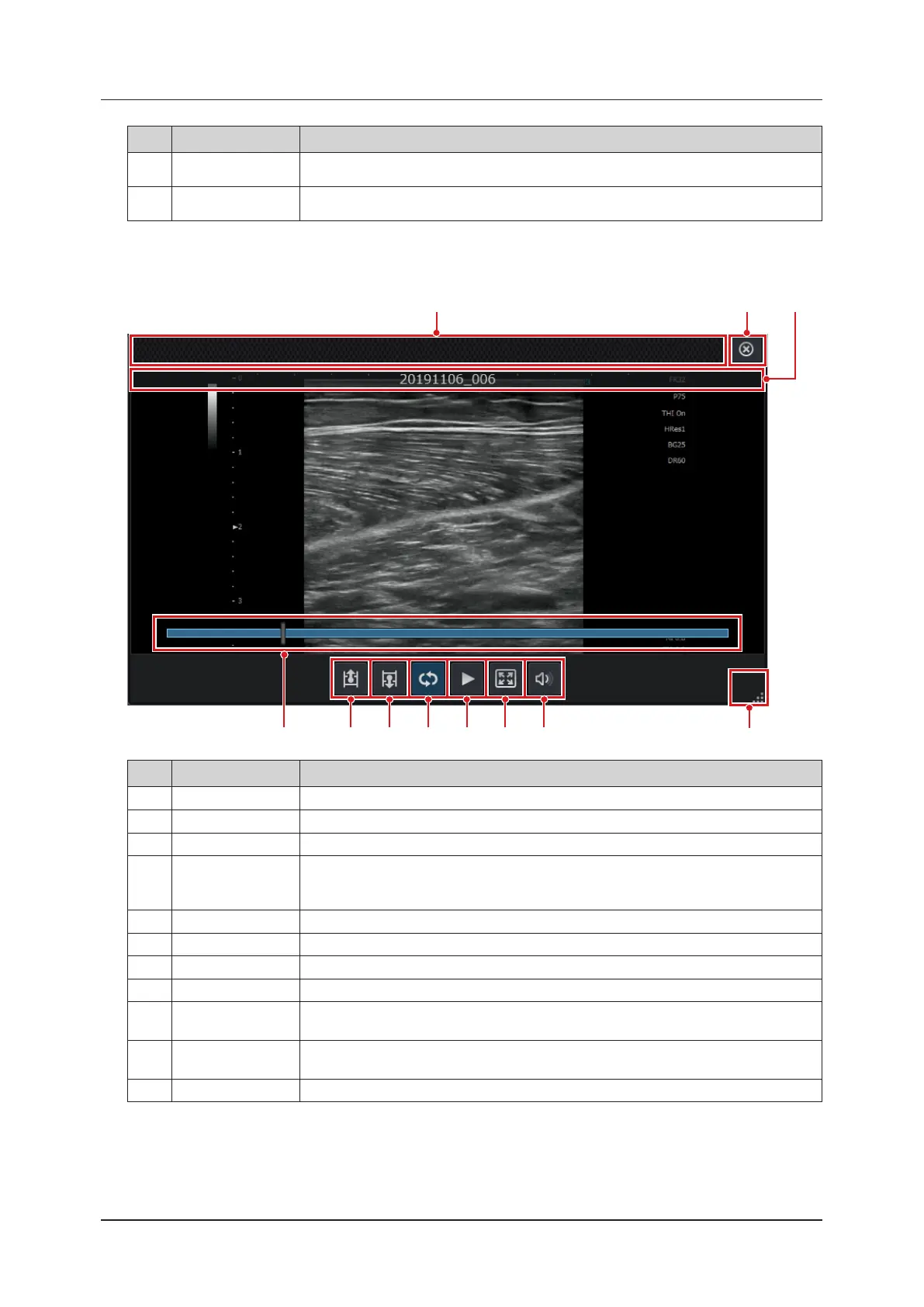
(2)(1) (3)
(11)
(4)
(5) (6) (7) (8) (9) (10)
No. Item Functions
(1) Move bar Move the position of the contents window by dragging it.
(2) [X] button Closes the contents window.
(3) Title Displays the le name, excluding the extension of the displayed image.
(4) Play bar
Displays the playback position of the clip. Move the frames that are displayed by sliding the
bar.
This is displayed only for clip les.
(5) Previous button Displays the previous image from the same folder.
(6) Next button Displays the next image from the same folder.
(7) Loop button Plays the clip in a loop.
(8) Play/pause button Switches between playing and pausing the clip.
(9)
Full size/original
size button
Maximizes the contents window display. Press again to return to original size.
Maximizing the display freezes the ultrasound image.
(10)
Audio volume con-
trol button
Displays the audio volume control. This is a function for adjusting the volume of clips.
(11) Change size Change the size of the contents window by dragging it.



 To Next Page