124
The system is directly operable on the touch panel.
The on-screen menus are used to display and operate functions that are not located on the mini console as neces-
sary. Some button functions allow a pop-up window to appear, or help you to display hidden buttons by pressing
in the button area and switching the page.
In addition, the on-screen menus and the mini console keys are customizable. Their layouts, however, vary depend-
ing on the settings.
Reference
•••••••••••••••••••••••••••••••••••••••••••••••••••••••••••••••••••••••••••••••••••••••••••••••••••••
• "Key Assignment Function" of the "Operation Manual: Applications"
•••••••••••••••••••••••••••••••••••••••••••••••••••••••••••••••••••••••••••••••••••••••••••••••••••••••••••••••••••••
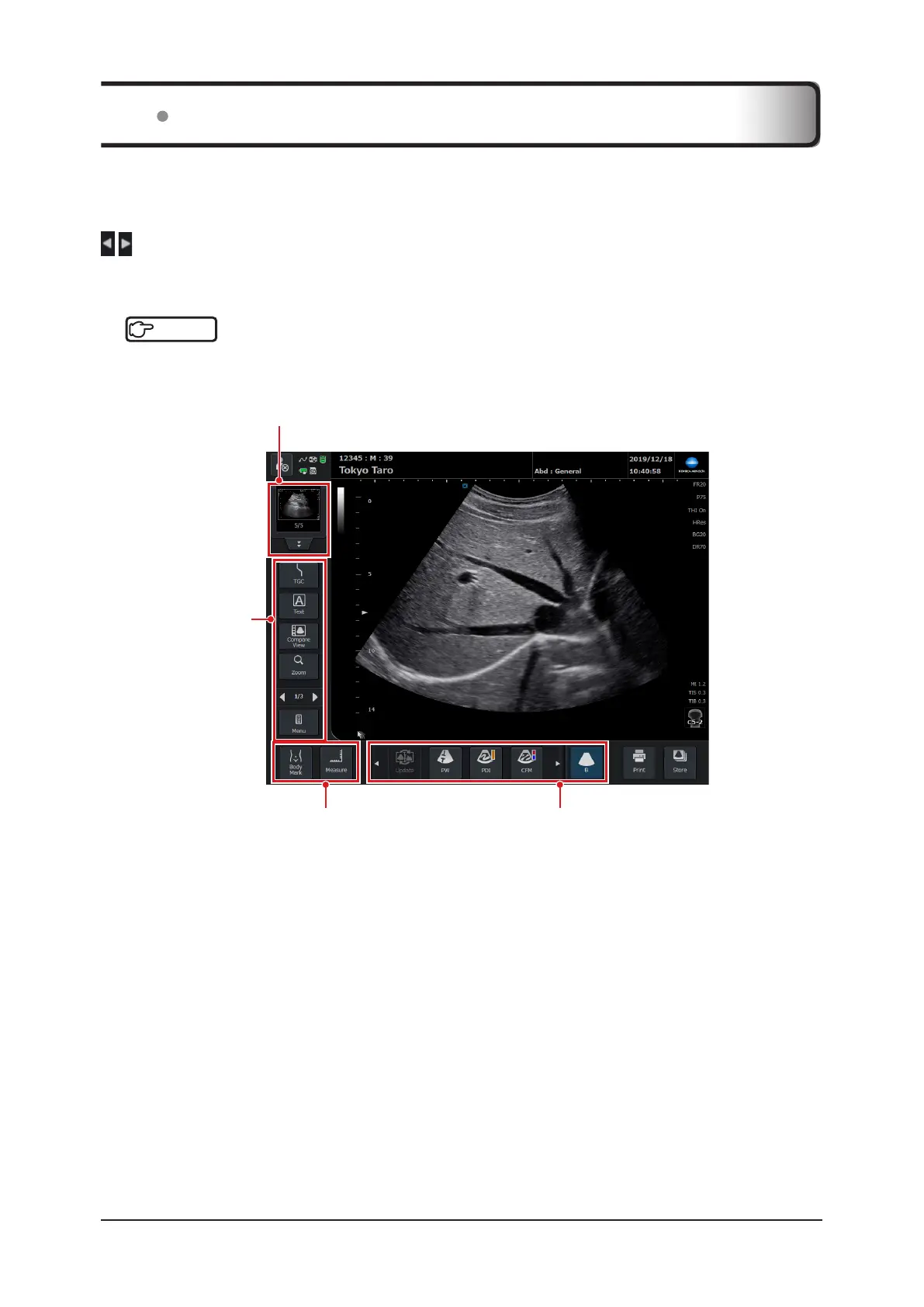
Application start button area
Application buttons such as the ones for
Measure and Body Mark are located.
Operation button area
Various function but-
tons are located.
Mode button area
The currently selected scanning mode is lit,
showing that it is in active use.
Thumbnail display area
Refer to "6.2 Thumbnail Function".
4.1 Basic Operation



 To Next Page