121
Chapter 3
The Auto ID function allows you to start an emergency examination on the [Patient] screen or the study screen.
An examination can be resumed only within 24 hours. You can edit patient information all the time, and after re-
registering information on a patient in the same format as commonly used for patients in general, you can browse the
information on the patient, or call up the information to examine the patient as a registered patient.
3.9.1 Examination by Auto ID
Using the Auto ID function, you can start an examination urgently.
An ID number is assigned according to the automatic assigning rule preset on the [Setup] screen.
Reference
•••••••••••••••••••••••••••••••••••••••••••••••••••••••••••••••••••••••••••••••••••••••••••••••••••••
•
For setting the automatic assigning rule, refer to "Patient Screen" of the "Operation Manual: Applications".
•••••••••••••••••••••••••••••••••••••••••••••••••••••••••••••••••••••••••••••••••••••••••••••••••••••••••••••••••••••
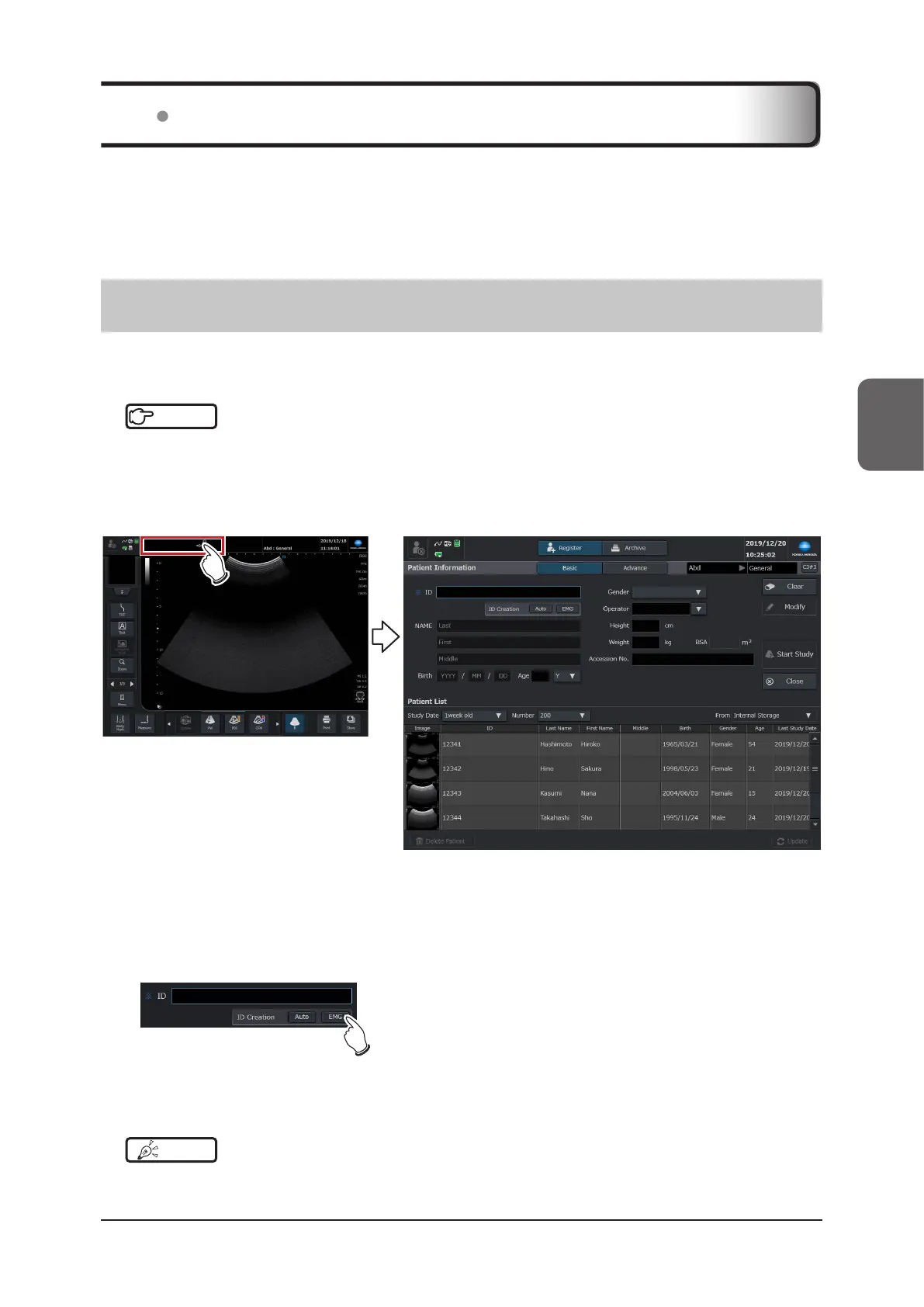
1
Touch the patient display area on the study screen.
• Changes to the [Patient] screen.
2
Select the target exam type from the [Exam] list.
• The [Exam] display changes.
3
Press the [EMG] button of [ID Creation].
• Automatically assigns a new ID number.
4
Press the [Start Study] button.
• The exam name / patient information is displayed on the study screen so that you can start an examination.
HINT
•••••••••••••••••••••••••••••••••••••••••••••••••••••••••••••••••••••••••••••••••••••••••••••••••••••
• The ID can be changed after the examination. Refer to "3.6.1 Editing Patient Information".
•••••••••••••••••••••••••••••••••••••••••••••••••••••••••••••••••••••••••••••••••••••••••••••••••••••••••••••••••••••
3.9 Emergency Examination



 To Next Page