182
The scanned image is temporarily recorded by Cine so that it can be used for the patient's diagnosis or the review.
Cine is used to temporarily record a live image into a memory and control playback of the recorded image that was
frozen. B images, color images, trace images (M image or Doppler image) can be recorded.
Cine has two types of reviews; one is a frame review for a frame-by-frame playback and the other is a motion review
for a continuous playback.
5.1.1 Cine Playback
To play back images, the images need to be frozen and Cine needs to be enabled. Cine is not available for live im-
ages. However, while live in the dual mode, you can use the cine function for images on the frozen side.
Press the FREEZE button to switch between live and frozen states.
All Cine functions end if the power is turned OFF or the freeze setting is cancelled.
1
Press the FREEZE button.
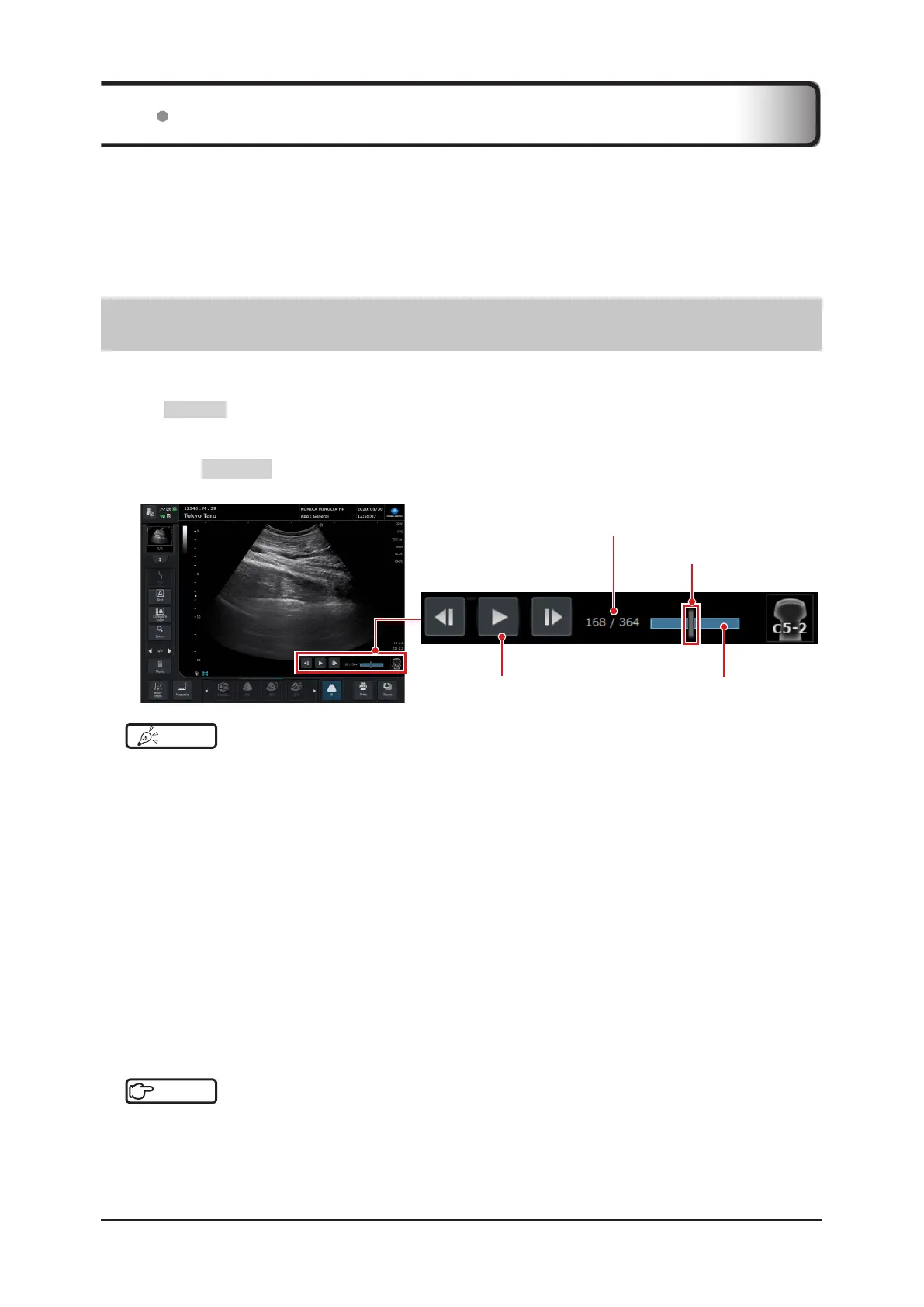
• The screen changes to frame review, and the Cine bar is displayed at the bottom of the image display area.
Frame number
Frame marker
Cine bar
Cine operation button
HINT
•••••••••••••••••••••••••••••••••••••••••••••••••••••••••••••••••••••••••••••••••••••••••••••••••••••
• Up to 767 frames of B images can be recorded.
• Depending on the settings, the Cine operation button can also be displayed.
•••••••••••••••••••••••••••••••••••••••••••••••••••••••••••••••••••••••••••••••••••••••••••••••••••••••••••••••••••••
2
Move the trackball right and left to change the frame to be displayed.
• The band area in the background of the frame marker indicates the present Cine record storage capacity and
its blue portion indicates the playable record area.
• The frame number (left-hand number) indicating where you are now changes as you slide the marker.
• In Cine operation of a trace image, the image slides from side to side. The frame number is not displayed on
the Cine bar.
• The previous frame and next frame buttons display the previous or next frame. While in motion review, the
screen switches to frame review. You can also continuously play the previous or next images by consecutively
tapping.
z
When still images are stored
Display a desired image on the screen and press the [Store] button.
Reference
•••••••••••••••••••••••••••••••••••••••••••••••••••••••••••••••••••••••••••••••••••••••••••••••••••••
• For details of the storing function, refer to "6.1 Storing Images".
•••••••••••••••••••••••••••••••••••••••••••••••••••••••••••••••••••••••••••••••••••••••••••••••••••••••••••••••••••••
5.1 Cine



 To Next Page