5.1 Cine
183
Chapter 5
5.1.2 Cine Operation
Touching in the information display area enables the following operations.
• Sliding the frame marker on the Cine bar on the B image changes the frame being displayed.
• Sliding the frame marker on the Cine bar on the on-screen trace image slides the trace image to the right or to the
left.
Trackball is also operated in the same manner.
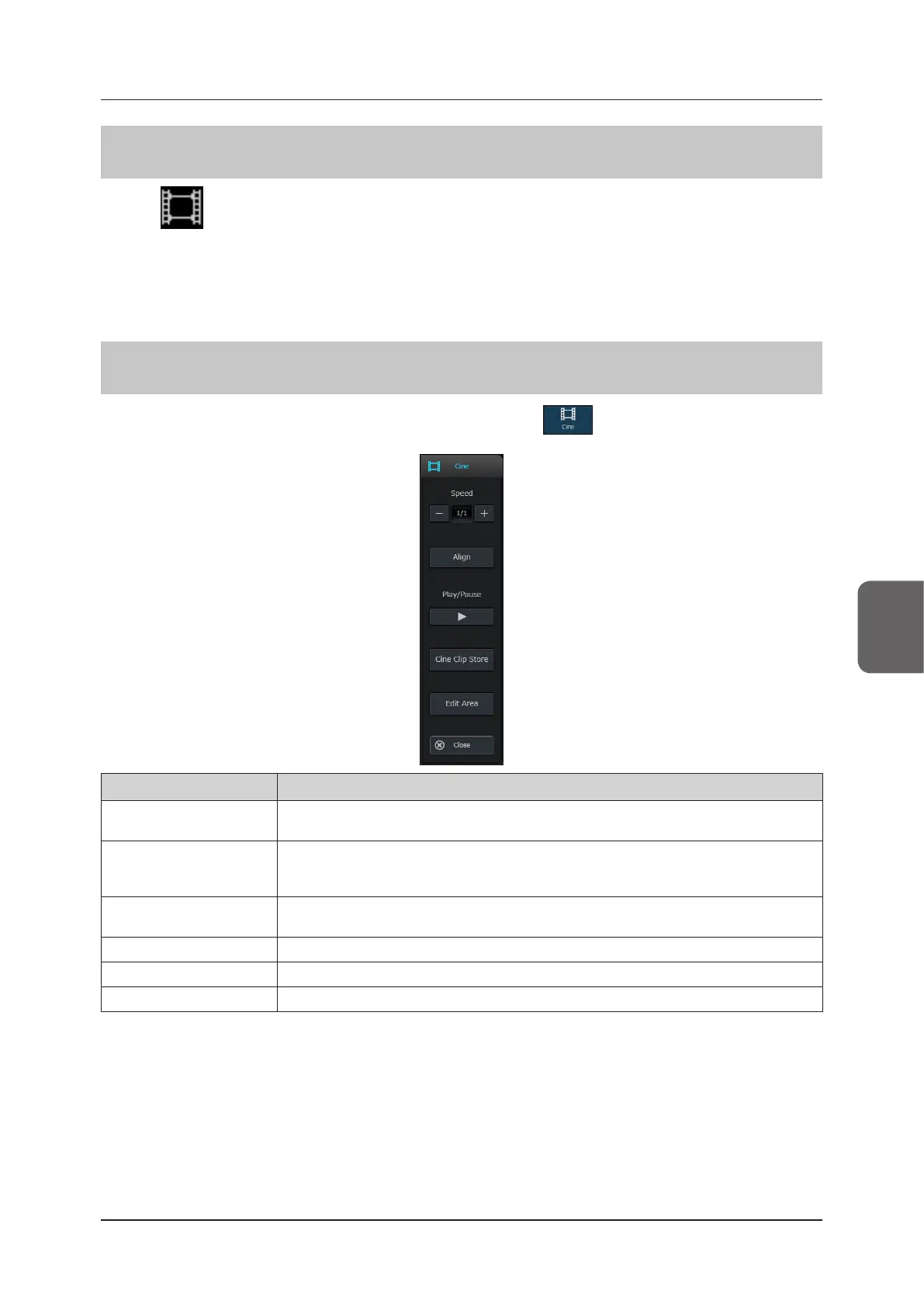
5.1.3 Cine Pop-up Menu
When you press either the Cine icon in the information display area or in the operation button area with the
Cine function enabled, the Cine pop-up menu will be displayed.
Button Functions
[Speed]
The playback speed of a motion review is changed in four levels.
1/1 (maximum frame rate), 1/2, 1/4, 1/8 (minimum)
[Align]
Changes between enable / disable of Align.
On
O
[Play/Pause]
Starts / stops motion review.
• A motion review stopped state means a frame review state.
[Cine Clip Store]
Stores Cine memory as clips.
[Edit Area]
Sets the motion review playback area.
[Close]
Closes the Cine pop-up menu.



 To Next Page