4.6 Multi-image Mode
165
Chapter 4
z
To change the layout
[Menu] button > Pop-up menu > Current mode tab
Use the [Dual Layout] ([M Layout] / [D Layout]) button to select the layout.
• The scan mark in the frozen image turns gray.
• The window opposite the live image either displays a frozen image or is blank with no image data.
• Parameters are shown on the respective images.
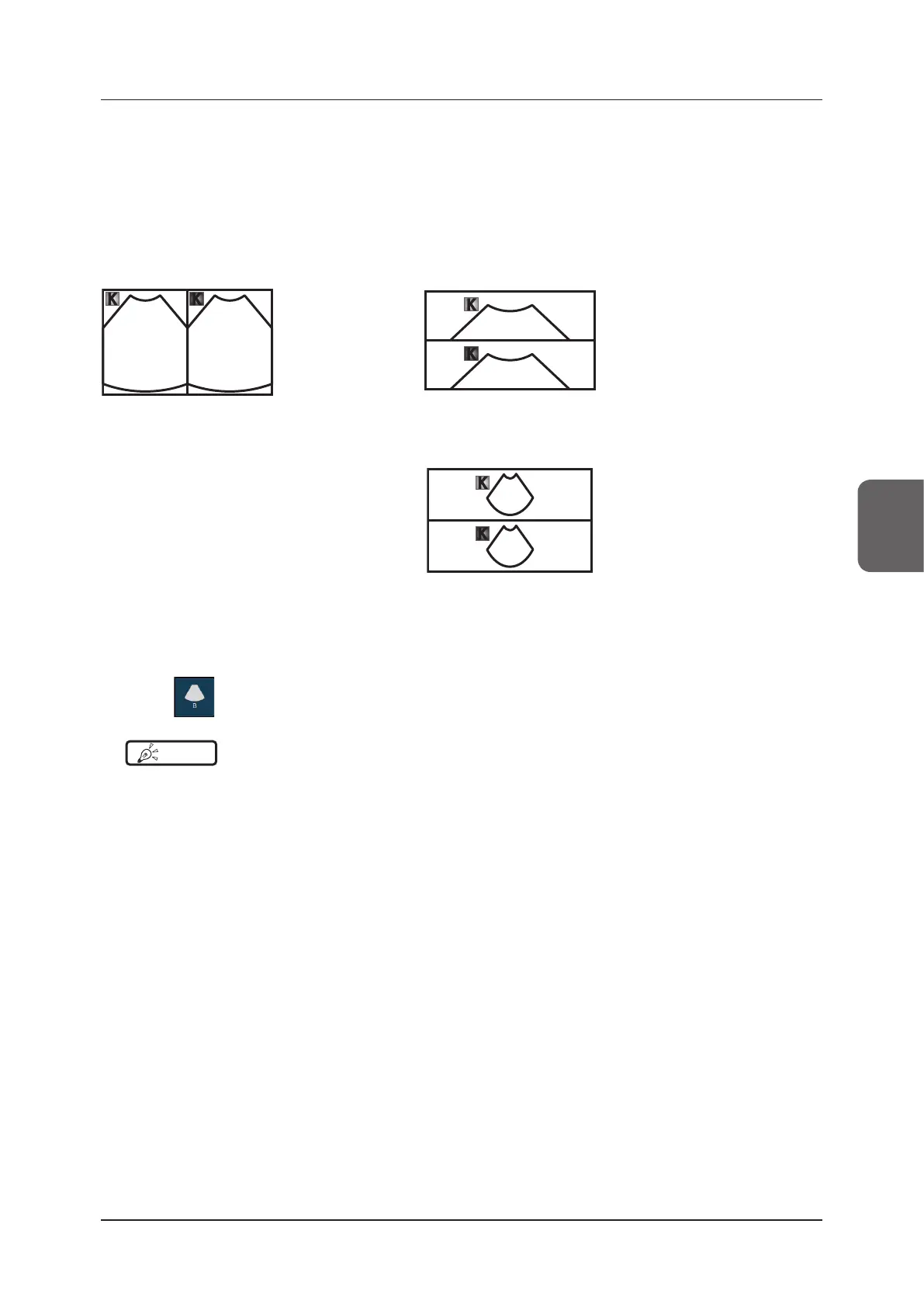
<L/R> <U/D 1>
Live Freeze
• B images are ar-
ranged side by
side.
• B images are arranged one above
the other.
Because each B image is magni-
ed to the same degree as B-
mode images, the upper half of
the B image can be displayed.
<U/D 2>
• B images are arranged one above
the other.
Because the display depth of the
B images is the same as that of
B-mode images, the entire B im-
ages can be displayed; but, they
are scaled down to a smaller size.
z
To exit
1
Press .
HINT
•••••••••••••••••••••••••••••••••••••••••••••••••••••••••••••••••••••••••••••••••••••••••••••••••••••
• In Elastography-mode, you can switch to Split-mode by pressing [Display Mode] menu button.
•••••••••••••••••••••••••••••••••••••••••••••••••••••••••••••••••••••••••••••••••••••••••••••••••••••••••••••••••••••



 To Next Page