263
8.2 Biopsy
Chapter 8
Menu Button Functions
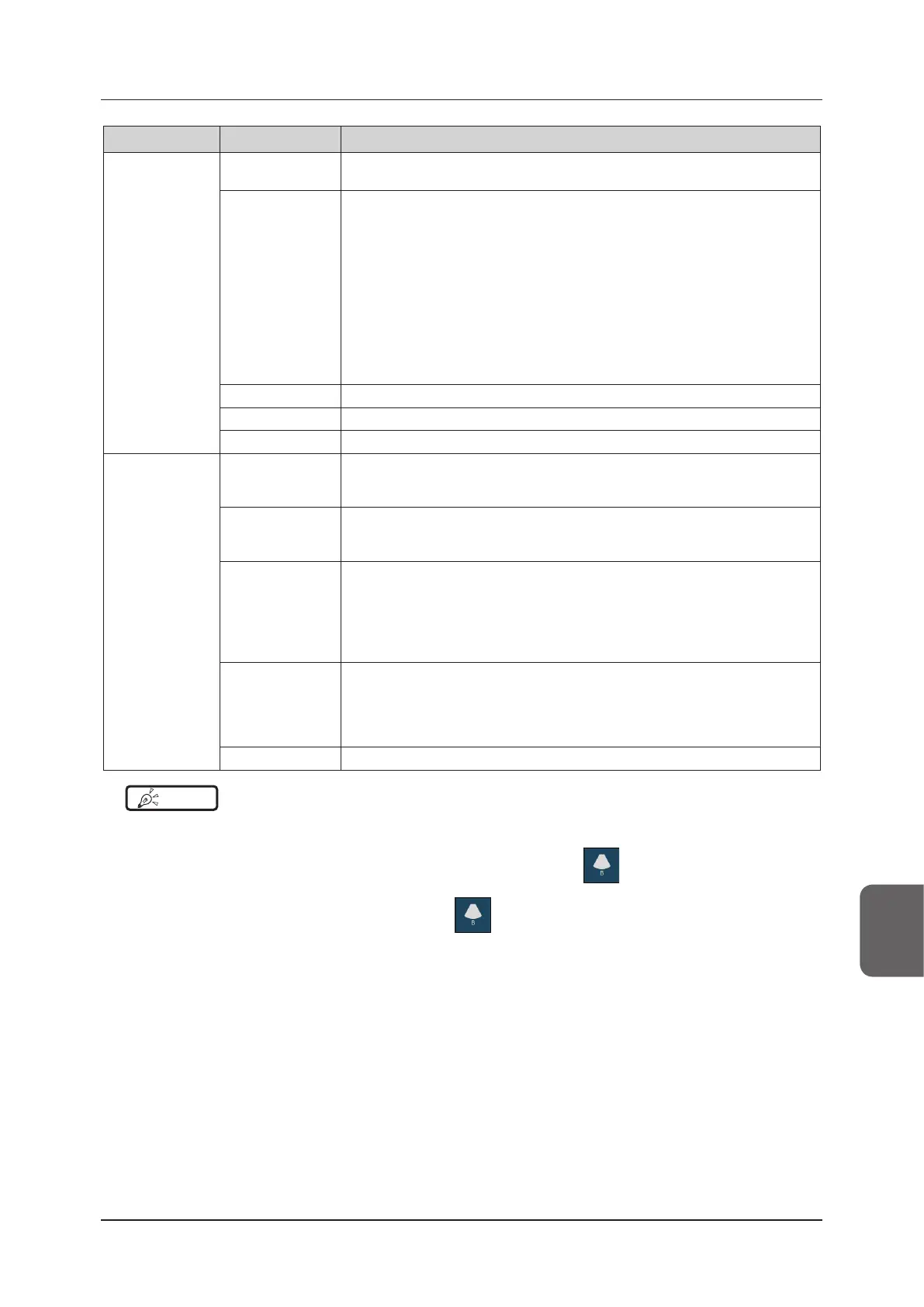
[SNV Menu]
[SNV Display]
Enables or disables the SNV.
• SNV cannot be enabled if S4-2, S4-2A, or EC9-3 transducer is used.
[SNV Steer]
Species the direction from which the biopsy needle comes into view on the screen.
The enhancement can be increased by specifying the direction in advance.
[Left] : Select this when the biopsy needle will come into view from the left side of
the screen.
[Right] : Select this when the biopsy needle will come into view from the right side
of the screen.
[Auto] : Select this when you cannot select which direction the needle will come
into view from in advance.
• If you want to turn this function o, pressing the highlighted button will remove
your selection.
• When you have selected either Left or Right, the SNV Steer will automatically
rotate as well if you change the Rotate or “Upside/Down” setting in B-mode.
[Clear Image] Adjusts contrast with consideration for the sizes of structures in the image.
[Setting] Switches to Detail Setting menu.
[Close] Closes the pop-up menu.
[Setting] Menu
[SNV Color]
Selects the color you use for enhancement. If the SNV Type is "7", this button is not
available.
• SNV Color is only eective when the SNV type other than "7" is selected.
[SNV Type]
Selects the enhancement method.
• There are eight patterns (0 to 7) available for the enhancement method such as
movement or continuous structure, etc.
[SNV Gain]
Selects the intensity of enhancement. If the SNV Type is "7", this button is not avail-
able.
[L] : Low
[M]: Medium
[H] : High
• SNV Gain is only eective when the SNV type other than "7" is selected.
[Contrast]
Selects the image contrast. This is available for SNV types 4 to 7.
[L] : Low
[M]: Medium
[H] : High
• Contrast is eective only when SNV type "4" or higher is selected.
[Back] Exits the Advanced Setting menu and returns to the SNV menu.
HINT
•••••••••••••••••••••••••••••••••••••••••••••••••••••••••••••••••••••••••••••••••••••••••••••••••••••
• SNV cannot be displayed in M/PW-mode or if M Cursor or the Doppler Gate is displayed. M/PW-mode, M Cursor, or
Doppler Gate cannot be displayed when SNV is active.
• You can also change the setting so that you can disable SNV by pressing
in the mode button area. Refer to
“Conrming preset / modifying user preset” in the "Operation Manual: Applications". If you set so, you can turn o [SNV
Display], [SNV Steer], and [Clear Image] by pressing
. Also, the transducer mark turns blue and the SNV pop-
up menu closes.
• You can also display explanations of the SNV type. Refer to "Image Screen" in the "Operation Manual: Applications".
•••••••••••••••••••••••••••••••••••••••••••••••••••••••••••••••••••••••••••••••••••••••••••••••••••••••••••••••••••••



 To Next Page