11/8/00 RTA (optional) 10-37
•
View Back
- Return to the previous display
•
Graph
- Adjusts the vertical graph scale and offset
Avg History
If the data being viewed has come
from a stored file, the +average
function is not available and will
beep instead of bringing up the
prompt “Add to Average?”.
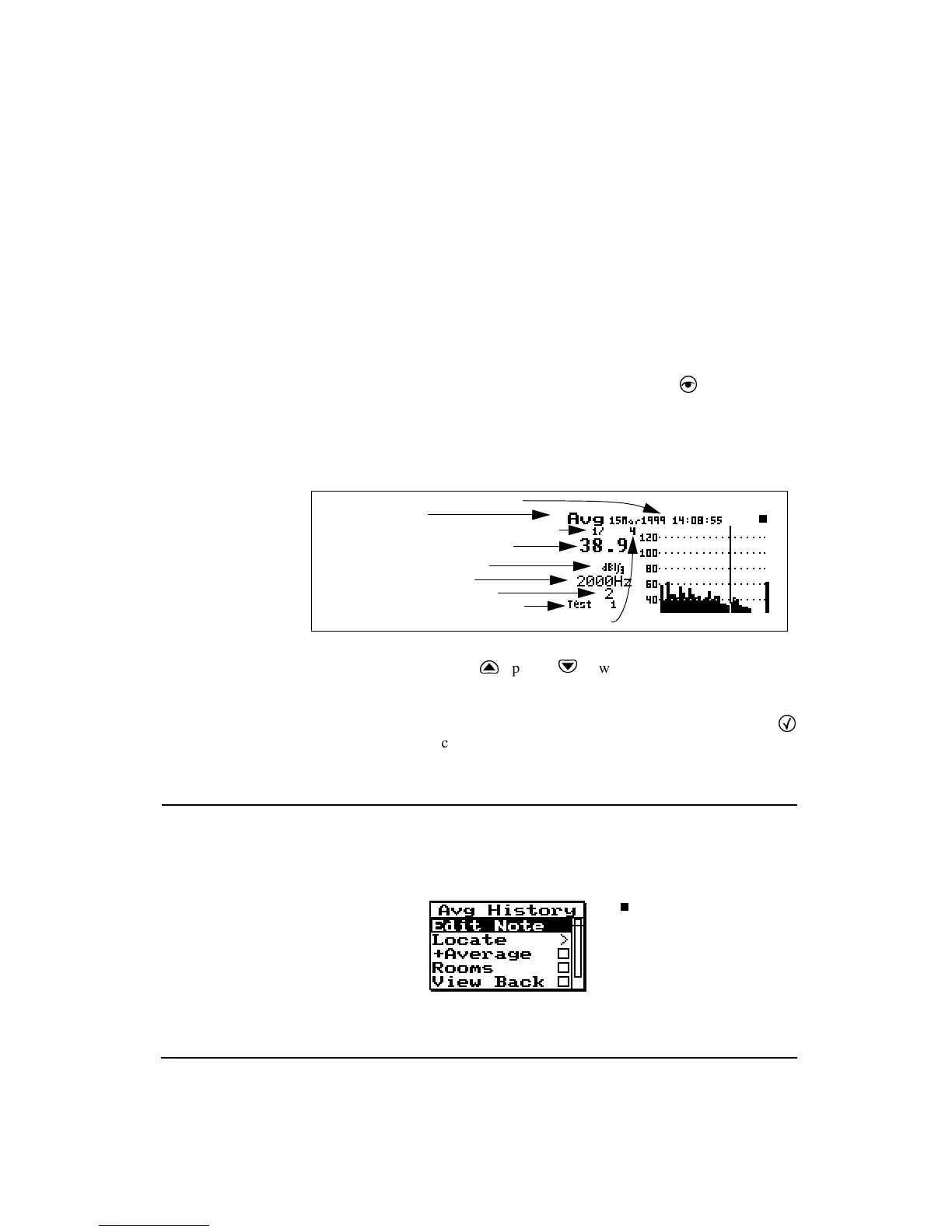
The Avg History display shows a history of the spatial aver-
ages which have been stored using the “Store” function in
the “Spatial Avg” check menu. Use the
V
View menu or
the “Spatial Avg” check menu to access the “Avg History”
display.
In order to clear the “Avg History”
records, an overall reset is required.
Use the
u
up and
d
down arrow keys to move to the
previous and next spatial average history records.
To manipulate the “Avg History” records, press the
c
check key to access the “Avg History” check menu.
Avg History Check Menu
The “Avg History” check menu is shown below:
Display label
Current average history record number
Level in dB of selected filter
Bandwidth (1/1 or 1/3 oct.)
Selected filter frequency
Number of spectra averaged
Spatial average history note field
Occurance date and time
Total number of spatial average history records



 To Next Page