General Information Cha
ter Ei
ht: O
eration in Control Mode
248
Torr
OPEN
AUTO
CLOSE
HOLD
MANUAL
TORR
4
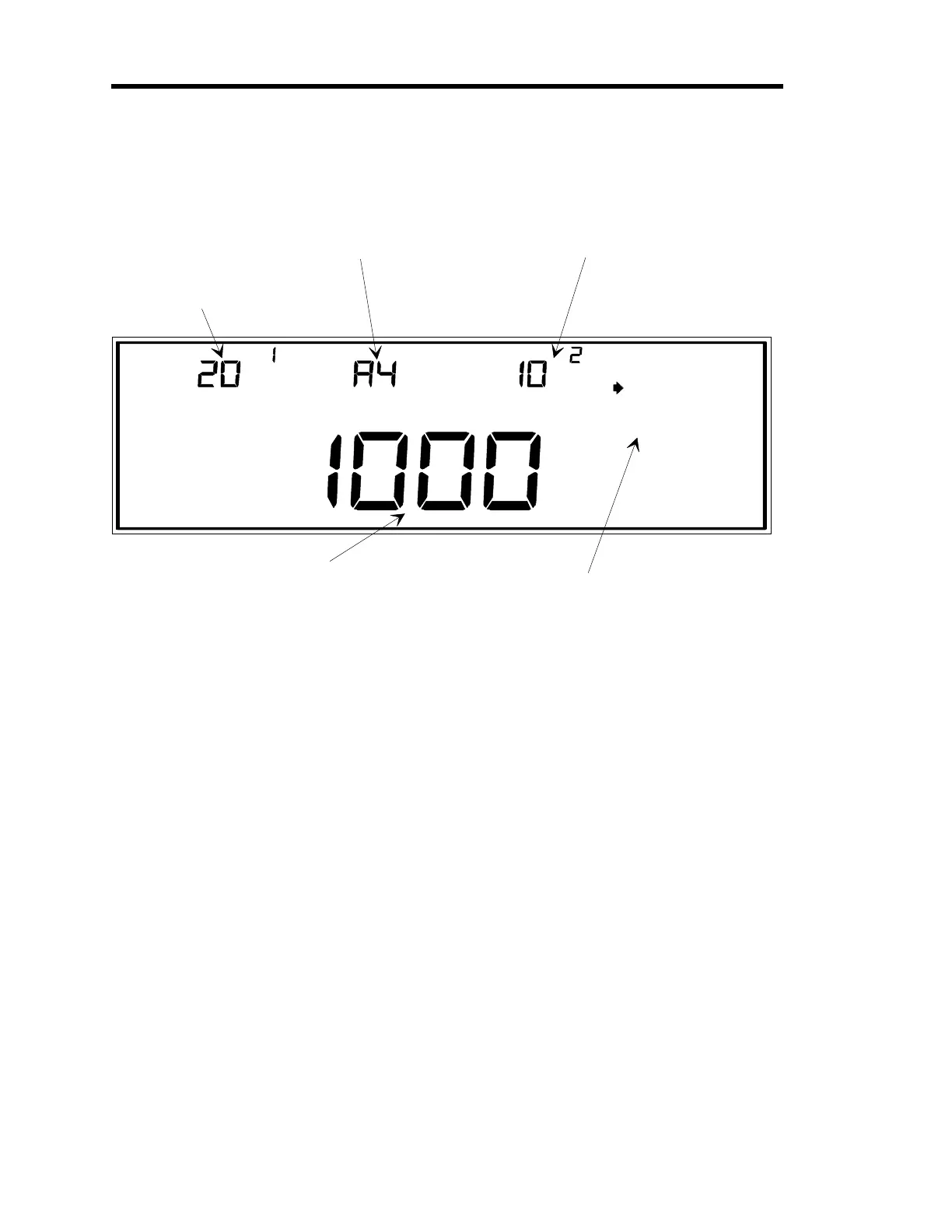
This is the current valve
position, expressed as
a percent of the valve
control si
nal output.
This example shows a
settin
of 20.1% of the
valve control si
nal output.
The active recipe is
selected in this displa
.
In this example, recipe
4 is the active recipe.
The set point for the active
recipe is entered here. OR,
if an analo
set point is bein
used, the analo
set point value
is displa
ed here.
LEFT DISPLAY
CENTER DISPLAY RIGHT DISPLAY
The current pressure readin
from
the control channel is displa
ed here.
MAIN DISPLAY
This is a list of valve control positions. The
arrow ke
s on the ke
board scroll the selectin
arrow throu
h the list of valve positions.
In this example, AUTO is selected, so the 146 unit
will control accordin
to the control parameters in
the active recipe (recipe 4 in this example).
Figure 83: Control Mode Screen
Artisan Technology Group - Quality Instrumentation ... Guaranteed | (888) 88-SOURCE | www.artisantg.com











 To Next Page