How To Set Up a Dual Channel Display Cha
ter Seven: O
eration in Setu
Mode
204
How To Set Up a Dual Channel Display
MAIN DISPLAY
CLOSE
TORR
SETUP
DUAL CHANNEL
THRESHOLD
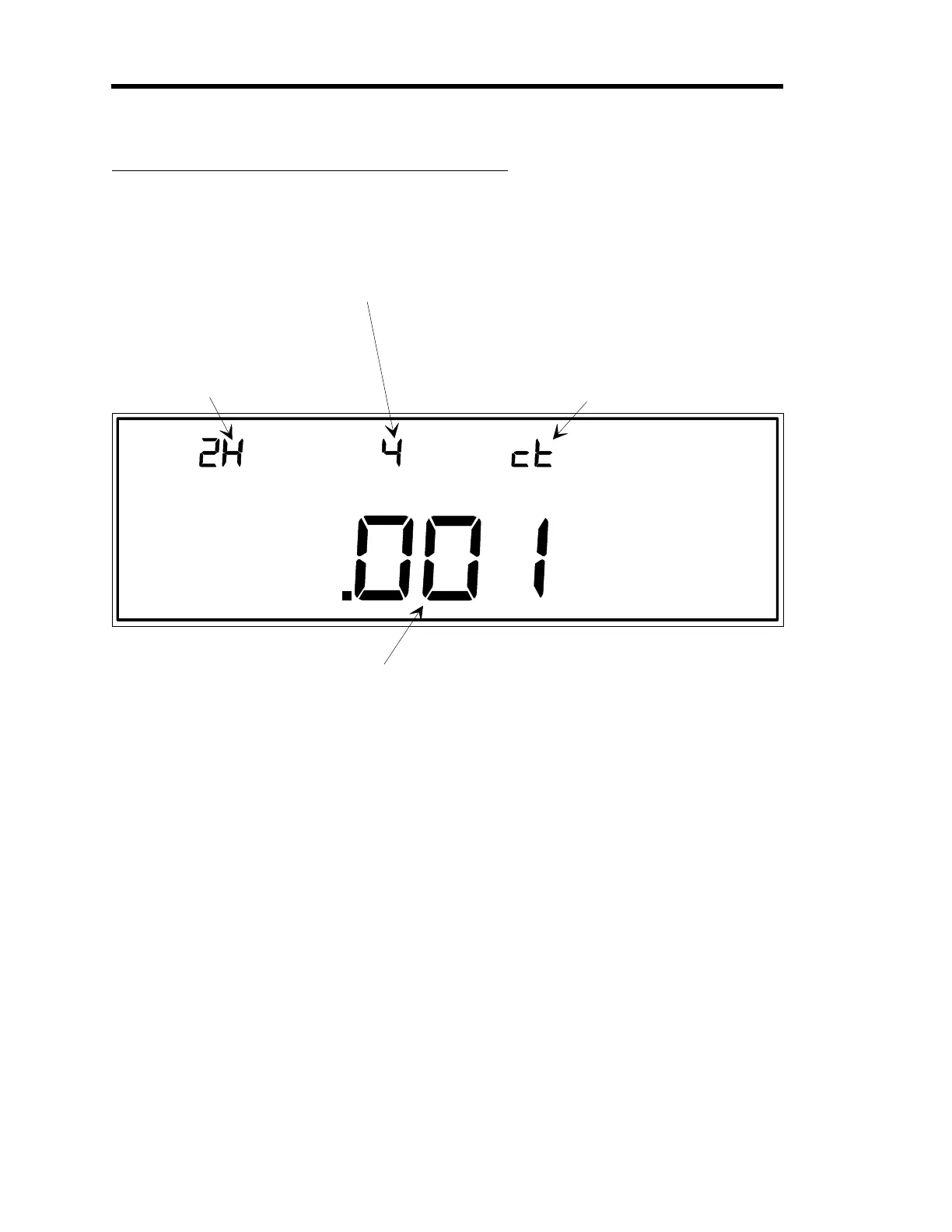
This indicates the channel
number associated with
the control
au
e.
This indicates the dual
channel setup number
(1 or 2), and the switch-
point (Hi
h or Low).
In this example, the Hi
h
switchpoint for dual
channel setup number 2
is selected for editin
.
The switchpoint value for the selected dual channel setup is shown here.
In this example, the value shown is the hi
h switchpoint for dual channel 2.
This display indicates if the
selected dual channel setup is
set to continuous operation (ct),
discontinuous operation (dc),
or disabled (OFF).
In this example, the dual channel
feature is set up for continuous
operation.
LEFT DISPLAY
CENTER DISPLAY RIGHT DISPLAY
Figure 62: Setting Up Dual Channel Displays
The dual channel display function can be activated in Normal and Leakage Modes (refer to
How
To Switch Channels in the Main Display,
in either the
Operation in Normal Mode
, or
Leakage
Mode
chapters). The dual channel function allows the 146 unit to display pressure readings from
one of two associated sensors. One sensor controls over a low range, and the other sensor
controls over the high range.
There are two switchpoints associated with the dual channel threshold function (high and low).
A switchpoint is the pressure at which the pressure reading display switches from one sensor to
another. When the pressure is above the high switchpoint, the upper channel is used for display.
When the pressure is below the low switchpoint, the lower channel is used for display. The
pressure range between the switchpoints provides hysteresis, and is used to create a single
pressure display.
Use the [+/-] key to toggle between the two switchpoints in the left display. The 146
instrument has default high and low switchpoint values which are different for different sensor
types. Enter a 0 in the switchpoint field (center display), to enable the default values. Table 50,
page 205, summarizes the default values.
Artisan Technology Group - Quality Instrumentation ... Guaranteed | (888) 88-SOURCE | www.artisantg.com











 To Next Page