Functions for Printing
Paper Feed/Output Settings for Special Paper and Printing Types [Eject Wing Control] [Special Paper Ctrl]
130
Clearing Special Paper Ctrl Settings
1
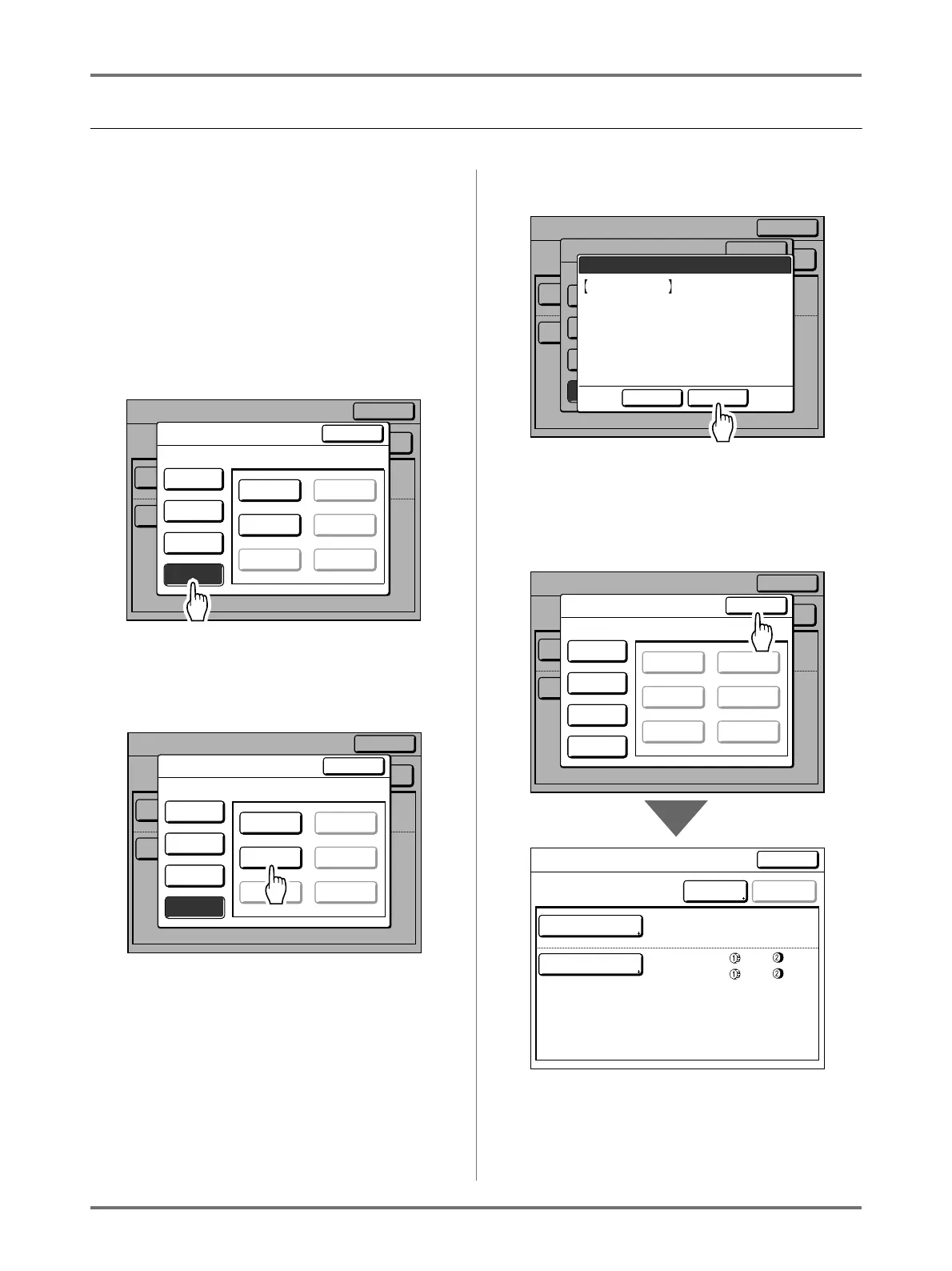
Display the Parameter List screen.
Follow steps 1 to 3 ()p.124).
Important!:
• First, check whether the setting can be cleared.
(Retrieve the appropriate setting and follow the
steps beginning with step 2.)
• Cleared settings cannot be recovered.
2
Touch [Clear].
3
Touch the button for the setting you
want to clear.
Greyed-out buttons are not available (no setting
has been registered yet).
4
Touch [OK].
Returns to the Parameter List screen. The
selected setting is cleared.
5
Touch [Close].
Returns to the Special Paper Ctrl screen.
OFF
4
OFF
4
Close
Special Paper Ctrl
S-Tray Upper Limit
Paper Feed Amount
+1
+2
ReviseEntry/Call
Paper Feed Adj.
Air Blow
Separation Fan
Paper Eject Adj.
Side
Pre-suction Fan
Suction Fan
Reseive Tray
Close
Parameter List
A-1 A-4
Poster A-5
A-3 A-6
Register
Retrieve
Rename
Clear
Select a Button to be Cleared
OFF
4
OFF
4
Close
Special Paper Ctrl
S-Tray Upper Limit
Paper Feed Amount
+1
+2
ReviseEntry/Call
Paper Feed Adj.
Air Blow
Separation Fan
Paper Eject Adj.
Side
Pre-suction Fan
Suction Fan
Reseive Tray
Close
Parameter List
A-1 A-4
Poster A-5
A-3 A-6
Register
Retrieve
Rename
Clear
Select a Button to be Cleared
OFF
4
OFF
4
Close
Special Paper Ctrl
S-Tray Upper Limit
Paper Feed Amount
+1
+2
ReviseEntry/Call
Paper Feed Adj.
Air Blow
Separation Fan
Paper Eject Adj.
Side
Pre-suction Fan
Suction Fan
Reseive Tray
Close
Parameter List
A-1 A-4
Poster A-5
A-3 A-6
Register
Retrieve
Rename
Clear
Select a Button to be Cleared
Cancel OK
This Setting will be
Cleared
OK?
Poster
OFF
4
OFF
4
Close
Special Paper Ctrl
S-Tray Upper Limit
Paper Feed Amount
+1
+2
ReviseEntry/Call
Paper Feed Adj.
Air Blow
Separation Fan
Paper Eject Adj.
Side
Pre-suction Fan
Suction Fan
Reseive Tray
Close
Parameter List
A-1 A-4
A-2 A-5
A-3 A-6
Register
Retrieve
Rename
Clear
Poster- Cleared
Close
Special Paper Ctrl
S-Tray Upper Limit
Paper-Feed Amount
+1
-2
Revise
Entry/Call
Paper Feed Adj.
Air Blow
Separation F
Paper Eject Adj
OFF
4
OFF
4



 To Next Page