Replacing Consumables
Replacing the Ink Cartridge
246
Replacing the Ink Cartridge
When the ink is depleted, a message is displayed and the machine stops.
Replace with a new Ink Cartridge.
BCaution:
• Ink may be left on the area around the Print Drum, so take care not to smudge your hands or clothes.
• Wash immediately with soap if you should get ink on your hands, etc.
Important!:
• For the Ink Cartridge, it is recommended to use the products specified by RISO.
• Keep the power ON while replacing the Ink Cartridge.
• Replace with an Ink Cartridge of the same ink colour. If you want to change the ink colour, replace the Print Drum
itself.
)p.250
1
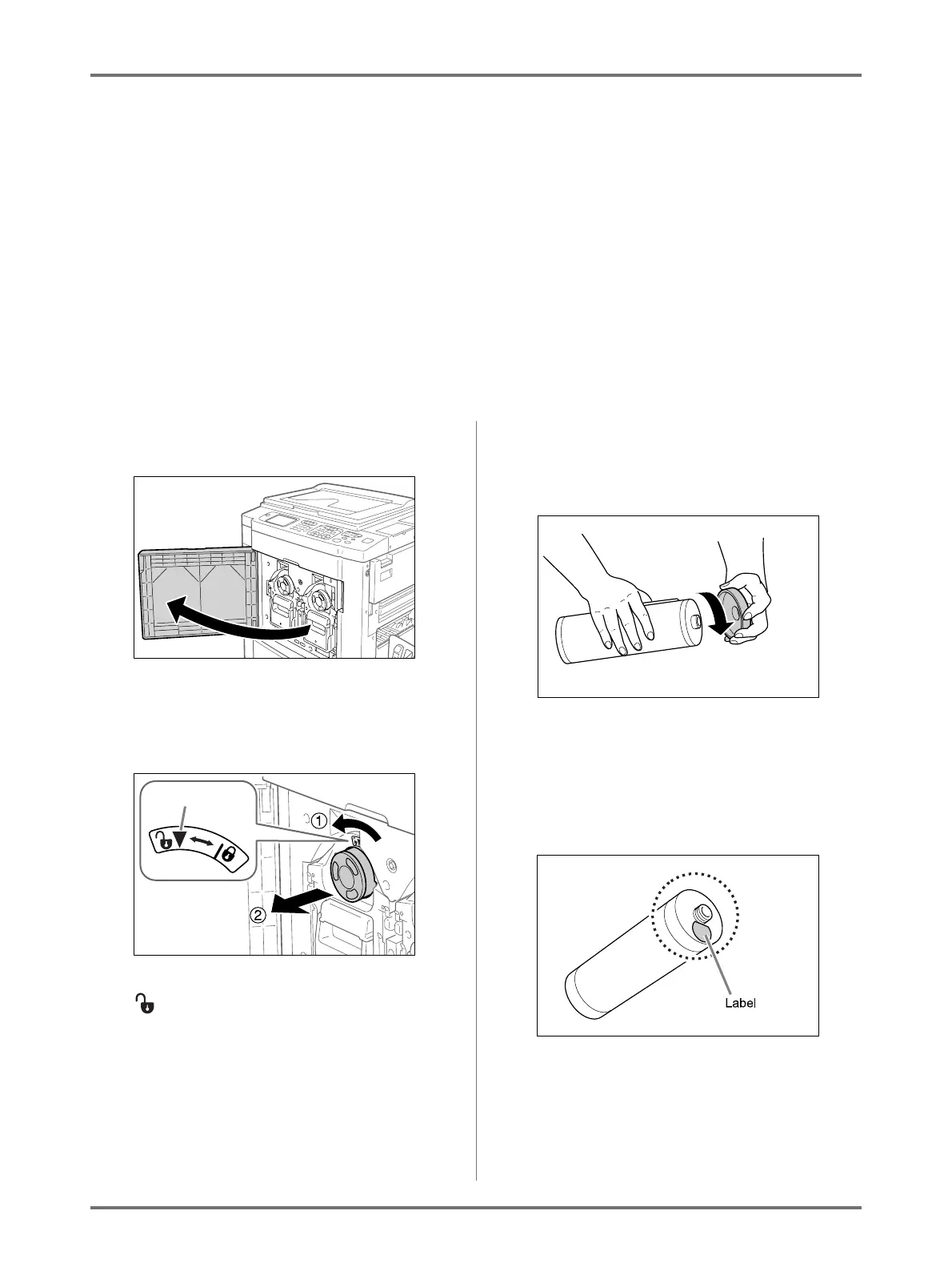
Open the Front Cover.
2
Pull the empty Ink Cartridge out of
the holder.
Turn the Ink Cartridge to the counter clockwise
( ) and then pull it out.
Note:
• Dispose the empty Ink Cartridge according to
the disposal rule of your local community.
3
Remove the cap on the new Ink Car-
tridge.
Turn the Ink Cartridge cap to remove.
Important!:
• Do not touch or give impact to the outlet surface
of the new Ink Cartridge.
Do not peel off the label beside the Ink Car-
tridge opening.
Unlock



 To Next Page