Functions for Master-Making
Adjusting Photo Contrast [Contrast Adj]
74
Adjusting Photo Contrast [Contrast Adj]
For originals that have ill-defined photos, adjust the contrast to print more clearly.
There are two ways to adjust contrast.
Important!:
• If the “Image” is set to “Line”, “Duo” or “Pencil”, “Contrast Adj” cannot be used.
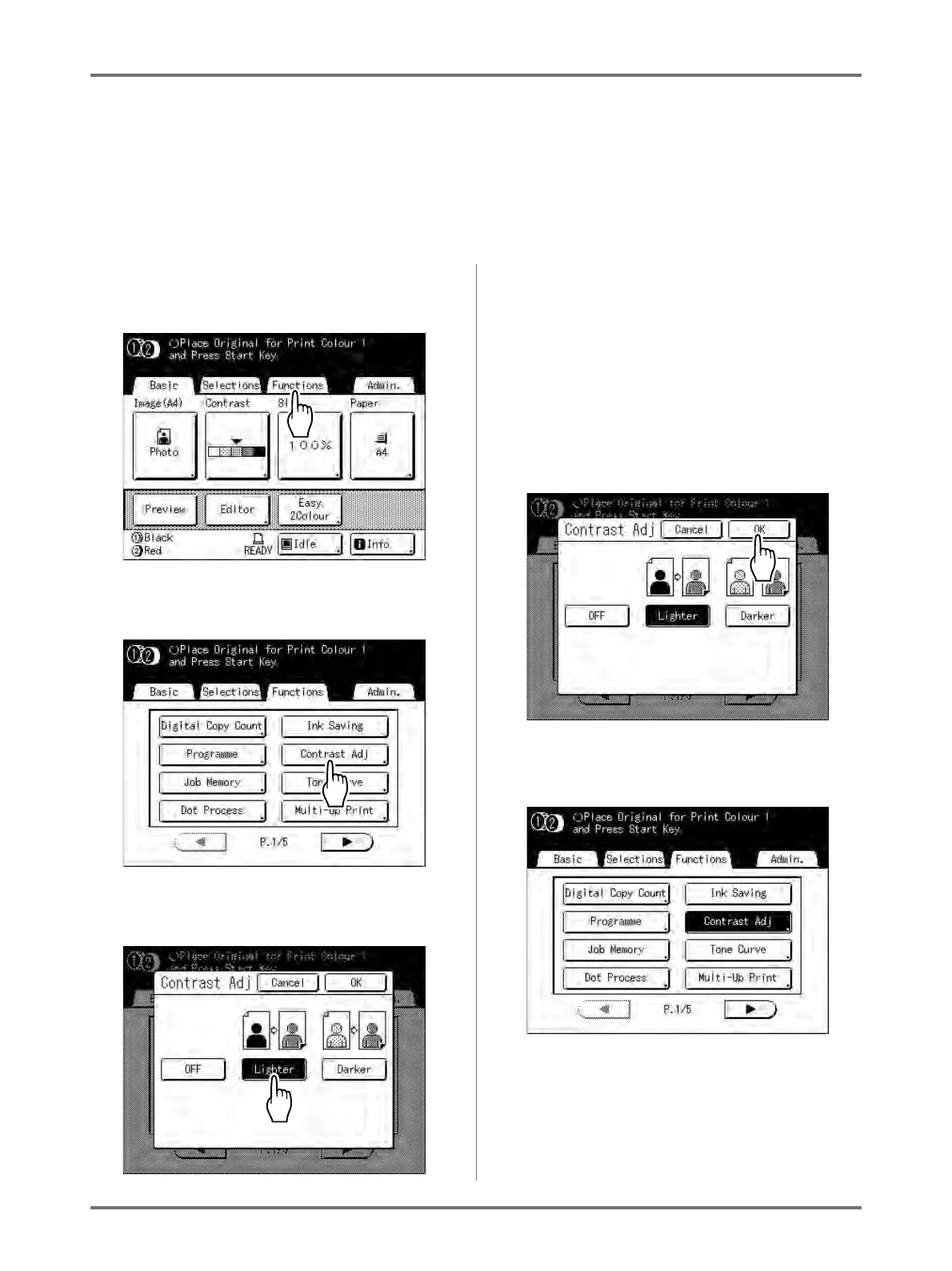
1
Touch [Functions] on the Master
Making Basic Screen.
2
Touch [Contrast Adj].
3
Touch the button of the contrast to use.
• [Lighter]: Lightens dark sections.
Use this setting if the entire photo is underex-
posed and the target subject of the photo is ill-
defined.
• [Darker]: Clarifies lighter portions.
Use this setting if the entire photo is overex-
posed and the target subject of the photo is ill-
defined.
4
Touch [OK].
Returns to the Functions screen. Contrast Adj set-
ting is updated.



 To Next Page