Advanced Features
Automatic Sorting Into Groups [Programme]
136
Setting Up for Programmed Printing
Note:
• Both the Touch Screen and Print Quantity Keys (and related keys) may be used for this operation.
1
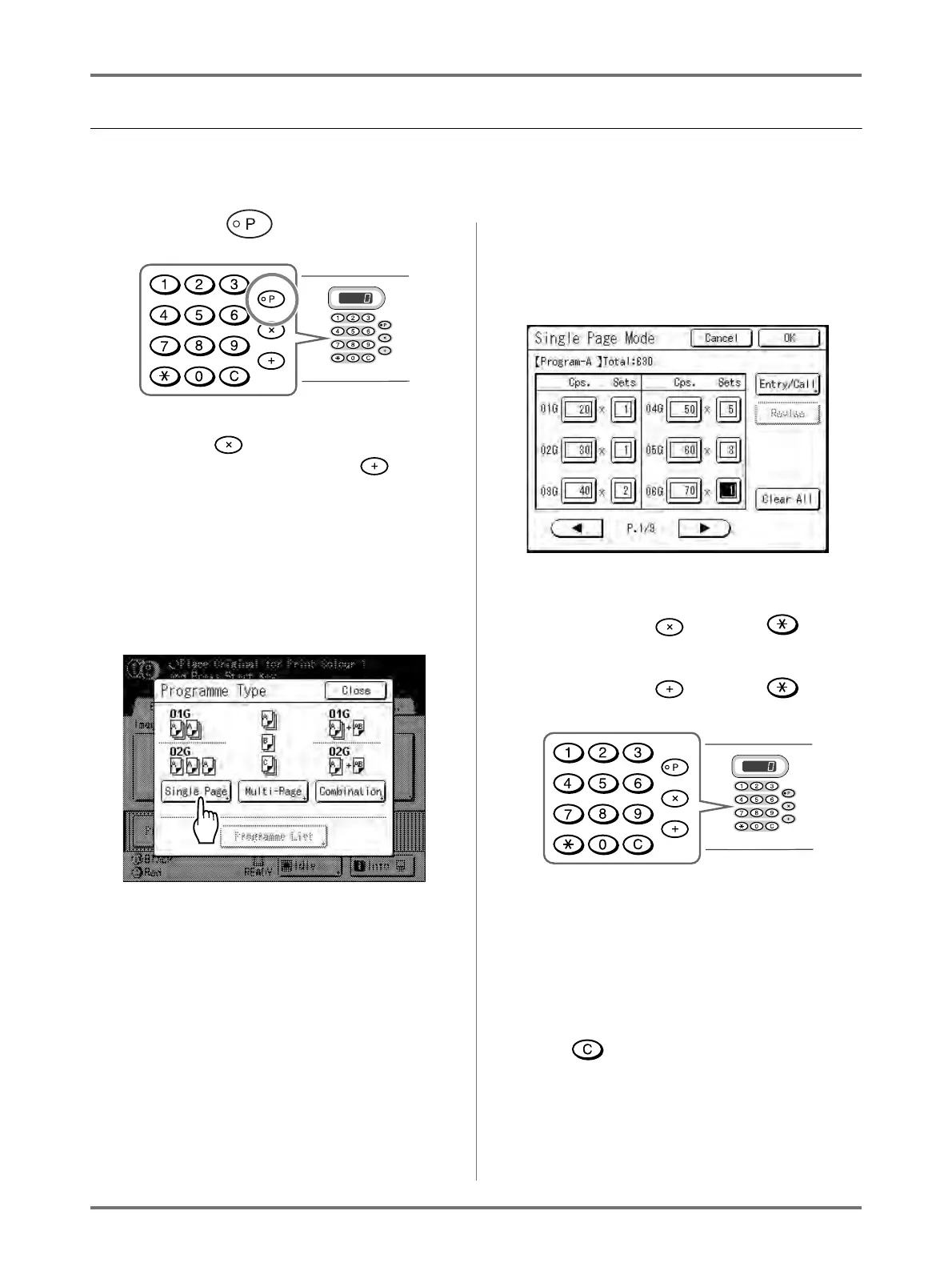
Press the key.
Note:
• Press the key and skip to step 3) of the
“Single Page Mode”. Press the key and
skip to step 3) of the “Multi-Page Mode”.
• Alternatively, from the Master Making Basic
Screen, touch [Functions] then [Programme]
to display the Programme Type screen.
2
Touch the button of the programme
to set.
The input screen for that programme displays.
3
Enter the numbers using the Print
Quantity Keys.
For Single Page Mode
1)
Enter the number of copies using the Print
Quantity Keys.
2) Press the key or the key.
3) Enter the number of sets (in the group)
using the Print Quantity Keys.
4) Press the key or the key.
To programme more than one group, repeat
steps 1) - 4).
Note:
• Touch the desired input box. You can input
the page/set number with the Print Quantity
Keys.
• To cancel or change a number, press the
key and enter again.
• To clear all (number of copies and number of
sets), touch [Clear All].
• The total number of all copies to be printed is
shown on the top of the screen.


 To Next Page