Basic Operations
Printing from a Computer Data [Direct Print]
69
Changing Stop Timing
Stop timing as set on the printer driver takes priority by default.
However, the settings can be changed on the machine while the machine is halted.
Note:
• If “Auto Print” is set to ON on the machine driver, press the key to stop the operation and to make changes.
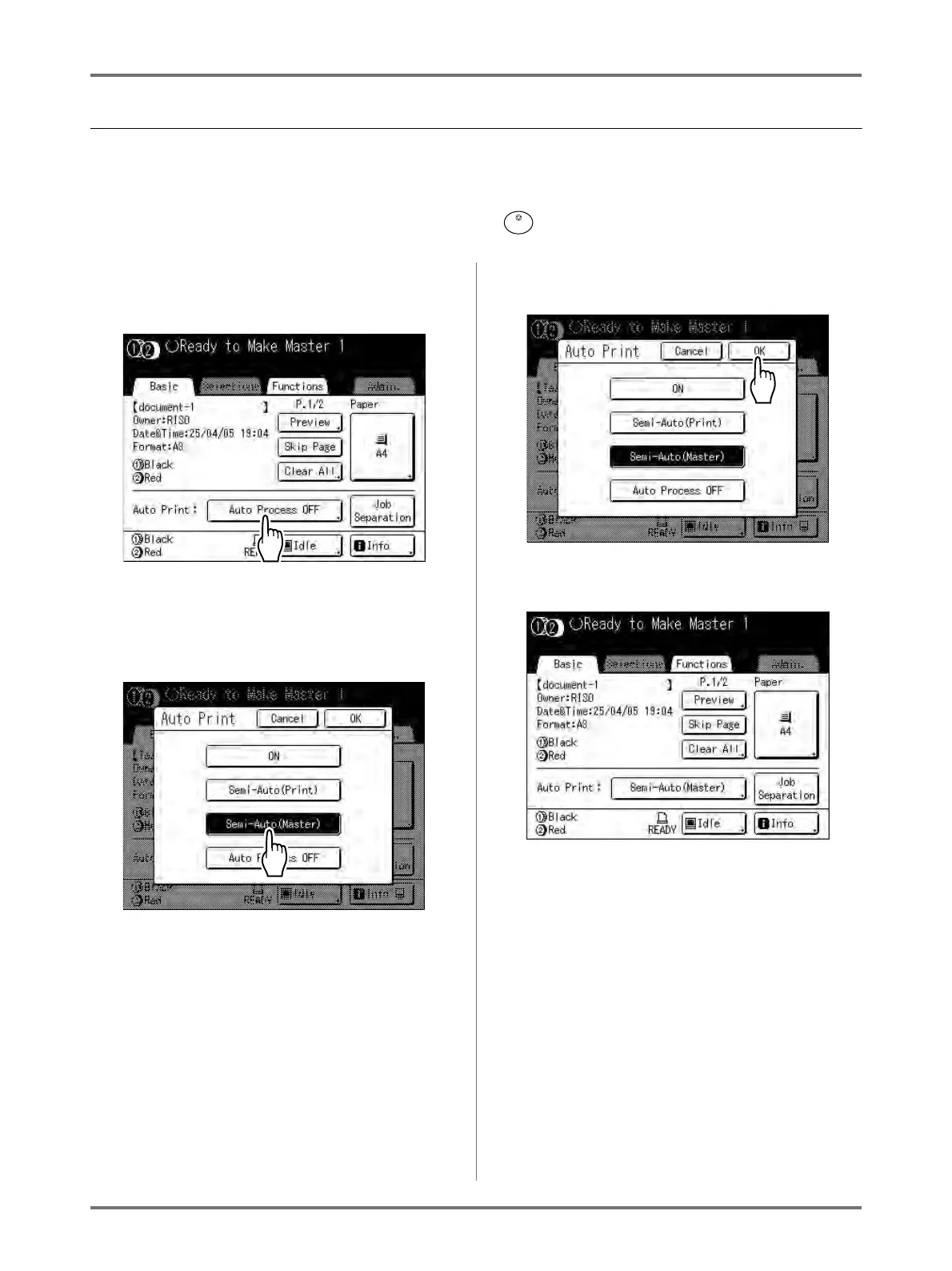
1
Touch the “Auto Print” function but-
ton.
The Auto Print screen appears.
2
Select the desired function.
• [ON]: Makes a master then automatically prints.
• [Semi-Auto(Print)]: After the data is received,
the operation stops before making a master.
• [Semi-Auto(Master)]: After a master is made
and a proof copy is printed, the operation stops.
• [Auto Process OFF]: Stops before making a
master, and then again before printing.
Note:
•See )p.64 for details regarding operations
after each stop.
3
Touch [OK].
The following screen appears.
Returns to Basic Screen. Auto Print setting is
updated.



 To Next Page