Selecting Image Processing Mode [Image]
70
Functions for Master-Making
Selecting Image Processing Mode [Image]
In order to make a master best suited for the original document, select an appropriate mode depending on whether
original contain only text (Line), photo, or both of them.
Note:
• Default Image Processing mode can be set on the Admin. screen.
)p.173
1
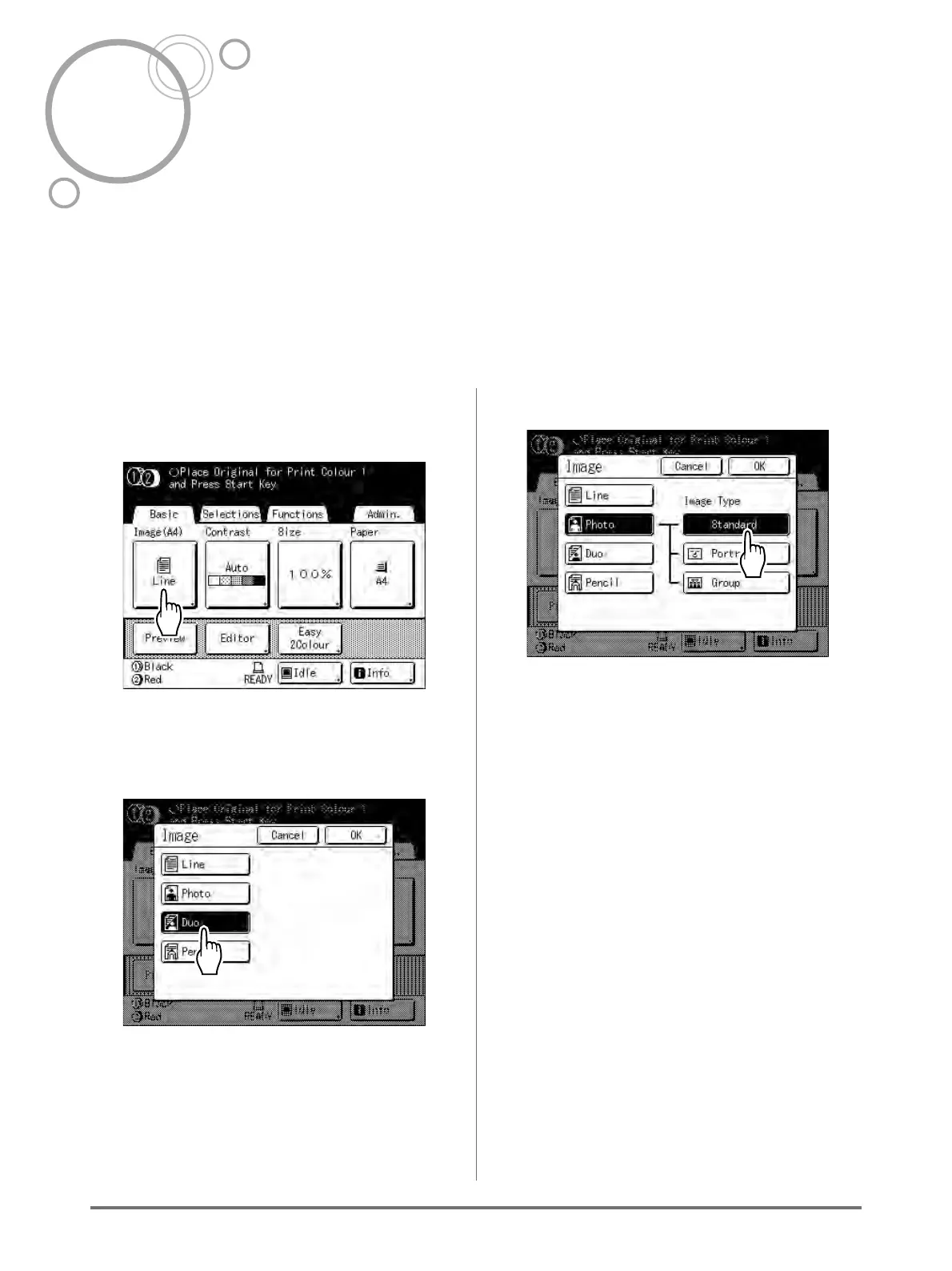
Touch [Image] on the Master Making
Basic Screen.
2
Select the appropriate Image
Processing mode for the original.
• [Line]: Only text contained; e.g., text docu-
ment, newspaper
• [Photo]: Only photos contained
• [Duo]: Both text and photos contained
• [Pencil]: pencil drawings or lightly printed doc-
uments
Touch [Photo] to select the type of photo.
• [Standard]: Select for photos other than [Por-
trait] or [Group].
• [Portrait]: Use this setting for pictures of one or
two individuals from the bust up. This type of
image processing is particularly good for print-
ing photos of faces.
• [Group]: This setting is for group photos that
are over-exposed. This process is effective for
restoring facial features that have become
washed out by a flash.
The Group setting is not for photos with faces
that are overly dark. It may be more effective to
select [Standard] for such photos.



 To Next Page