Functions for Master-Making
Enlarging/Reducing Originals [Standard Ratio] [Free] [Margin+] [Zoom]
79
Enlargement and Reduction by Standard Ratio
[Standard Ratio] [Margin+]
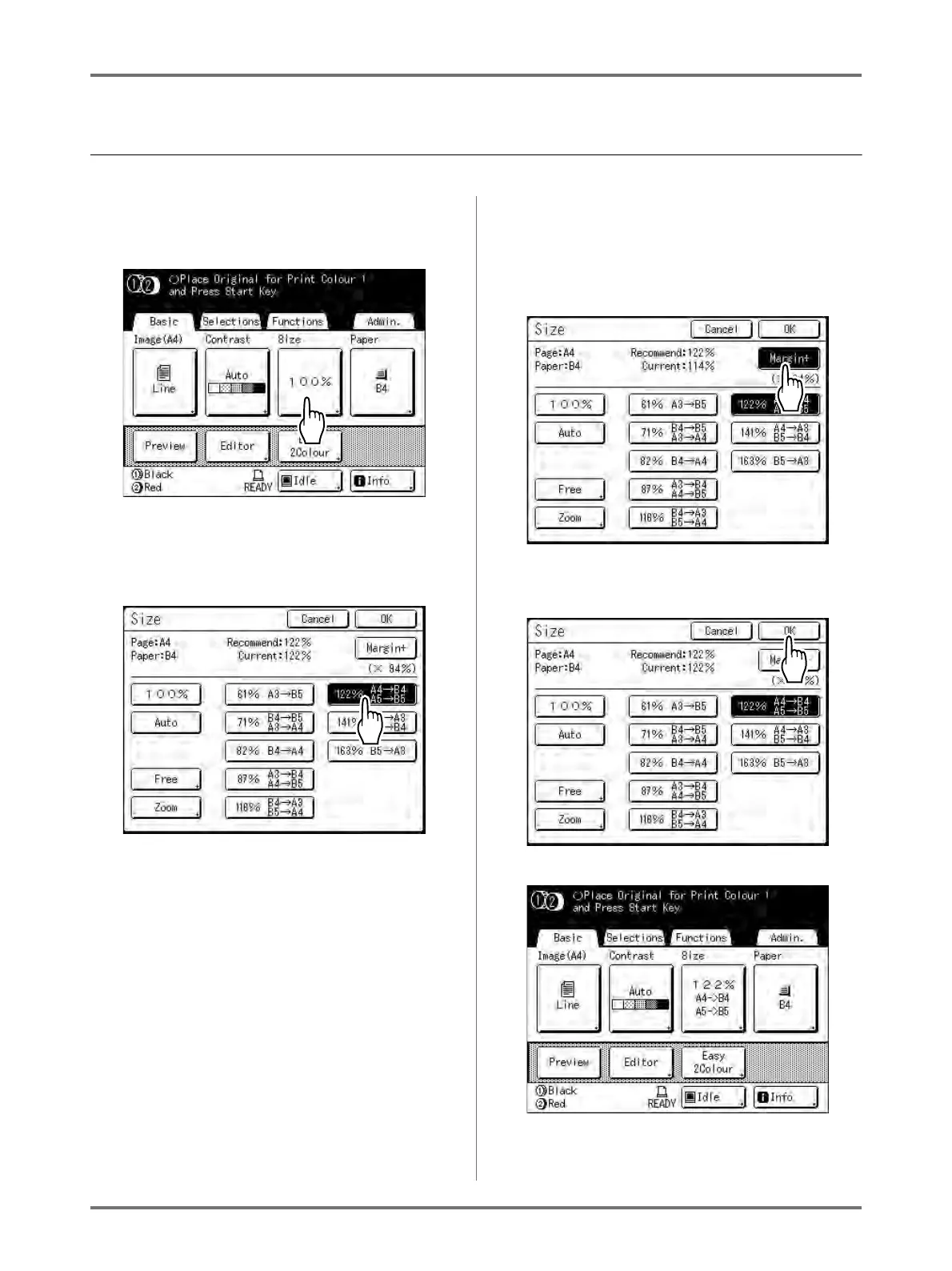
1
Touch [Size] on the Master Making
Basic Screen.
2
Touch the button corresponding to
the desired size.
Touch [100%] to restore the original size.
Important!:
• The “Margin+” setting is not available when
“Auto”, “Zoom” or “Free” is selected.
Note:
• “Standard Ratio” and “Margin+” can be selected
at the same time. The “Current” field will indi-
cate the combined result of “Standard Ratio” ×
“Margin-Plus Rate” when both are selected.
3
Touch [OK].
The following screen appears.
Returns to the Master Making Basic Screen. Size
is updated.



 To Next Page