Storage and Scan Modes (Option)
Retrieving Stored Data and Printing [Storage Memory]
206
Using the Storage Retrieve Screen
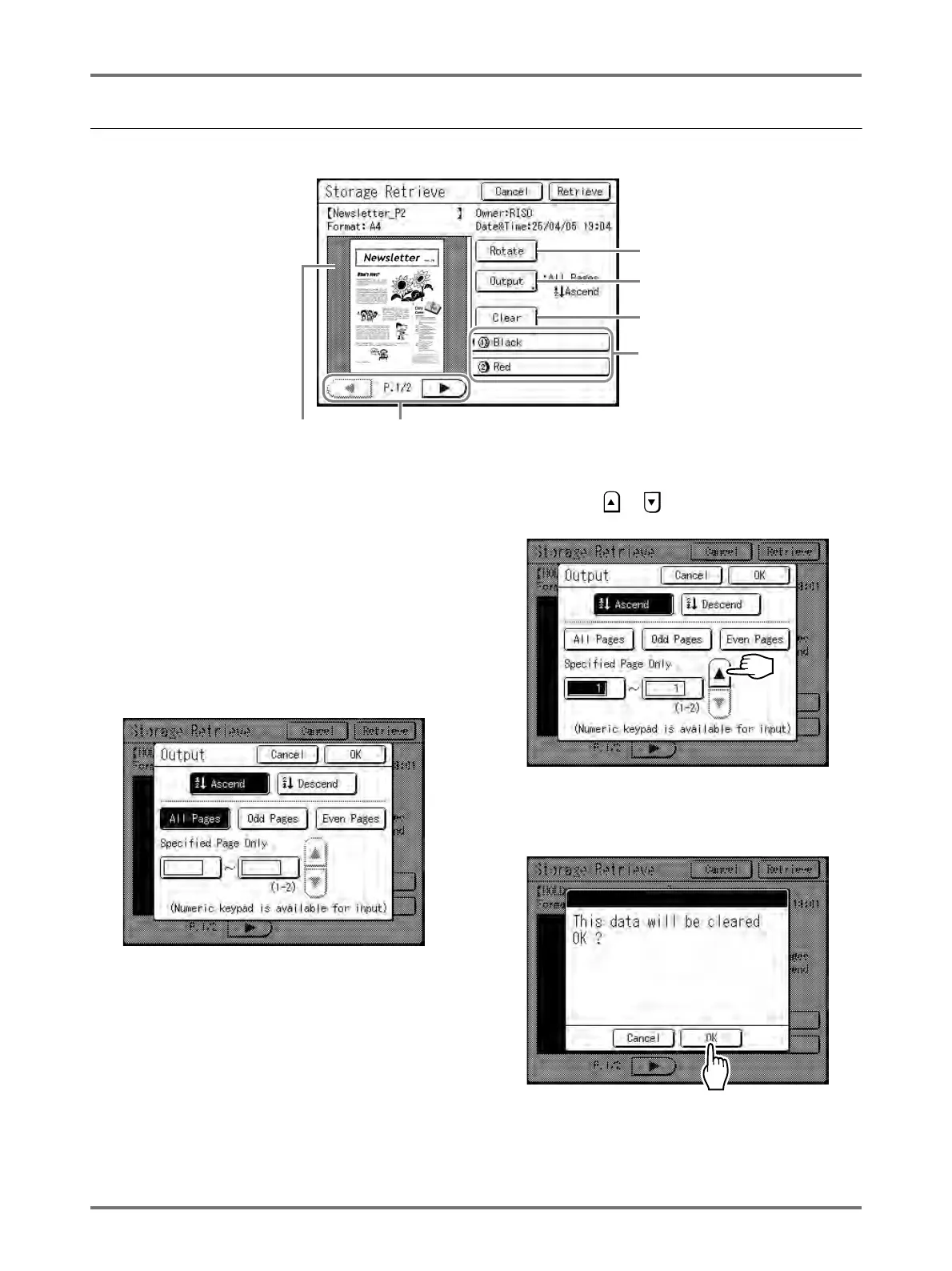
Each section of the Storage Retrieve screen is shown below.
1) A thumbnail is displayed for each page.
2) If the data contains multiple pages, touch to
change page.
3) Touch to rotate the storage data 180 degrees
and output.
4) For 2-colour originals, select the tab for each
colour to display its thumbnails.
5) Output Range
If the storage data consists of multiple pages, you can
specify which pages to print. Touch [Output] and the
Output screen appears.
Touch the corresponding buttons to print all pages, only
odd pages, or only even pages .You can also specify
whether to print the selected pages in [Ascend] or
[Descend] order.
To specify a page range, touch the page input box and
touch either or to specify the pages.
6) Clear
Touch [Clear] and a confirmation screen appears.
Touch [OK] to delete the data.
12
3
5
6
4



 To Next Page