Advanced Features
Keeping Masters Secure After Printing
191
Preventing Leaks of Masters After Creation or Disposal [Protect]
Turning the Protect Setting ON
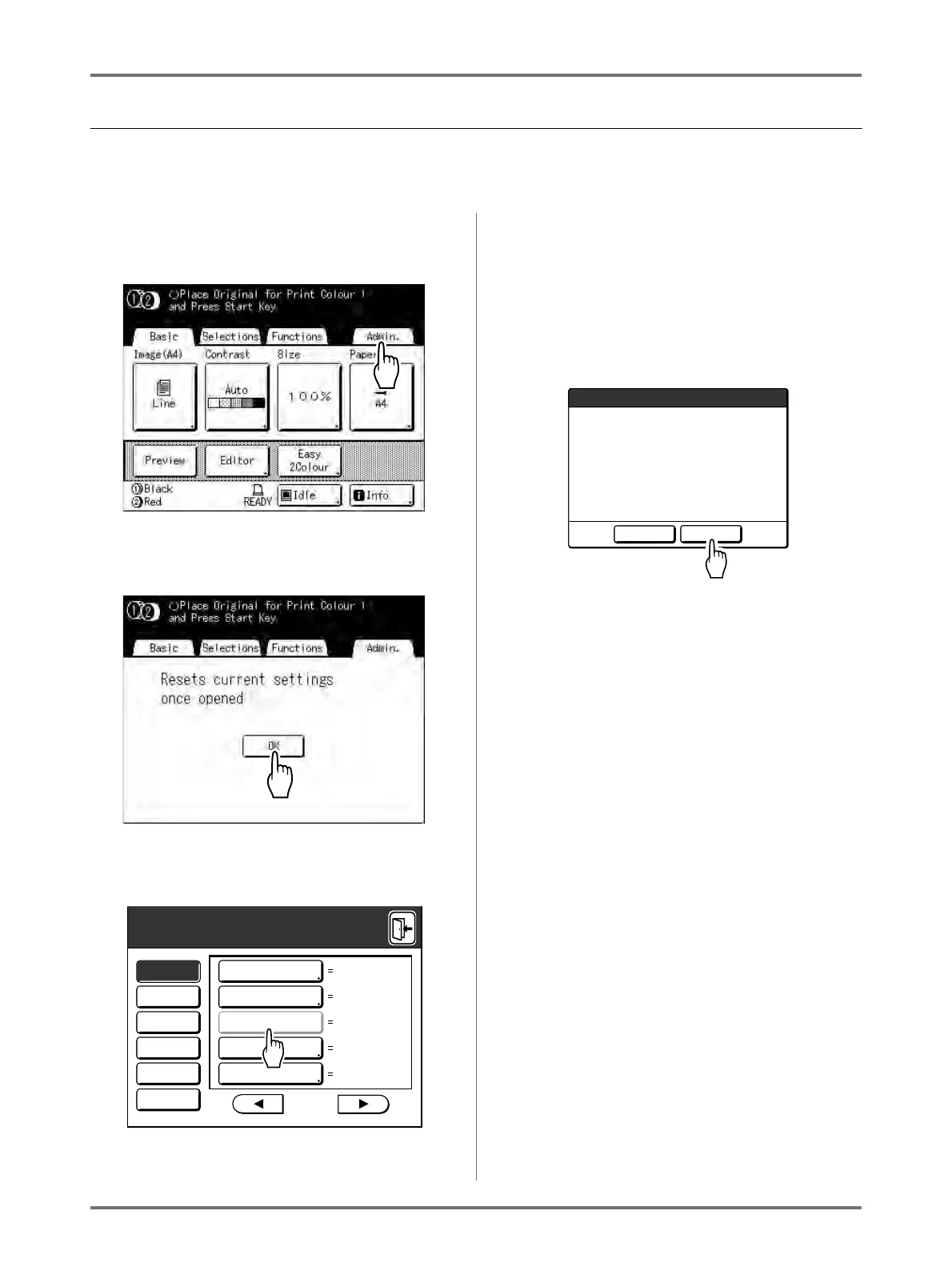
1
Touch [Admin.] on the Basic Screen
for each mode.
2
Touch [OK].
3
Touch [Protect].
“Protect” is turned ON and the button is greyed-
out.
Note:
• If “Protect” is ON, “Energy Saving Mode” (Auto
Sleep) is activated automatically.
• If “Protect” is ON, [Renew Page] is greyed-out
with no access allowed.
If “Protect” is ON:
The following screen is displayed after printing.
Touch [OK] or [Cancel].
[OK]: Discards the master remaining on the
Print Drum.
[Cancel]: Choose this when you do not wish to
discard the master or wish to print further cop-
ies.
12hour
OFF
ON
P
.7/10
OFF
5mnAll
Display
Default
System
Link Mode
Editor
Energy Saving Mode
Power-OFF Schedule
Protect
Auto Idling
Auto Page Renewal
Admin.
Discard Current Master
-- Protect --
Cancel
OK
F95-008



 To Next Page