Functions for Master-Making
Adjusting the Side Margins of the Master [Side Margin]
106
Adjusting the Side Margins of the Master
[Side Margin]
If you are using the ADF unit to print multiple originals and need to move the left and right margins to make a master,
use “Side Margin” for one simple operation to offset the margins for all the originals (up to 10 mm left/right).
You can also use “Side Margin” to create side margins when printing an original from the platen glass.
Important!:
• “Side Margin” is a function intended to adjust the location of the master.
If there are no white margins on the left or right of the original, a margin will not be created (the function is not
intended to add and print a margin).
Note:
• This function cannot be used with the following functions.
– Multi-Up Print
–2 Up
• If “Side Margin” and the print location controls on the control panels are used together, the final print location of the
original can be adjusted up to 20 mm.
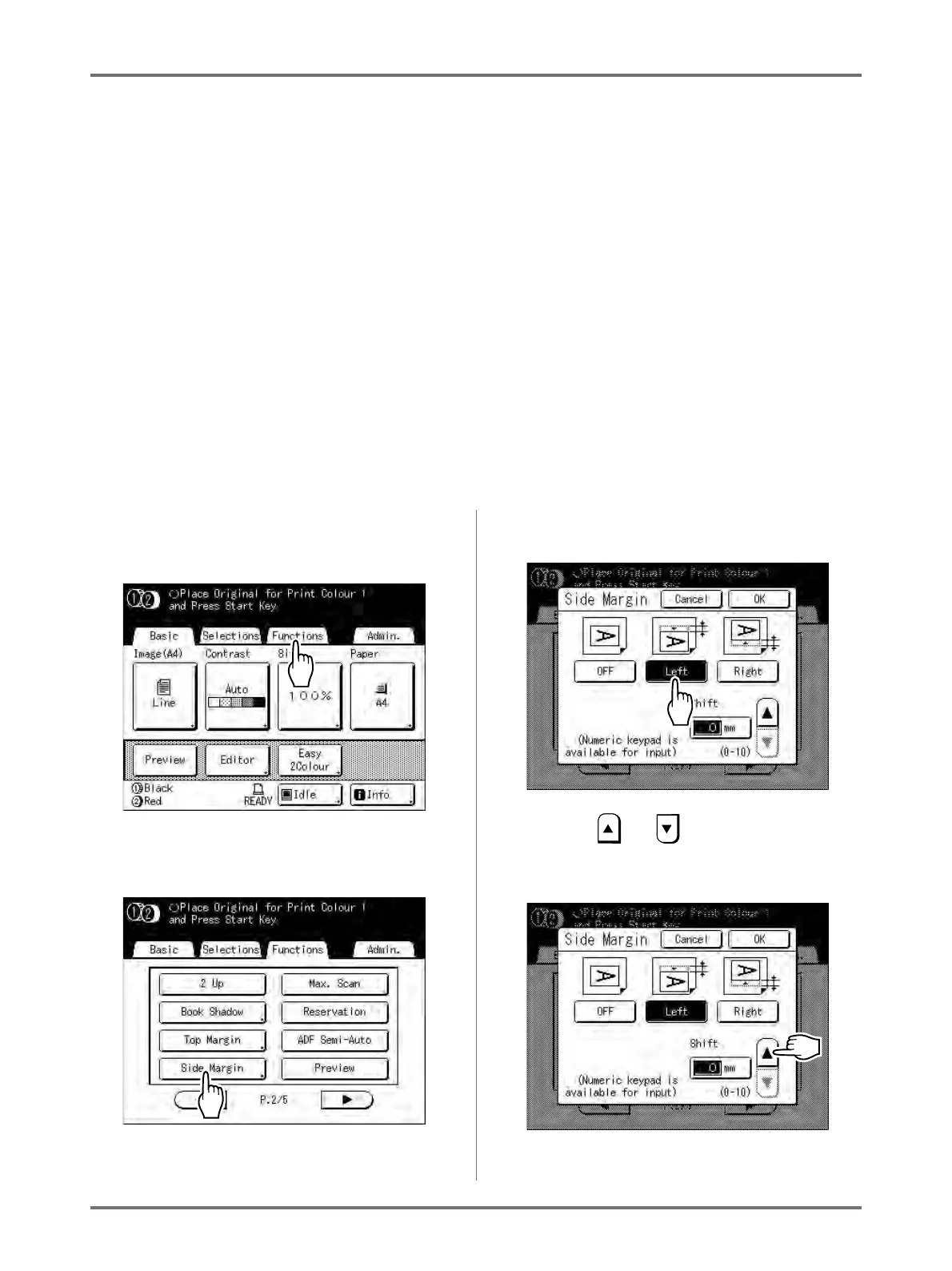
1
Touch [Functions] on the Master
Making Basic Screen.
2
Touch [Side Margin].
3
Touch [Left] or [Right] to adjust.
4
Touch or to specify the shift
distance.
You can set from 0 to 10 mm.



 To Next Page