Advanced Features
Showing Usage Status [Digital Copy Count]
169
Showing Usage Status
[Digital Copy Count]
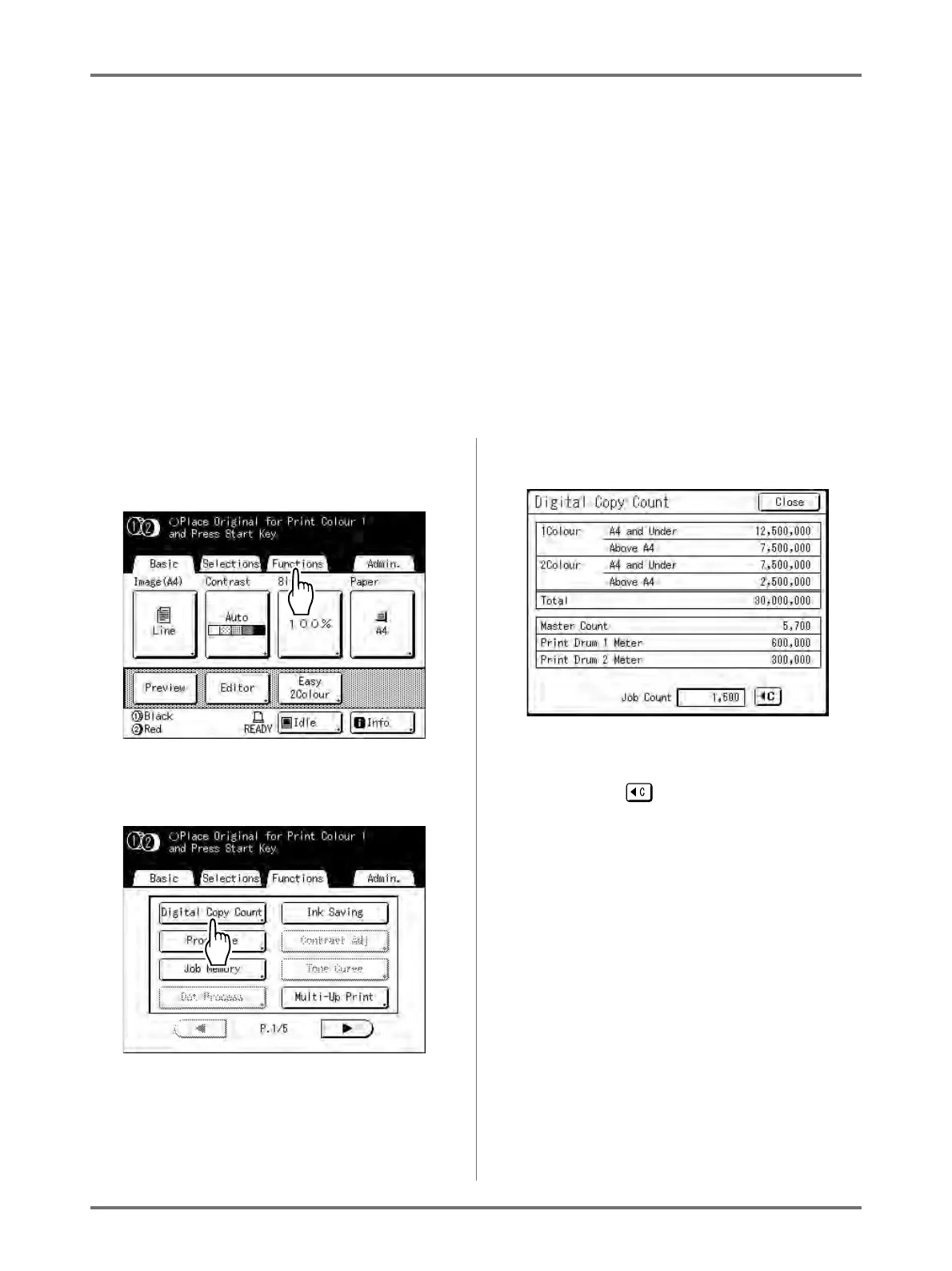
The machine can record and display the following information:
A4 and Under: Total number of copies A4-sized and smaller that have been printed.
Above A4: Total number of copies larger than A4 that have been printed.
Master Count: The total number of masters made by the machine.
Print Drum 1 (2) Meter: Total number of copies that have been printed with the current drum.
Job Count: Start and stop as needed.
For example, to keep track of the number of prints made in a day, set “Job Count” to 0 in the morning, and check the
counter at the end of the work day to get the count.
Note:
• When using more than one Print Drum, install the Print Drum for which you need information before displaying the
Digital Copy Count screen.
1
Touch [Functions] on the Master
Making Basic Screen.
2
Touch [Digital Copy Count].
3
Review counts.
Note:
• Using the “Job Count”
1) Touch to set the counter to 0.
2) Touch [Close] to close the Digital Copy
Count screen. Operate the machine as nor-
mal.
3) To display and review the Job Count, follow
steps 1 and 2.
4
Touch [Close] to close the window.
Returns to the Functions screen.



 To Next Page