Storage and Scan Modes (Option)
Overlaying Storage Data onto a 1-Colour Print Job [Overlay]
208
Overlaying Storage Data onto a 1-Colour
Print Job
[Overlay]
When 1-Colour printing, you can overlay stored data onto a hard-copy original.
For example, this function can be used to overlay a stamp over multiple originals indicating “Sample”.
This function cannot be used with the following functions.
• Ink Saving
• Top Margin
• Side Margin
• Storage Memory (“Overlay” images cannot be stored.)
• When sending original data from the computer
1
Place an original and load paper.
Place the original on Platen Glass or in ADF unit
(option).
See the “Basic Operations” chapter for informa-
tion on placing the original.
2
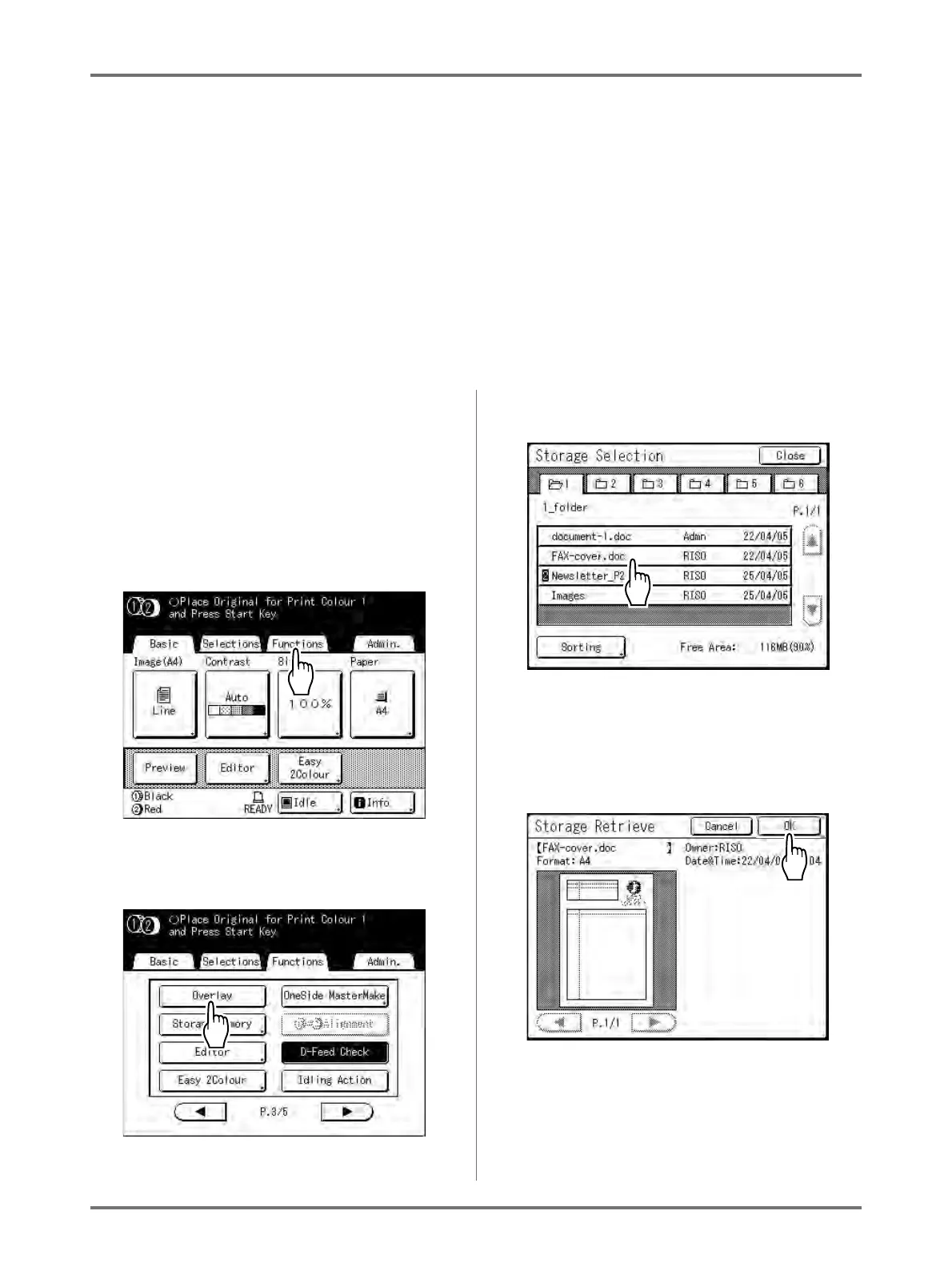
Touch [Functions] on the Master
Making Basic Screen.
3
Touch [Overlay].
The Storage Selection screen appears.
4
Select the storage data to overlay.
The Storage Retrieve screen appears.
5
Confirm the storage data and touch
[Retrieve].
Note:
• If the storage data is separated into two colours,
specify the colour (drum) of the side you want to
print.



 To Next Page