Storage and Scan Modes (Option)
Converting Hard-copy to Stored Data (Scan Mode)
201
Setting Data Information
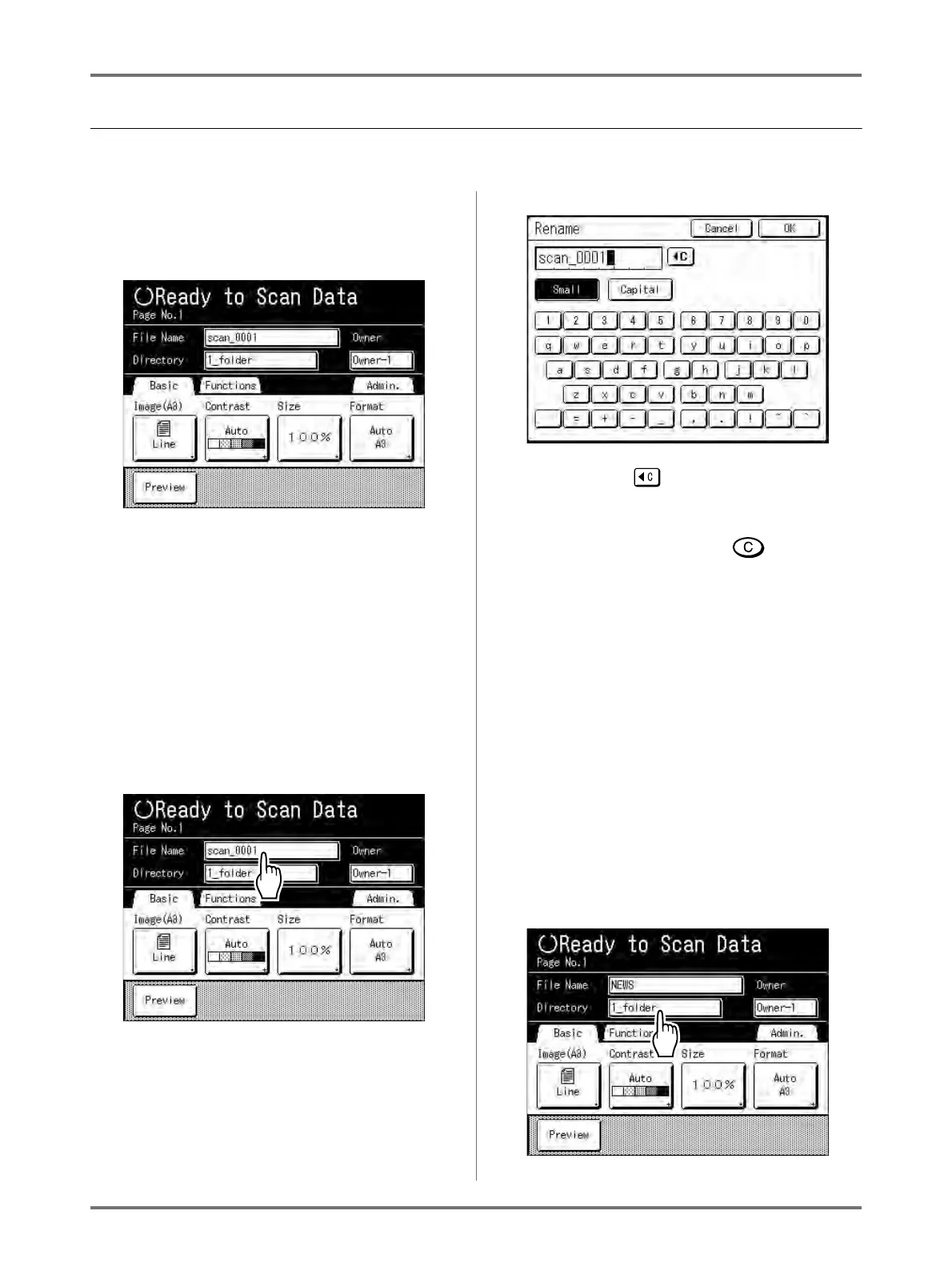
Settings for the data to be scanned and stored are configured on the Scan Basic Screen.
1
Select a scan mode.
See )p.196 for information about selecting a
scan mode.
The data name, save location and owner name
are automatically allocated when scan mode is
started, but you can change this preset informa-
tion if needed.
Note:
• Default settings for the “Directory” folder can be
changed in “Admin.”.
()p.174)
2
Enter a data name.
1) Touch the data name input box.
The Rename screen appears.
2) Touch the button to delete the current
name.
Note:
• You can also press the key to delete.
3) Touch the text button and enter the data
name one character at a time.
Touch the Text Type button to change the
display, and look for the text you want to
enter.
()p.142)
4) Touch [OK].
The data name is confirmed and the screen
returns to the Scan Basic Screen.
3
Specifying a Save Location
Note:
• If the machine is equipped with the optional
RISO Controller PS7R, you cannot specify
where to store the data.
1) Touch the save location input box.



 To Next Page