Advanced Features
Extending the Reserve Period [Reservation]
159
Extending the Reserve Period [Reservation]
This function is useful when the machine is connected to a computer. When the machine is inactive for a certain
period of time, it determines that the current job is completed, even if the actual printing is still under way.
If another person accidentally initiates another job from the computer, this will cause a new master to be made, dis-
carding the current one.
By extending “Reserve Period”, such interruption can be prevented. We recommend that you activate the “Reserva-
tion” setting when temporarily pausing a job to prevent interruption.
Note:
• Select from 5, 10, or 30 minutes as the “Reservation” period on the Admin. screen. The factory default is 5 minutes.
)p.176
• The following operations do not count towards reservation period.
– When the machine is operating (making a master, printing, confidential action, idling, etc.)
– When the Job Separator (option) is operating
– When Control Panel buttons are being entered
• Auto Sleep and Auto Power-OFF will be disabled during the reservation period.
Auto Sleep/Auto Power-OFF: timer re-activates after the reservation period is up.
Power-OFF Schedule: Will not shut off until next day on time.
)p.176
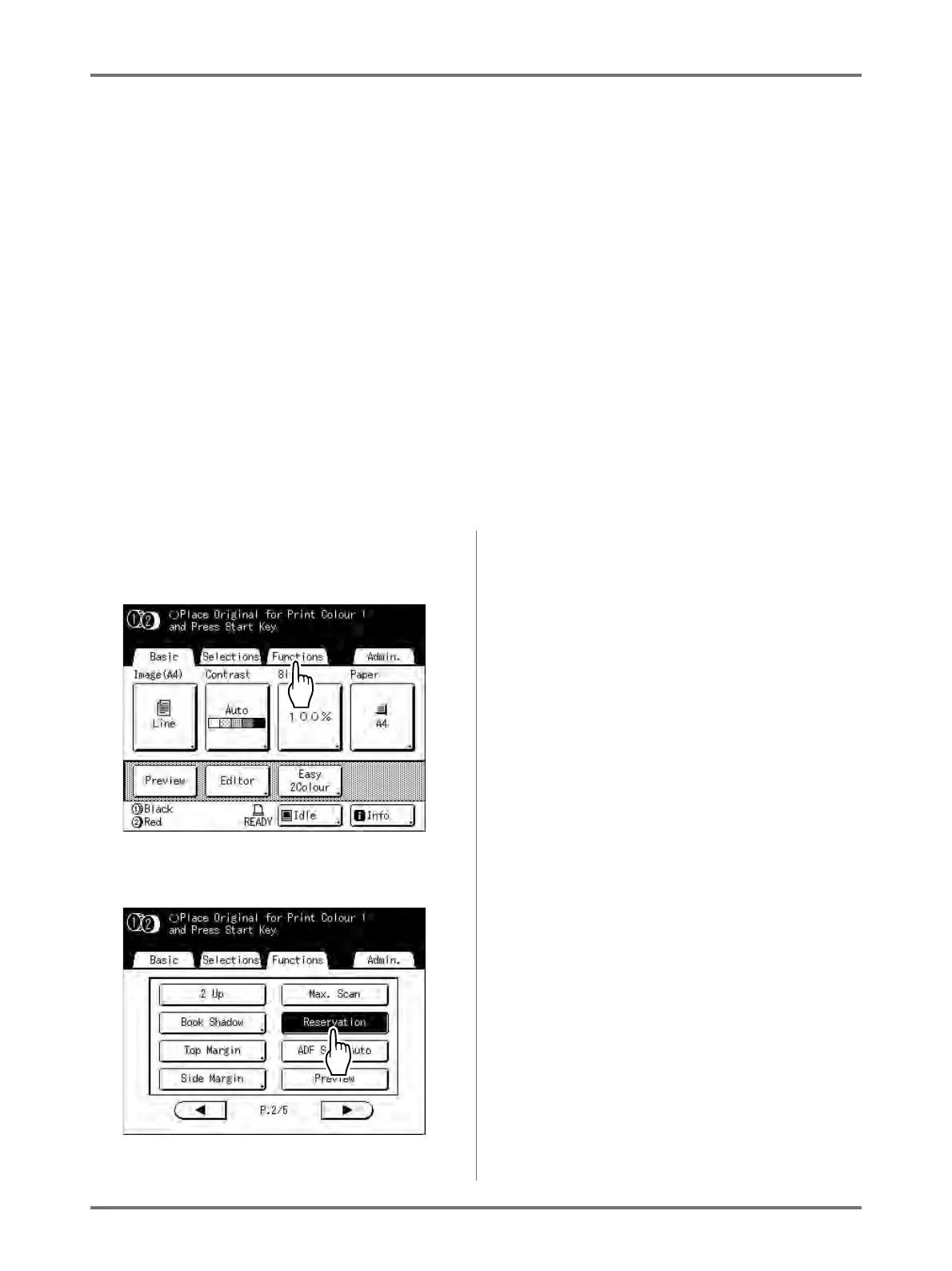
1
Touch [Functions] on the Basic
Screen.
2
Touch [Reservation].
Reservation period is extended.



 To Next Page