Functions for Master-Making
Printing Side-by-Side on One Sheet [2 Up] [Multi-Up Print]
93
Operation for Multi-Up Printing
1
Select a colour mode.
Select 1-Colour or 2-Colour print.
Note:
•See )p.25 for how to select a colour mode.
2
Place an original and load paper.
• When 2-Colour printing with 2 originals )p.40
• When printing with 1 colour )p.59
Note:
• Pay attention to the orientation of the original.
)p.88
3
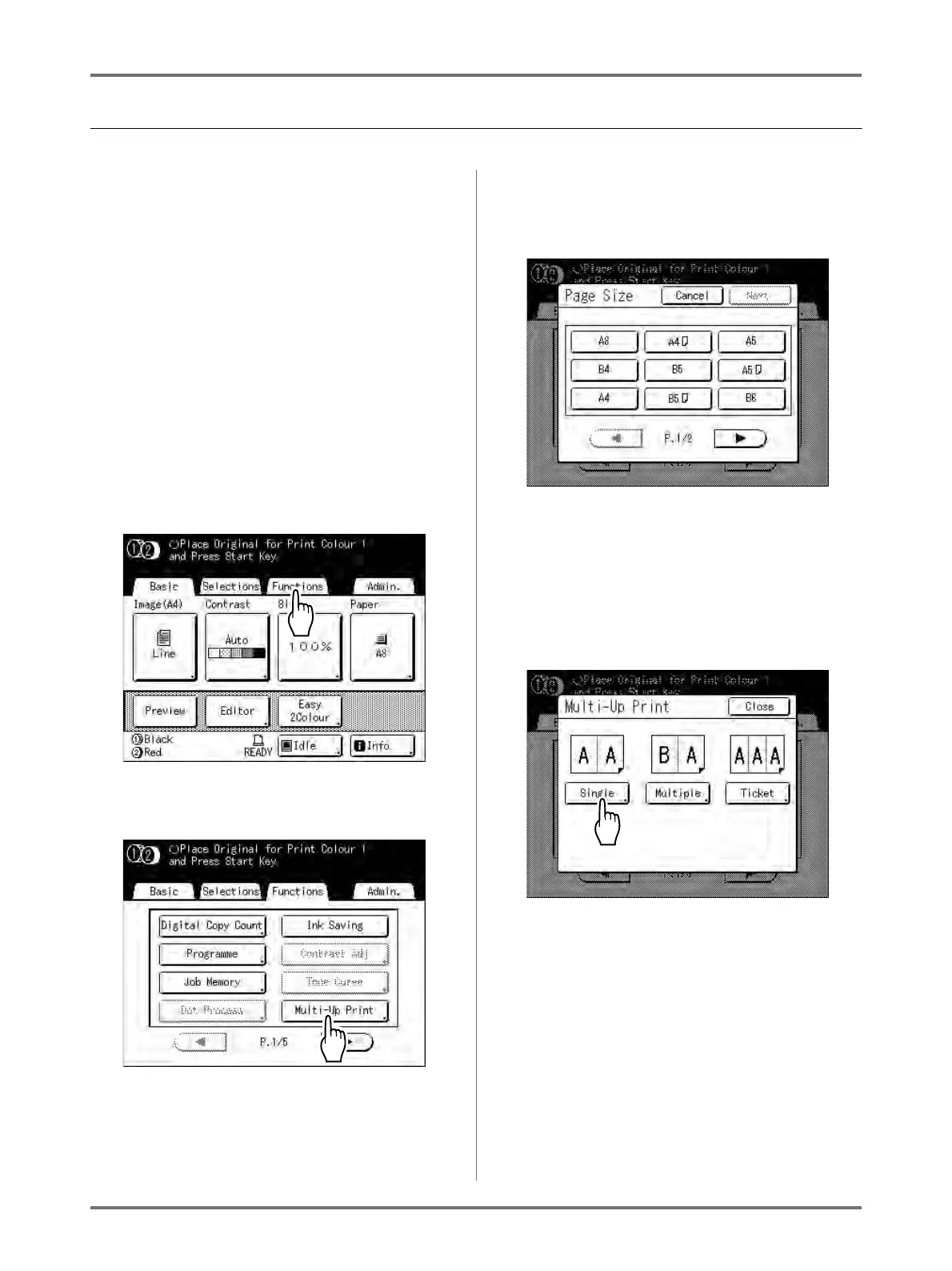
Touch [Functions] on the Master
Making Basic Screen.
4
Touch [Multi-Up Print].
5
Select the Page Size to use.
Touch the Page Size same as the original and
touch [Next].
Reproduction Size is set automatically and Multi-
Up Print screen is displayed.
6
Touch [Single] for Single-Original,
touch [Multiple] for Multiple-Origi-
nal.
Except for the original placement method, opera-
tions for “Single-Original” and “Multiple-Original”
are basically the same. This example is for “Sin-
gle-Original”.



 To Next Page