Functions for Master-Making
Printing Side-by-Side on One Sheet [2 Up] [Multi-Up Print]
94
7
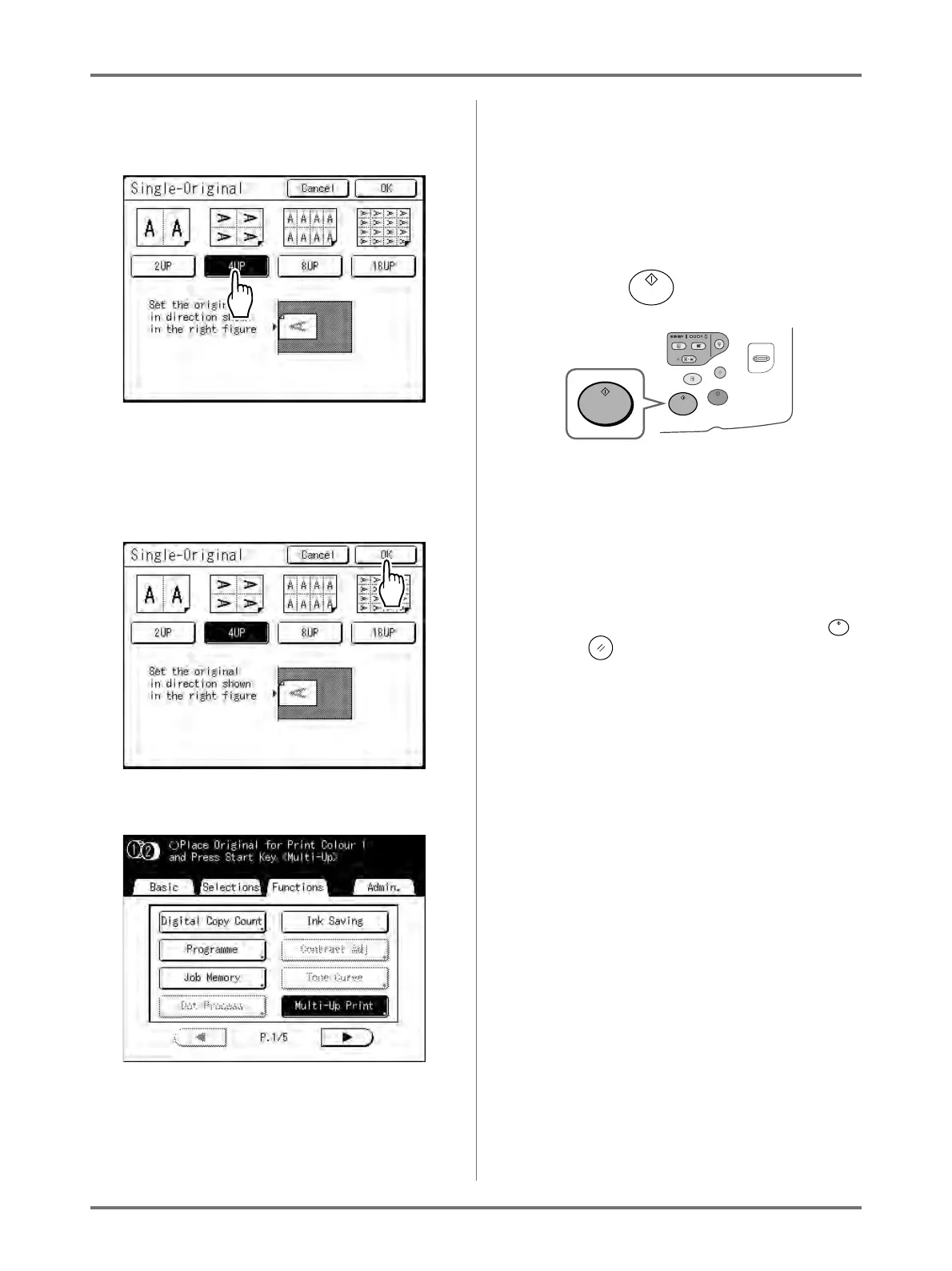
Touch the button of the number of
images to use.
To cancel the “Multi-Up Print” settings, return to
the previous screen and touch [Cancel].
8
Touch [OK].
The following screen appears.
Returns to the Functions screen. Multi-Up Print
setting is updated.
An error will occur in the following instances.
Following the instructions on the screen.
• An original is not set
• Paper is not set
• The correct size paper is not set
9
Make necessary settings.
Make various settings as needed.
10
Press the key.
Starts scanning of the original.
After this, please follow the same operations for
normally making a master for 1-Colour and 2-Col-
our mode.
Important!:
• After displaying the message, “Place Another
Original and Press Start Key To Cancel, Press
Stop Key” the machine waits for the next original
to be loaded. Set the next original and press .
Press to cancel the “Multi-Up Print” mode.
Note:
• When using “Multiple-Original” mode, in the
case that the actual number of pages in the
document is less than the number of pages
specified in the mode settings, set an equiva-
lent number of blank pages in the machine to
make up the specified number.
)p.88 “Original Orientation and Print Results”



 To Next Page