Storage and Scan Modes (Option)
Converting Hard-copy to Stored Data (Scan Mode)
198
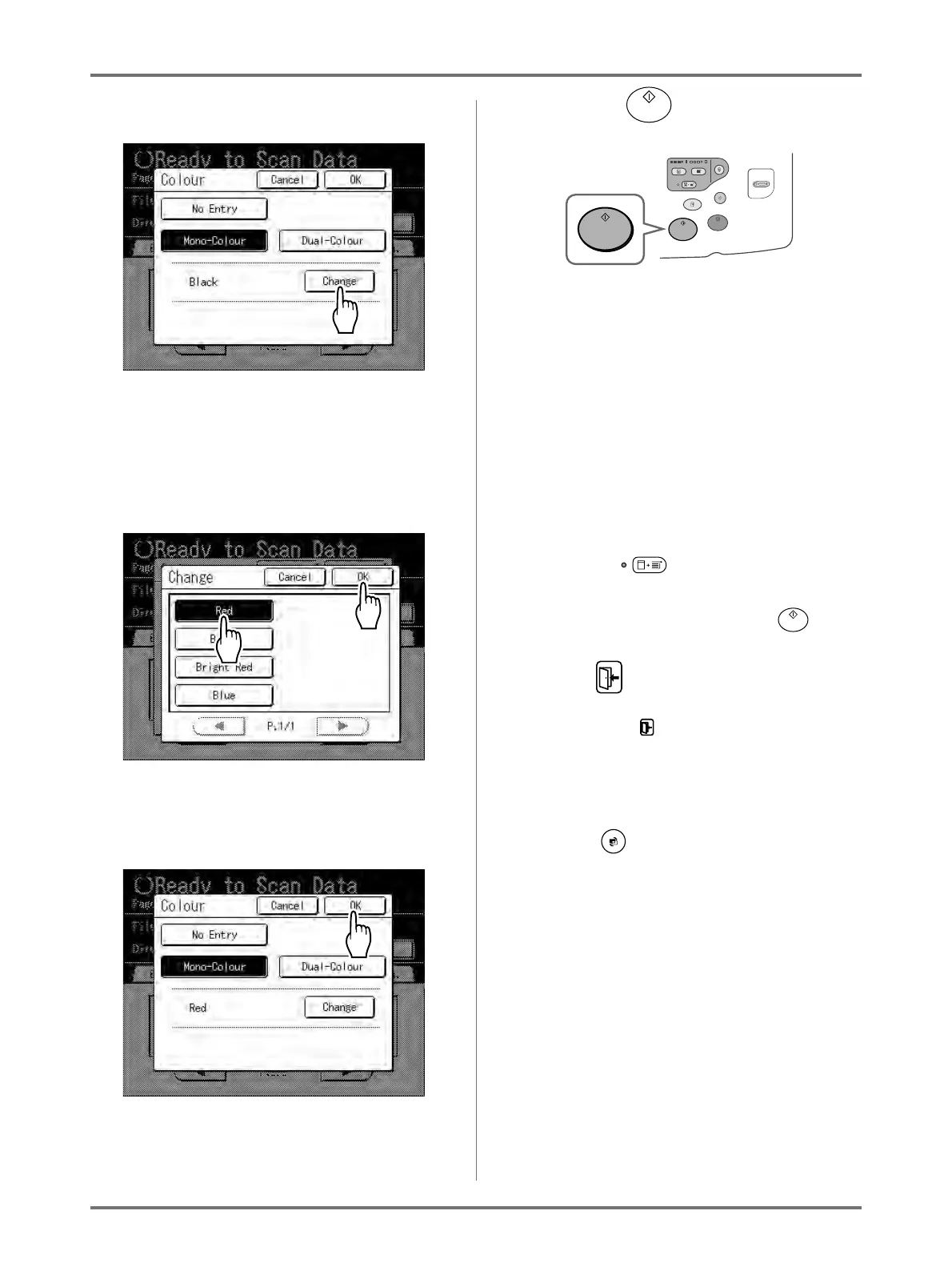
4) Touch [Change].
5) Touch the button of the colour to set and
then touch [OK].
Note:
• The previously set colour name displays
on the Change screen.
Returns to the Colour screen. The Colour
setting is updated.
6) Touch [OK].
5
Press the key.
The scan starts.
Note:
• After scanning the original, a preview shows on
the display if “Preview” is set.
6
Repeat steps 2, 4 and 5 if the original
has multiple pages.
Note:
• If multiple originals are combined on the ADF
unit (option) and “Auto Process” is set to ON, all
originals will be scanned using the same set-
tings.
Check the key indicator to determine if
“Auto Process” is ON or OFF (illuminated indi-
cates ON).
If “Auto Process” is OFF, press the key for
each original.
7
Touch .
Once the original to be saved as one set of data is
scanned, touch .
A confirmation screen appears.
8
Touch [Yes].
The data is saved.
Press the key to exit scan mode.



 To Next Page