Troubleshooting
When a Message Displays
263
T00-000:Service Call Error (in alphabetical order)
A00-000:Paper Jam Errors (in alphabetical order)
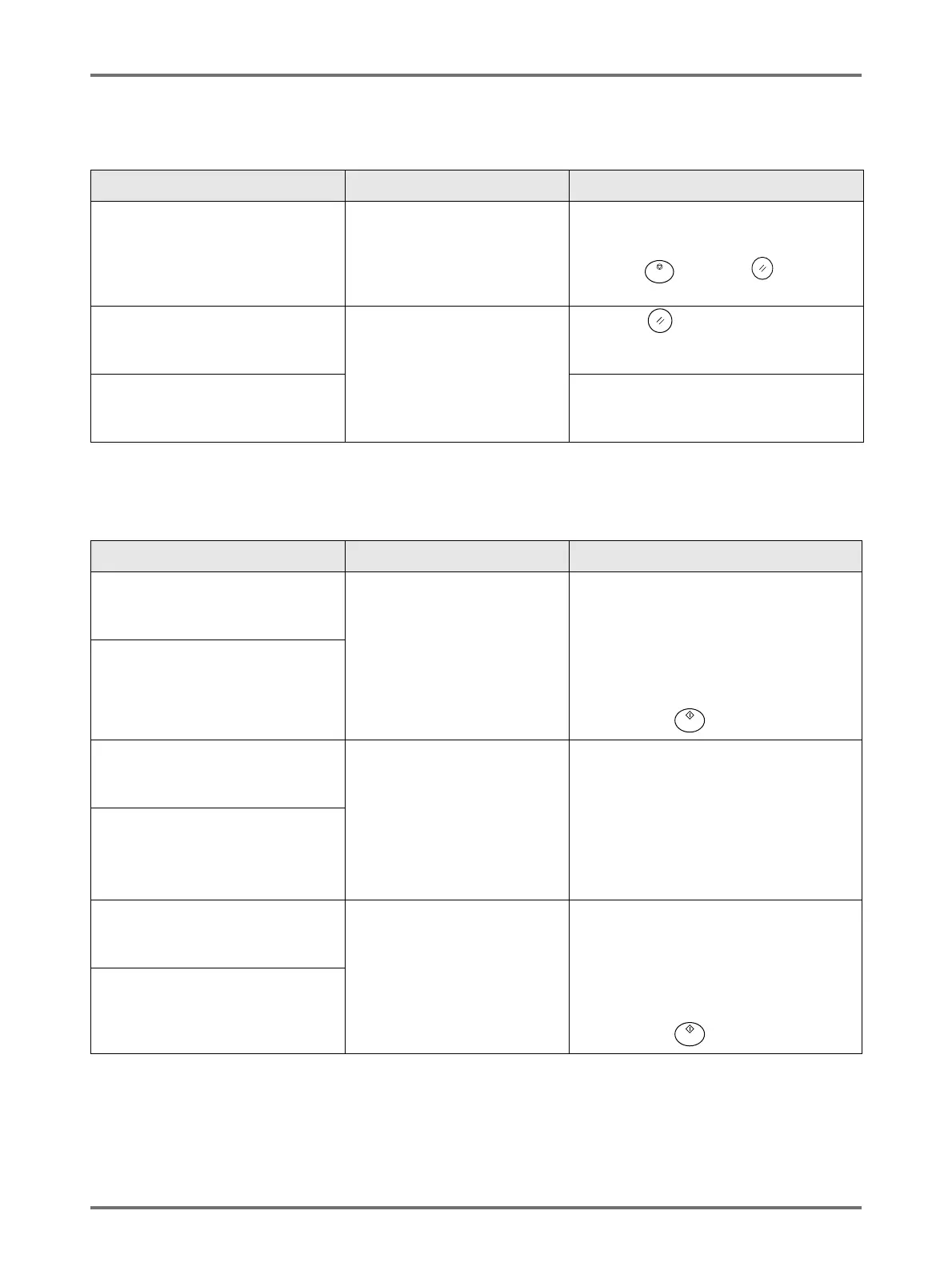
Message Possible Cause Action
!!Battery Replacement!!
Call Service
The battery is low or depleted. Contact your dealer (or authorised service
representative) and have the battery
replaced.
Press the key or the key to clear
the error message display.
!!System Error!!
Press Reset Key
If Recovery has Failed, Call Service
A system error has occurred. Press the key.
If the problem persists, contact your dealer
(or authorised service representative).
!!System Error!!
Turn Main Power SW OFF Then ON
If Recovery has Failed, Call Service
Shut off power, then restart.
If the problem persists, contact your dealer
(or authorised service representative).
Message Possible Cause Action
Master Disposal Error
Pull Out Print Drum 1 and
Discard Master
The master was not properly
discarded.
1) Pull out the Print Drum and remove
the master from the drum.
If a master is not wrapped around the
drum, check the disposal unit and
remove the master.
)p.250
2) Return the Print Drum in place.
3) Press the key.
Master Disposal Error
Pull Out Print Drum 2 and
Discard Master
Master Jammed in Disposal Unit
Pull Out Master Disposal Box 1 and
Remove Jammed Master
The master is jammed in the
Master Disposal Unit.
Pull out the Master Disposal Box and
remove the jammed master.
If the masters are difficult to remove, pull
out the drum and then remove.
)p.248
)p.250
If the error persists, contact your dealer (or
authorised service representative).
Master Jammed in Disposal Unit
Pull Out Master Disposal Box 2 and
Remove Jammed Master
Master Loading Error
Pull Out Print Drum 1 and
Discard Master
The master did not properly
attach to the Print Drum.
1) Pull out the Print Drum and remove
the master from the drum.
)p.250
2) Return the Print Drum in place.
3) Pull out the Master Making Unit and
reinstall the master.
4) Press the key.
Master Loading Error
Pull Out Print Drum 2 and
Discard Master



 To Next Page