Troubleshooting
When a Message Displays
269
J00-000:Paper Jam Error
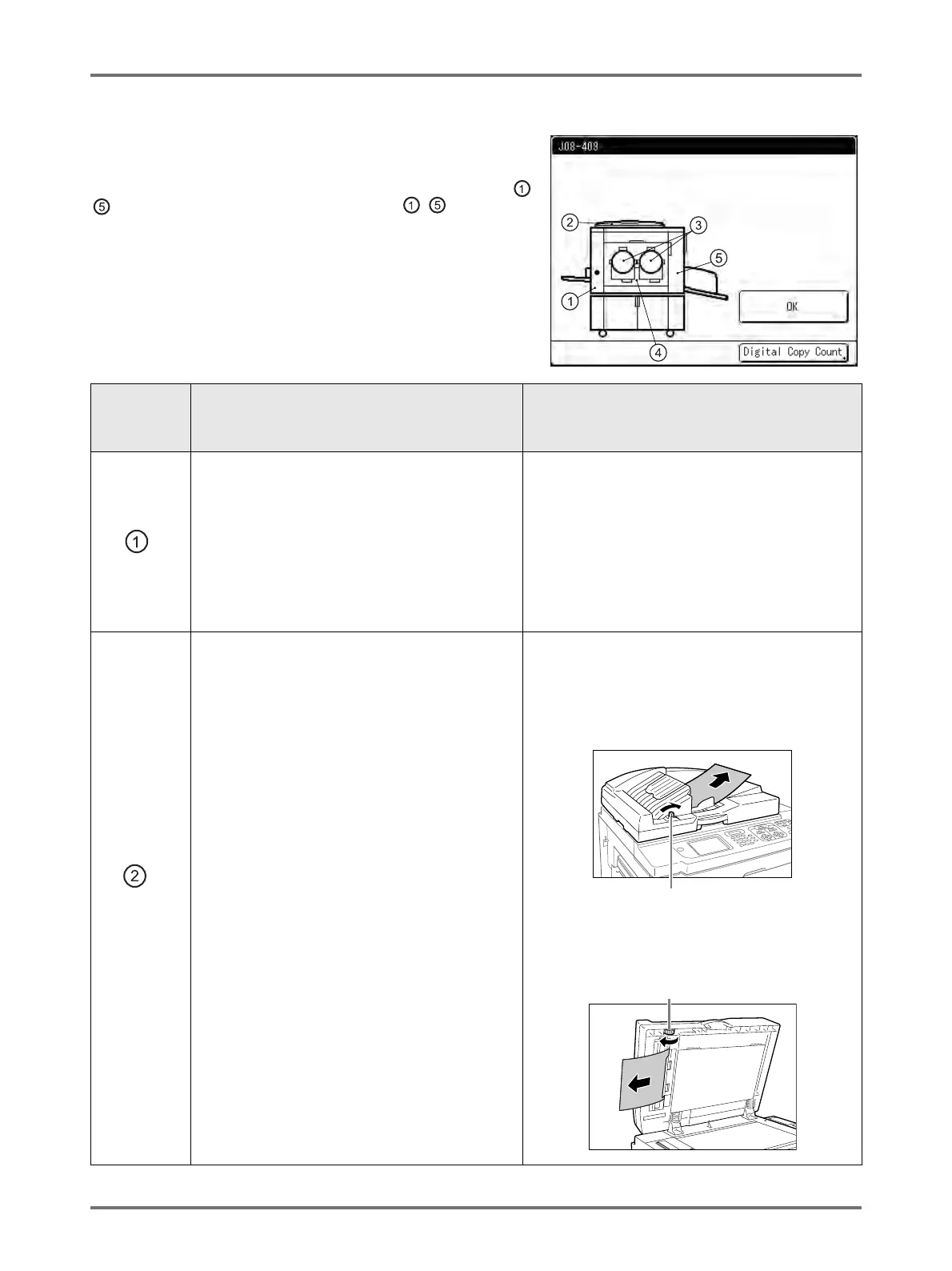
Displays when the original document or printing paper is jammed
inside the machine or the ADF unit (option).
The location of the paper jam is indicated by the flashing icon ( -
) in the illustration. Refer to the table below ( - ) and resolve
the issue as indicated.
Note:
• Use appropriate printing paper to prevent paper jams. Also select
appropriate original document suitable for the ADF unit.
)p.14
)p.16
Area
Indicated/
Blinking
Possible Cause Action
Paper is jammed in the Paper Feed area.
1) Check the paper feed side and remove the
jammed paper.
2) Touch [OK].
Note:
• When using special paper, adjust the
Paper Feed Pressure Adjustment Lever
according to the paper characteristics.
)p.33
The original is jammed in the ADF unit (option).
For Auto Document Feeder AF-VI
Removing in the document insertion
direction
Pull the ADF Original Release Lever to the
right, and pull out the original.
Removing in the document ejection
direction
Raise Platen Cover, turn the ADF Original
Release Dial and remove the original.
Paper Jam
Remove Paper in Indicated Areas
and Press [OK] Button
ADF Original Release Lever
Original Release Dial



 To Next Page