Vista 5 M3 Digital Mixing System
4-8 GC Operation
Document generated: 28.08.13
SW V4.9
4.2.1 The Toolbar
The toolbar contains a number of short-cut icons for the Vista’s most impor-
tant functions.
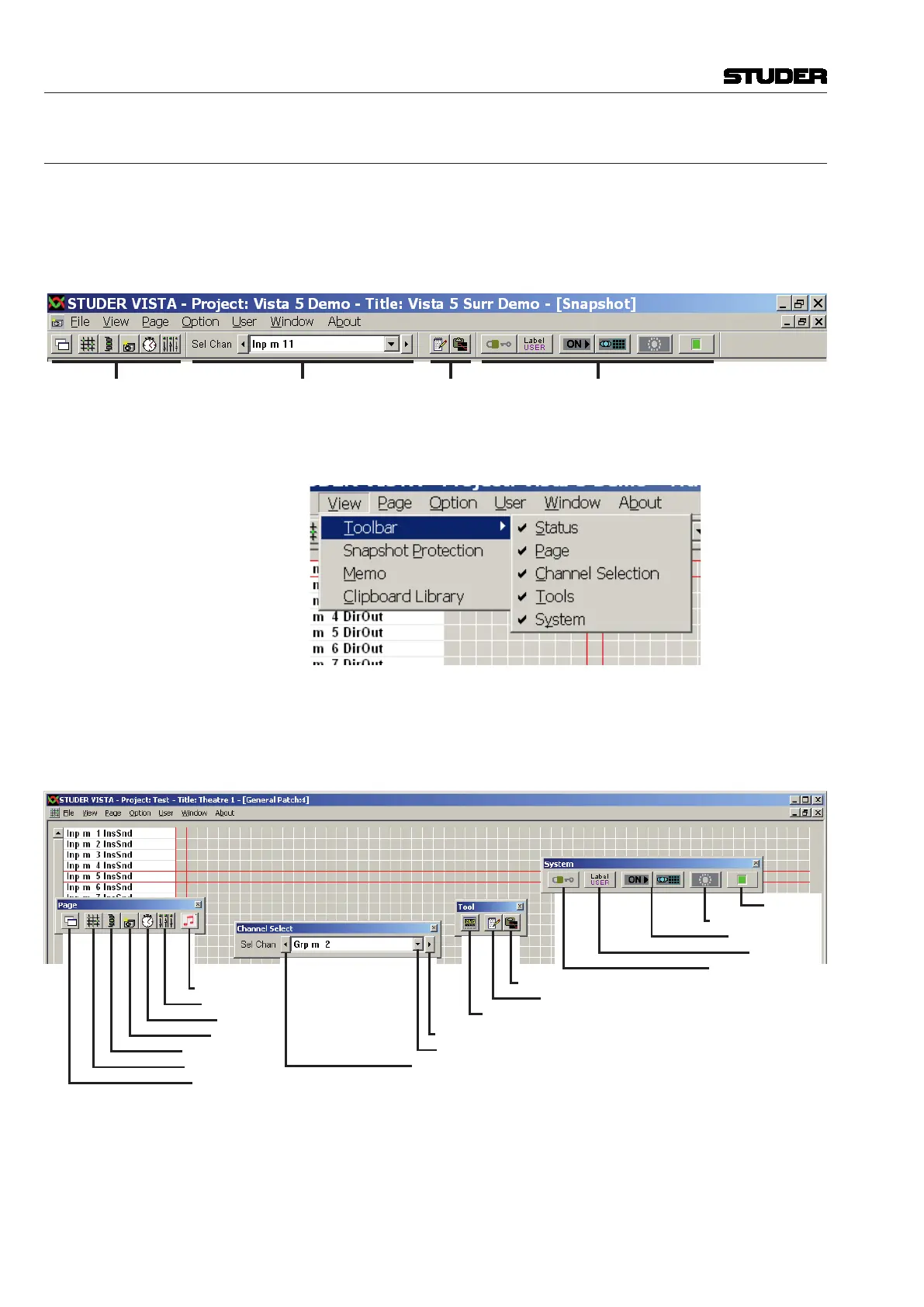
There are four individual toolbar parts: page selection, channel selection,
tools, and system functions.
Page Selection Channel Selection Tools System Functions
Each of the parts can be switched on and off individually. The simplest way
to do so is the View menu, item Toolbar:
This menu item also contains the Status bar (refer to chapter 4.2.2). The
toolbar elements can be arranged in one continuous bar – as shown in the
illustration above – or positioned individually, using conventional drag-and-
drop technique:
Jingle Player
Strip Setup
Cue List
Snapshot
Channel Patch
General Patch
New Window
Select: Next Channel
Select: One Channel
Select: Previous Channel
EQ/Dyn Library
Title Memo
TC/Gen./Machine Ctrl
Surveyor
Offline Conference
Snapshot Filter
Label Mode
Protect / Unprotect
This arrangement may be saved in a ‘preferences’ file.
The icons represent Vista system functions as described in the illustration;
individual functions will be explained later in this chapter.



 To Next Page