Vista 5 M3 Digital Mixing System
4-108 GC Operation
Document generated: 28.08.13
SW V4.9
4.6.4.3 Option: N–1 Assign(ment)
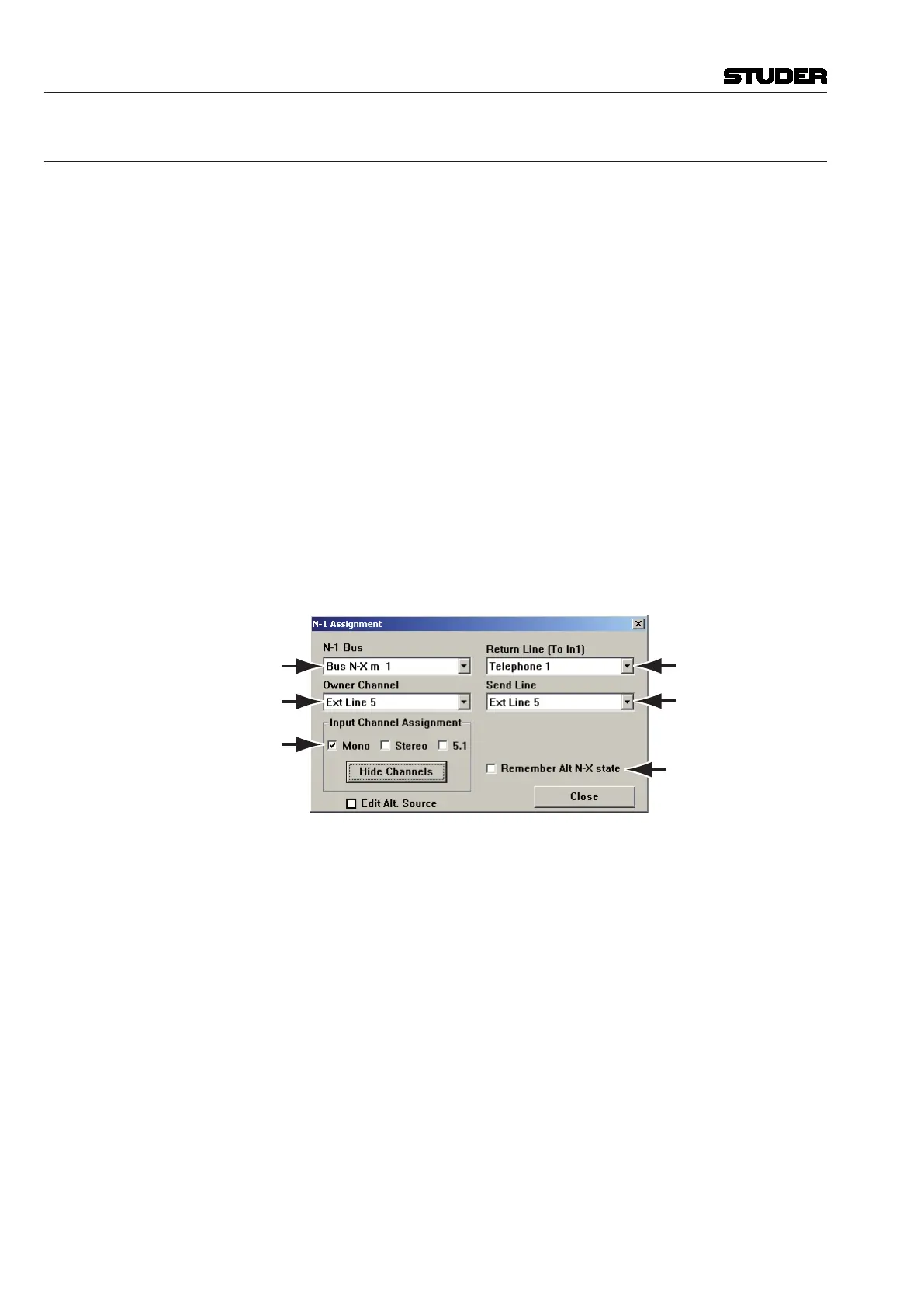
The N–1/mix-minus Assignment window allows setup and configuration of
the N–1/CleanFeed/mix-minus structure.
The principle of N–1 is summing; i.e. all desired channels (N) get summed
to a bus except the ‘minus one’ (–1).
The N–1/mix-minus bus is a special bus that sums the contributions of
channels other than the Bus Owner of the Channel, thus performing the
N–1 summation. The number of Mono and/or Stereo N–1 busses depends on
the currently loaded DSP configuration.
The Bus Owner channel is the channel which:
• DoesnotcontributetotheN–1bus
• ContainstheN–1busoutputlevelandTalkbackcontrolsonthephysical
channel strip assigned to it
• HasanN–1indicationontheassignedchannelstrip.
The setup and assignment of the N–1 is done in three steps:
1 A Bus Owner (–1 channel) must be assigned to an N–1 bus.
2 The N–1 Send Line (Physical Output) and Return Line (Physical Input)
must be patched in the General Patch
3 The channels which are to be sent to the –1 must be assigned to the bus.
The N–1 Assignment window allows fast setup of this process.
Bus Selection
Assignment of
Channels to Bus
Bus Owner Selection
Return Input
Selection
Send Output
Selection
Alt N–X Option
Selection
Setup is as follows:
1 First choose the N–1 bus to be used with the drop-down menu, and the
Bus Owner Channel which will be the –1 channel.
2 Use the drop-down menus to select the Return Line (Physical Input) and
Send Line (Physical Output) to which the Outside Source (–1) is connected
to the console. This is essentially making cross-points in the General Patch
without having to go to the General Patch page. Selections made using
these drop-down menus will change any previous patching of the Outside
Source. Please note that the label type shown is taken from the General
Patch.
3 The two Channel Assignment check boxes allow fast allocation of all Input
Channels to the chosen N–1 bus. If only Mono inputs are chosen, then all
Mono input channels in the system (except the Bus Owner channel) are
routed to the chosen bus. If specific channels need to be routed instead of
all Mono or Stereo input channels, the Show Channels button should be
clicked. This will extend the window as shown below, to allow individual
assignment of the channels to the chosen N–1 bus within the currently
loaded DSP configuration.



 To Next Page