Vista 5 M3 Digital Mixing System
AutoTouchPlus 5-49
Document generated: 28.08.13
SW V4.9
when a new Control Mode is enabled. In other words, only the controls
that have been preselected will enter the new mode and all others change
to READ.
• <WhenLoadingaPreset>:RadiobuttonsinthePanelPresetOptionspage
allow the selection of one of the following options to take effect when a
Panel Preset is loaded:
- <Maintain Object Modes>: Loading a Panel Preset will not change
the control modes of any of the controls in the console. Current modes
will be retained.
- <Set All to Read>: Loading a Panel Preset will set all controls to
READ.
- <Apply Stored Control Mode>: The Control Modes and preselectors
stored within the recalled Preset will be applied.
5.7.5.2 Mode Entry
Local Control Mode Entry Refer to chapter 5.7.5.2
Global Control Mode Entry Global Control Mode entry is made as described above. However it should
be noted that the Global CONTROL MODES Activators are located in the
CONTROL MODES section of the ACU window.
5.7.6 Control Mode Indicators
In automation mode, the channel strips and Vistonics indicators hold addi-
tional indications for detailed display of the current status.
This chapter shows all possible indications of automation status and explains
their meaning.
Record indicators integrated within the channel strip’s recording keys:
MUTE Desk Key Current and replay value of the channel mute. If the current value is different
from the one in the last mix pass, this key indicates the value within the last
mix pass, while the MUTE LED indicates the current value.
The MUTE LED is also used for mute indication if ‘solo in place’ is active.
MUTE Rec Recording of the channel mute. If half-lit: Channel mute is armed (i.e., in Trim
Enable or Write Enable mode). If fully lit: Channel mute is recording.
Pressing this key will either punch-in the current MUTE status, or punch it out
of recording.
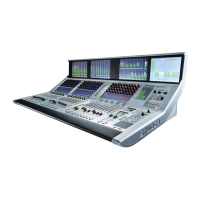
The meaning of the different Vistonics indicators is as follows:
Displayed Value The displayed value (e.g. ‘–7.6 dB’) is always the current value, except when
the control is in TRIM mode. Then it shows the offset from TRIM null point.
It is underlined whenever the control is touched (‘hold’ in automation).
Rotary Value Current and replay value of the rotary control. If the current value is different


 To Next Page