Vista 5 M3 Digital Mixing System
GC Operation 4-17
Document generated: 28.08.13
SW V4.9
4.4.2 The General Patch
The GC General Patch page can be accessed in three different ways:
• FromthePagemenu,byclickingontheappropriatemenuitem
• Usingthepageicons,byclickingontheappropriateiconinthetoolbar
• UsingtheGENERAL PATCH function key. This is the fastest way.
The General Patch is the main tool used to establish and clear audio con-
nections within the system. The name ‘Patch’ is used because it mimics the
conventional patch bay used in analog consoles. It accomplishes all the tasks
of a conventional patch bay, and much more. Patch cross-points are saved
into the snapshot/preset memories.
It utilizes an X-Y axis (or side-to-side/up-down) representation to aid viewing
and editing of existing connections or cross-points (equivalent to the location
of patch cords), and all existing Sources and Targets (equivalent to the patch-
jack pairs used in most patch bays).
The General Patch can be thought of as a number of ‘sub-patches’ whereby
single subcategories of the sources and targets can be viewed at a time.
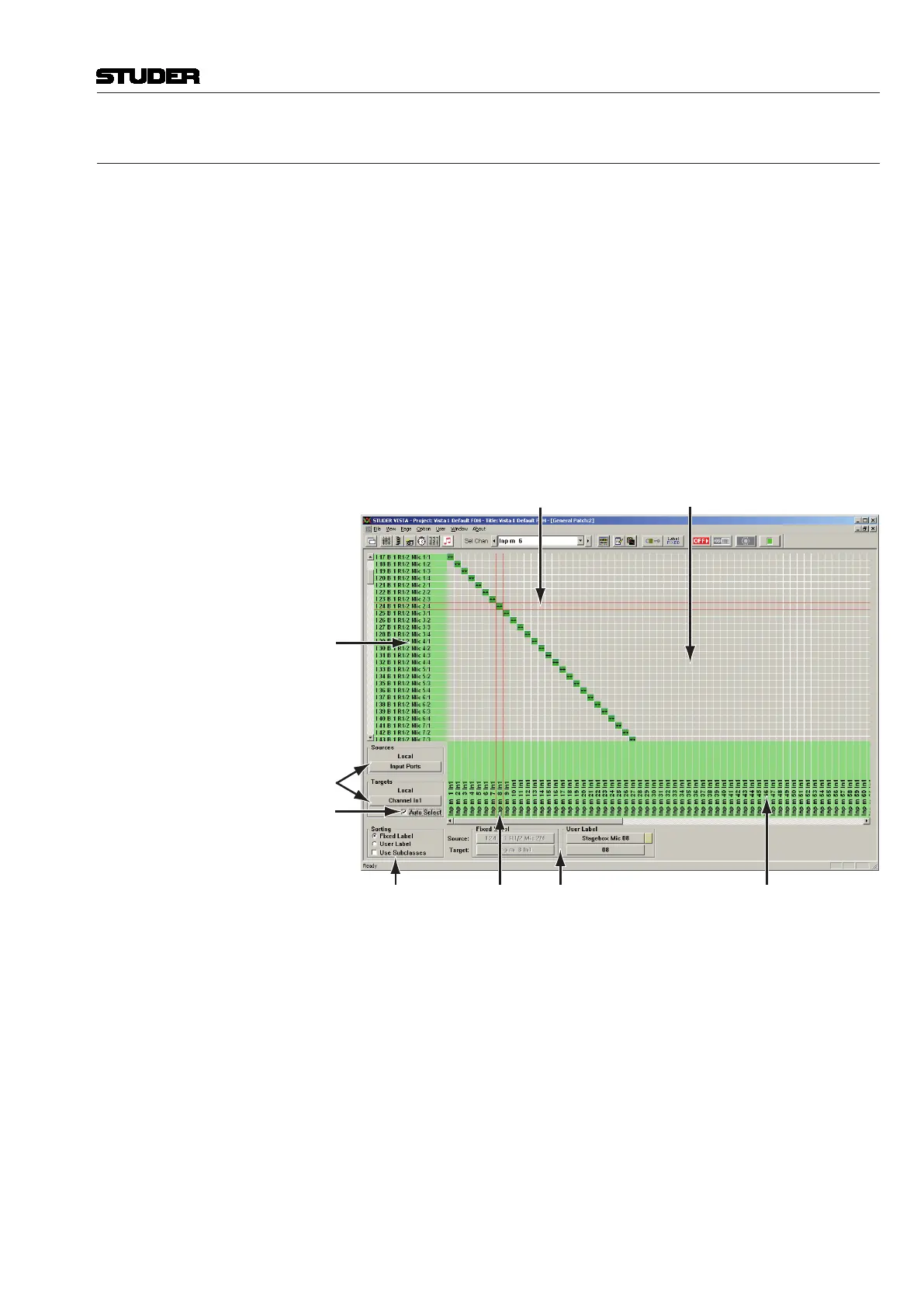
Sorting
Selections
Source Selection Bar X-Y Field
Sources List
Subcategory Drop-Down Menus
Auto Select Function
Target
Selection
Bar
Fixed / User
Label Display
Targets List
The General Patch consists of:
• ATargetslist(thelowerhorizontal,orxaxis),equivalenttothelowerjack
row in a patch bay
• ASourceslist(theleft-handverticaloryaxis),equivalenttotheupper
jack row in a patch bay
• TheX-Yfield,wherethecross-pointiconsenableinterrogationandediting
of cross-point connections
• TheSourceandTargetselectionbars
• SourceandTargetdrop-downmenusforselectionofthesubcategoryto
be viewed
• AutoSelectfunction
• ViewingselectionswhichallowsortingoftheSourcesandTargetsLists
by label type
• TheFixed/UserLabeldisplaysfortheselectedSource/Target.



 To Next Page