Vista 5 M3 Digital Mixing System
AutoTouchPlus 5-31
Document generated: 28.08.13
SW V4.9
5.5.1.4 Mix Tree Click Functions
A variety of ‘click functions’ are available within the Mix Tree. These
functions range from
Left-Click Functions • Single-clickingaMixPasswithintheMixTreewill‘mark’thatpassby
highlighting it in red. Clicking a marked pass will ‘unmark’ it and re-
move the red highlight. Only one mix at a time may be selected using this
method.
• Control-clicking(holdingtheCtrl key and single-clicking) allows individ-
ual Mix Passes anywhere within the Mix Tree to be marked or unmarked.
Any combination of passes may be marked.
• Shift-clicking(holdingtheShift key and single-clicking) two Mix Passes
allows these passes and those in-between to be marked or unmarked. The
passes must be within the same branch or root-branch of the Mix Tree.
In this way, multiple passes may be marked. More importantly, the link
history of these passes is maintained.
• Double-clickingaMixPassaddsittothetopoftheMixPassStackand
makes it the Active Pass. The Active Pass will be highlighted in green in
the Mix Tree.
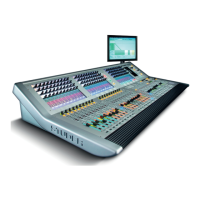
Right-Click Functions • Right-clickingwithintheMixTreewillopentheMix Tree Menu. Only
the items that do not pertain to individual passes or branches are shown.
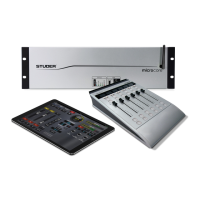
• Right-clickingaMixPasswithintheMixTreewillopentheMix Tree
Menu with all available items shown.


 To Next Page