6.4.2 Sampling Rate
The sampling rate can be set with the two according buttons on the toolbar
(48/96). It may be set anytime during configuration; however, it is wise to do
it first thing when editing or generating a new configuration.
6.4.3 Channel/Bus Page
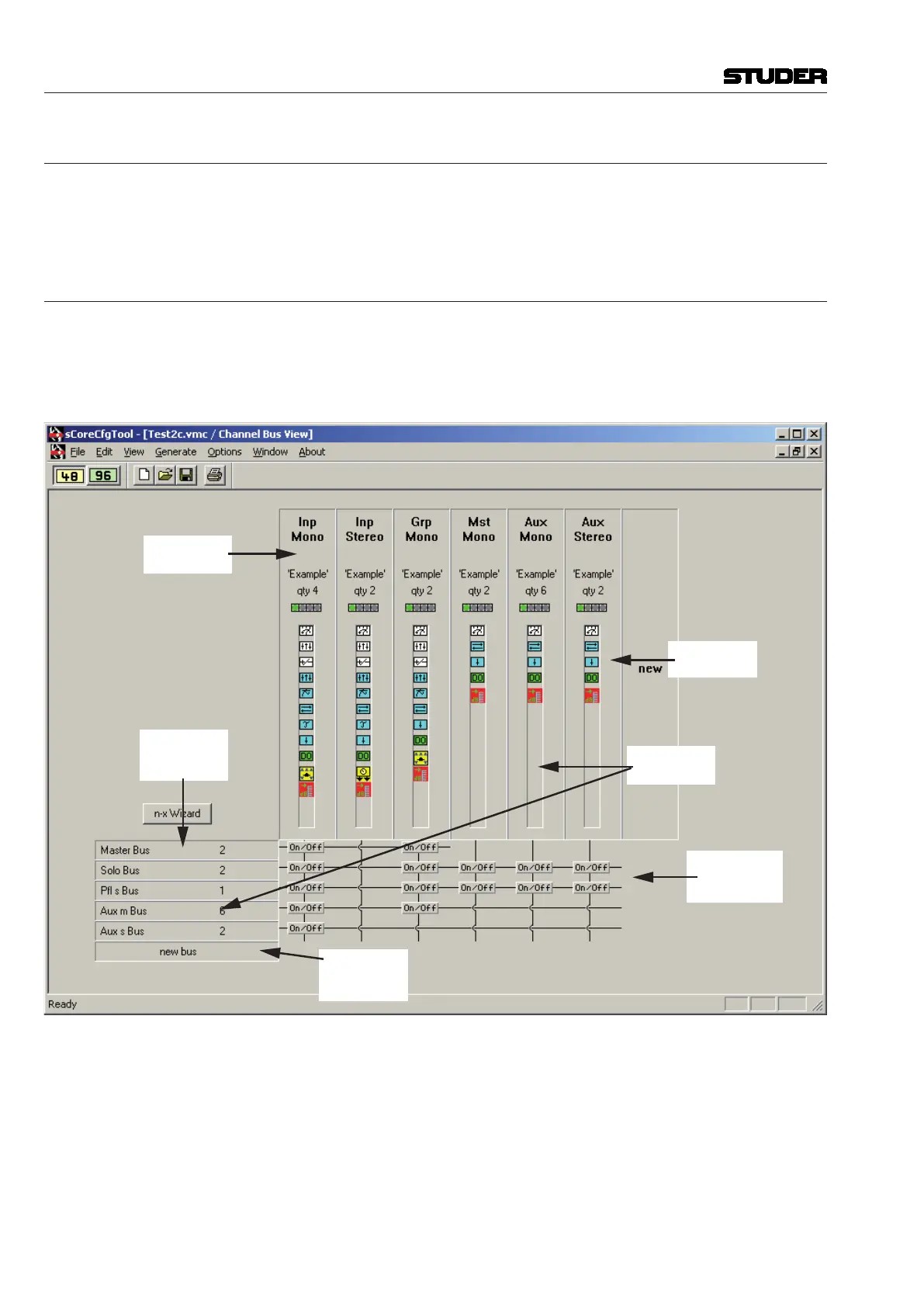
The Channel/Bus page is the main working area of the Session Configura-
tion Tool. It allows adding new or editing existing channels, buses and their
interconnections, displaying the configured console in a matrix arrangement.
It displays all the configured channel types and their functions in a condensed
way.
Channel Types
and Numbers
Add New
Channels
Double-click
to Edit
Which Channels
go to which
Buses?
Add New
Summing
Buses
Summing Bus
Types
and Numbers
How to: Add new channels Double-click on ‘new’ in the channel area
Add new buses Double-click on ‘new bus’ in the bus area
Edit channels Double-click on an existing channel type in the channel area
Edit buses Double-click on an existing bus type in the bus area
Assign/Deassign buses Double-click on the ‘On/Off’ button where the channel and bus cross. All
channels of the selected type will have access to all buses of the selected type
if the button is set.
Vista 5 M3 Digital Mixing System
6-22 Session Conguration
Document generated: 28.08.13
SW V4.9


 To Next Page