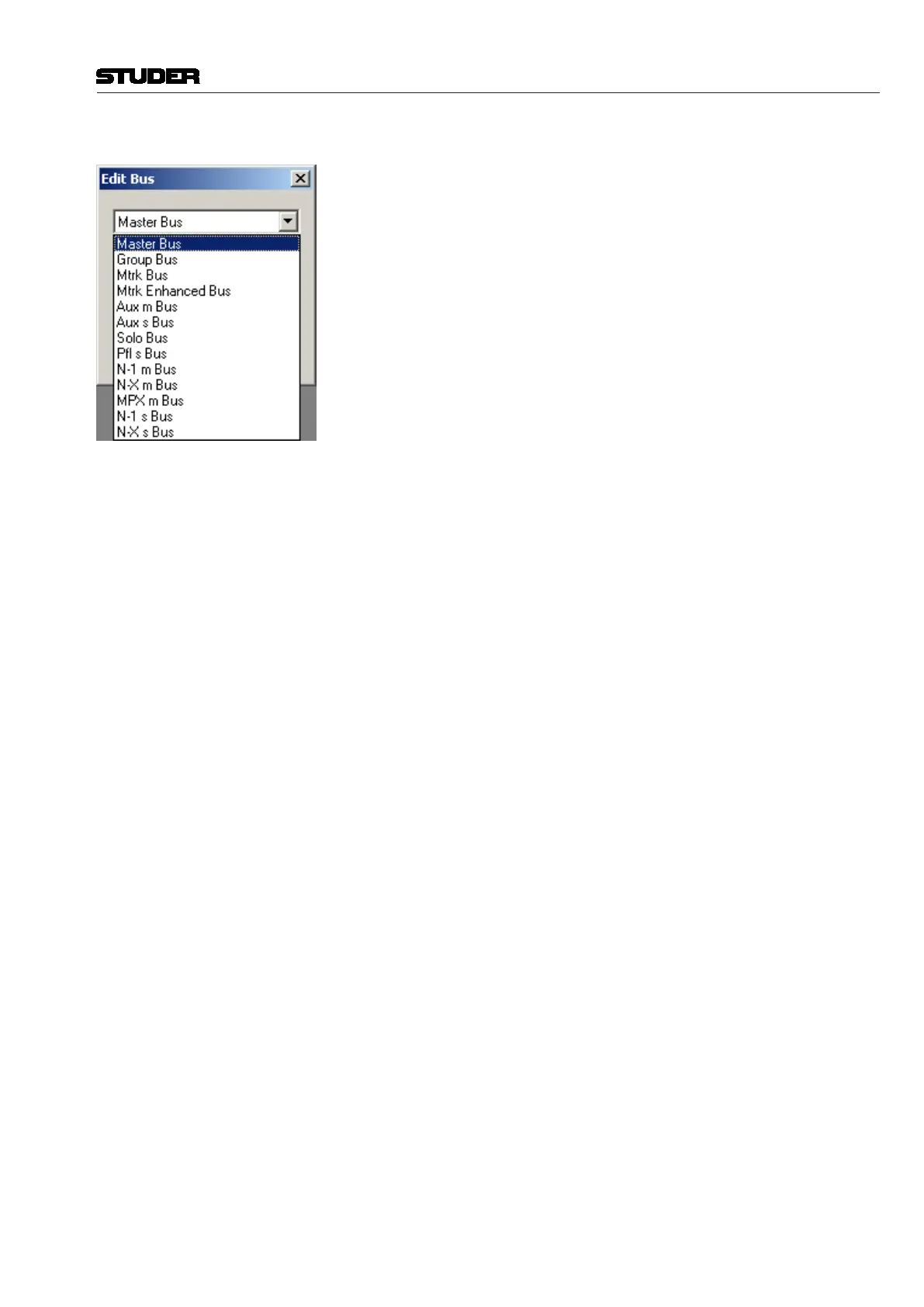
Select Bus Type Click on the box to display the available bus types. Currently, the following
bus types are available:
• MonoMasterbus
• MonoGroupbus
• MonoMultitrackbus
• EnhancedMonoMultitrackbus
• MonoAUXbus
• StereoAUXbus
• MonoSOLObus
• StereoPFLbus
• MonoN–1bus
• MonoN–Xbus
• MonoMPXbus
• StereoN–1bus
• StereoN–Xbus
Number of Buses Any number can be entered here to define the quantity for this particular bus
type. The maximum numbers are in function of the overall installed DSP
capacity (check the Core page to see how requirements change).
Bus Conventions There are four types of stereo buses:
• Aux Stereo bus
• PFL Stereo bus
• N–1 Stereo bus
• N–X Stereo bus
These bus types have to be entered bearing in mind that their number is
counted as stereo. All other bus types are mono, regardless how they are used.
For example, having eight mono master channels and eight stereo master
channels will need a total of 24 mono master buses.
The required numbers are automatically entered into the Edit Bus dialog based
on the number of corresponding channels. In the example above, the Edit Bus
box will suggest 24 buses automatically.
For buses which do not correspond to channels (Multitrack, SOLO, PFL, N–1
and N–X buses), the suggested number will be initially zero and must be set
by hand.
Tips When having mono and stereo channels of the same type (applies for master
and group channels only), you have to make a gang of buses for each type.
The first gang will be connected to the stereo channels and the second gang
to the mono channels.
When adding a new mono or stereo channel format (applies for master and
group channels only) to an existing configuration, first delete the correspond-
ing buses (group or master) before adding the new buses, in order to guarantee
the correct bus sequence.
Typically, there will only be one stereo PFL bus. The number of Solo buses
has to comply with the surround format – i.e., for the 5.1 format you will need
six Solo buses.
It is legal to have more buses than corresponding channel types. The reason
for this is that the buses (unlike in analog consoles) are valid audio signals
and can be used as such in the Studer Vista patch. They are simply summing
buses which will output the sum of all assigned inputs, which means that the
buses can also be used as components of multiformat stems.
Remove Buses Simply click on the bus type to be removed and click the ‘Del’ (delete) key.
Vista 5 M3 Digital Mixing System
Session Conguration 6-27
Document generated: 28.08.13
SW V4.9


 To Next Page