10-8 Sysmex XP-300
Calibration
Revised October 2012
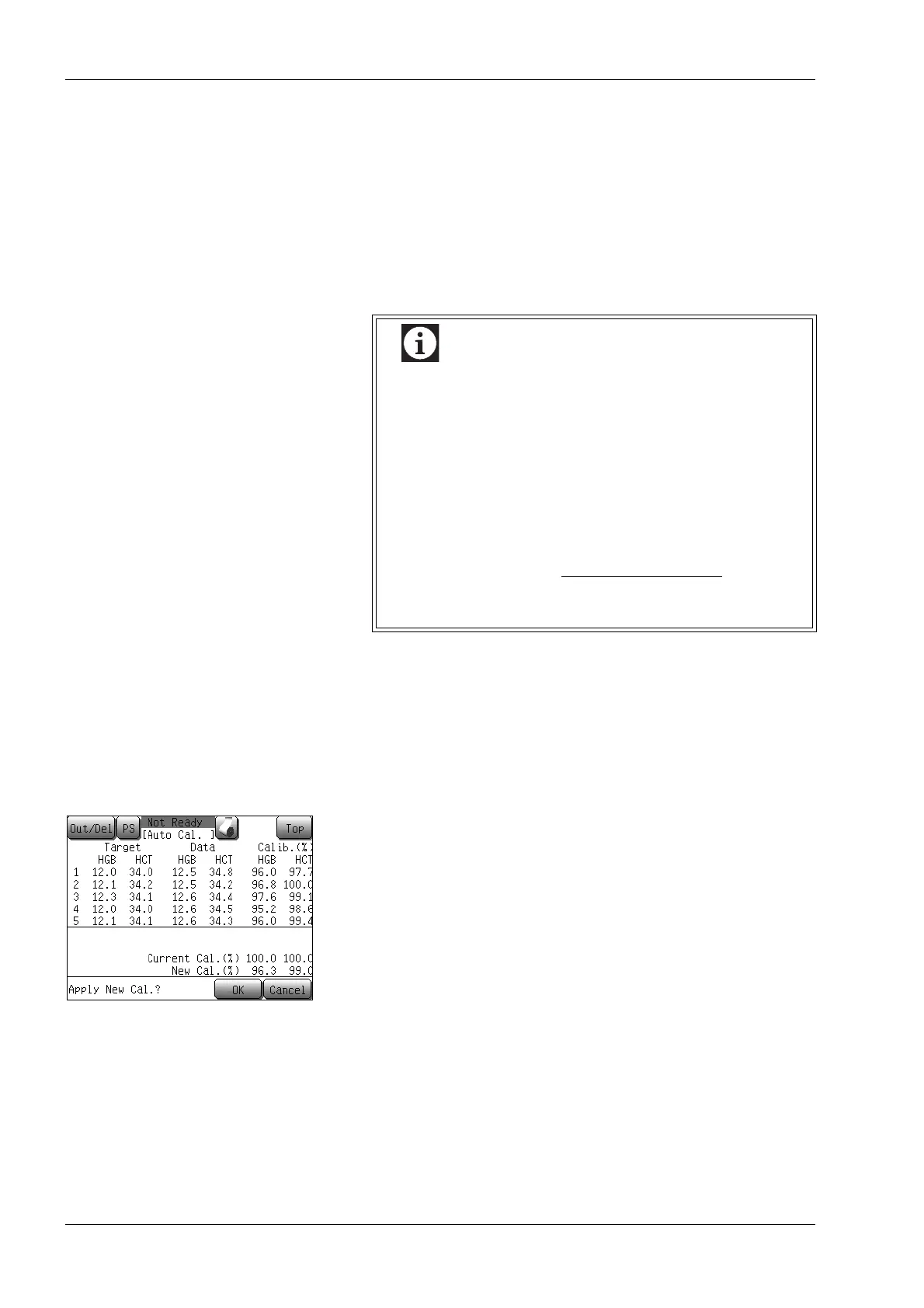
When an analysis is performed, its values are listed in the Data
column and calculated calibration values in the Calib. (%) column,
then the underline cursor moves to the next sample. When the
analysis of more than one sample is completed, the calibration value
is calculated automatically for each analysis, and it is displayed at the
bottom of the Calib. (%) column.
The mean calibration value for each analysis and the current
calibration value are used to calculate and display the new calibration
value.
Perform analysis for 5 samples.
Updating calibration values
After completion of all analysis, press the [Quit] button. The
automatic calibration complete confirmation dialog will appear.
The calibration value change confirmation message will appear.
• Press the [OK] button to update the calibration values, and to
return to the Main screen.
• Press the [Cancel] button to return to the Main screen without
updating the calibration values.
During analysis, if the mean calibration value for each
analysis exceeds 105% or is less than 95%, or if the
new calibration value exceeds 120% or is less than
80%, an alarm sounds and the automatic calibration
error confirmation dialog will appear.
Press the [Cancel] button, and analyze again.
The calibration ratio can be calculated using the
following formula.
Calibration Ratio =
Current calibration
value
New calibration
value
× 100



 To Next Page