9500 MXC User Manual
3DB 23063 ADAA - Rev 004 July 2007 Vol. IV-2-7
5. Click
Properties.
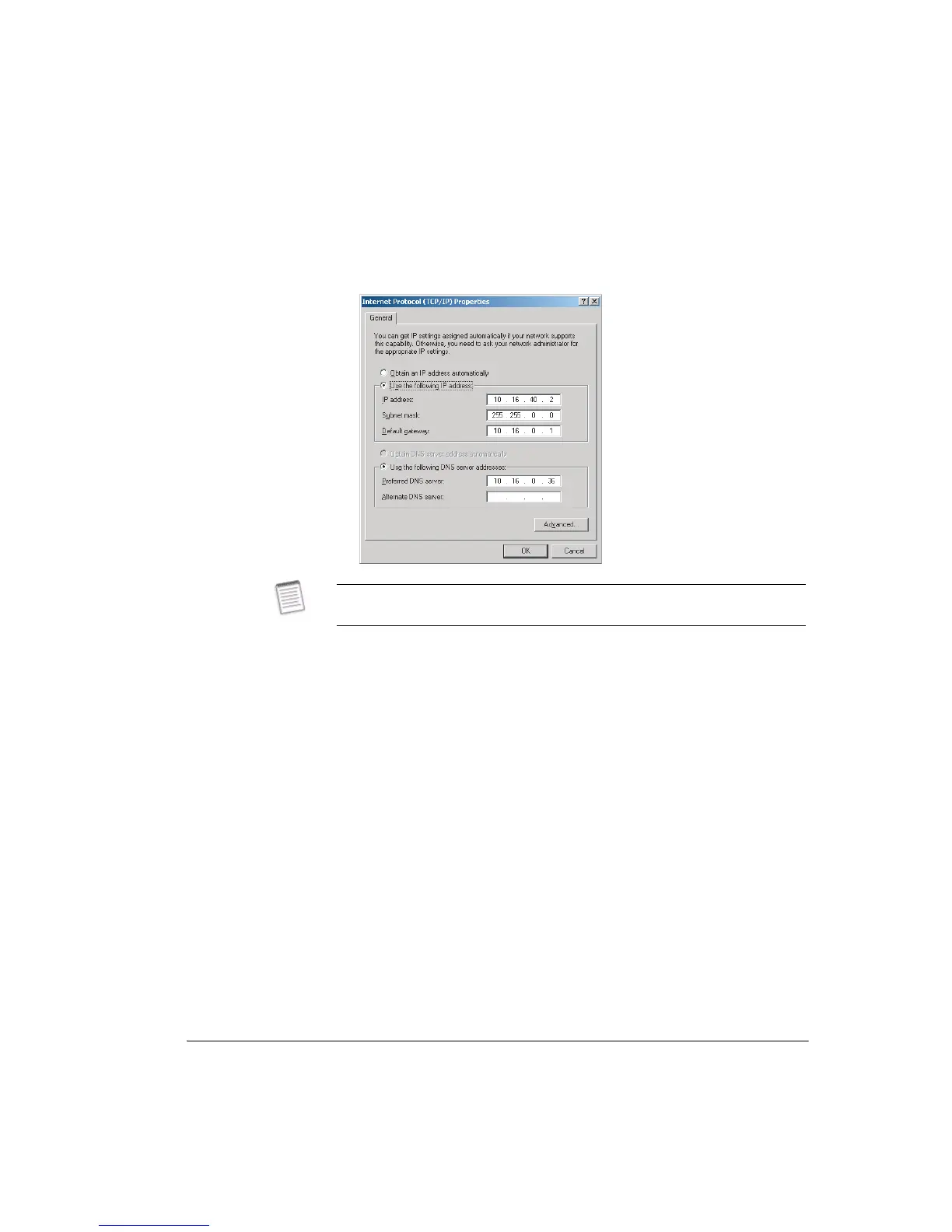
The Internet Protocol (TCP/IP) Properties window is displayed.
6. Select
Use the following IP address.
7. In the IP address field enter a LAN compatible IP address for the Node/
Terminal:
• The network portion of the IP address must be the same as the Node/
Terminal you are connecting to. The network portion is determined from the
subnet mask. Except in circumstances where sub-netting is used this
network portion will be indicated by subnet mask octets of 255.... In the
example above the network portion is 10.16 (subnet mask of 255.255.0.0).
• The host portion of the IP address must be set so that your CT PC is seen as
a different connection on the Node/Terminal LAN. It must NOT be set to the
same host number as the Node/Terminal you are connecting to.
• The subnet mask must be set to be the same as the Node/Terminal you are
connecting to.
Refer to Example - Changing TCP/IP Properties on page 2-8 for guidance.
8. To enable viewing of other 9500 MXC Nodes/Terminals on the network, set
the default gateway to be the same as the IP address of the Node/Terminal you
Before making any change to the settings in this window, record and retain the
existing settings, which may pertain to your company LAN.



 To Next Page