Chapter 7. Node and Terminal Plug-ins
Vol. IV-7-6 Alcatel-Lucent
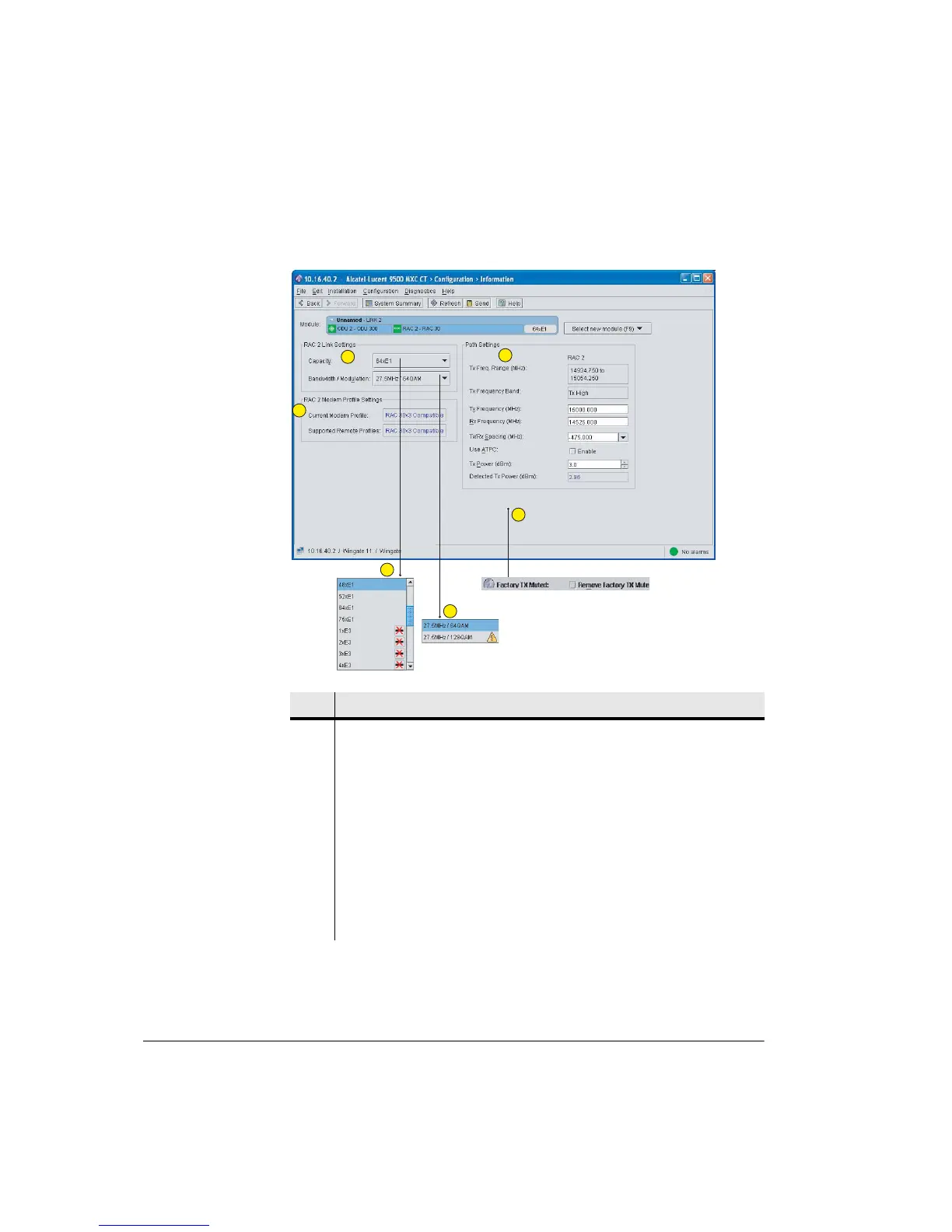
Figure 7-3. Example Link Plug-Ins Screen for a Non-Protected Link
Item Description
1 Select and set link capacity and bandwidth/modulation from drop-down menus.
2 Example link capacity menu (RAC/ODU). Click to select the required capacity.
• A cross icon indicates this capacity option is incompatible with the
backplane setting (change backplane type in the Circuits screen).
• A triangle icon indicates an obsolete modem setting. The setting remains
available but has been superseded with a new modem profile that provides:
• The same capacity in the same bandwidth but with a lower modulation
rate for higher system gain, or
• Higher capacity for the same modulation rate and bandwidth.
3 Shows the bandwidth / modulation options for the selected capacity. Click to
select.
• A triangle icon indicates an obsolete modem setting.
1
2
3
4
5
6



 To Next Page